


 英語
英語 スペイン語
スペイン語 ポルトガル語
 フランス語
フランス語 イタリア語
イタリア語 ドイツ語
ドイツ語インジケーターを使ってストップロス/イグジットのトレードルールを設定する方法
1件の返信

皆さん、こんにちは,
could you tell me please how to set a Trading Rule (and in which EAW Trading Rule Window), that stops out a Trade with an Indicator and not a Take Profit Rule in Pips?
Thanks for your help and feedback.
Birdy70
See attached Examples.
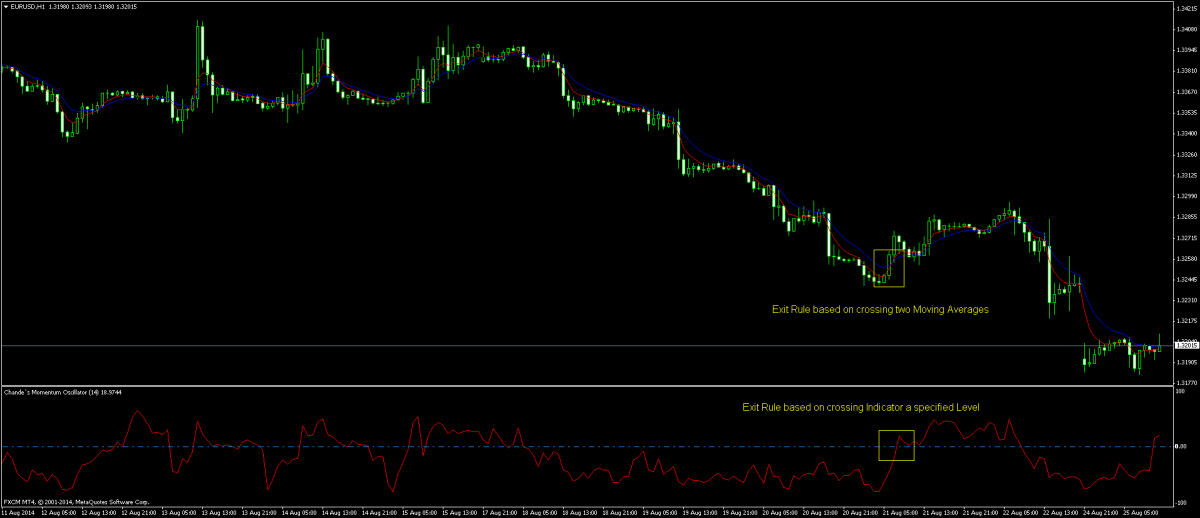 Examples for Exit Rules.png
0

こんにちは,
it depends on what exactly you want to do:
– if you want to have a trading rule that checks for example when EMA(10) crosses below EMA(20) then close the trade you can specify a rule like this:
もし
EMA(10) crosses below EMA(20)
それから
Order Management -> ClosePosition(some magic number)
– if you want to set SL or PT to an indicator value instead of fixed pips you can do it directly in order edit screen in Stop Loss dialog by choosing Stop Loss is a specific price level and selecting the indicator or formula you want to use.
I’m attaching a screenshot.
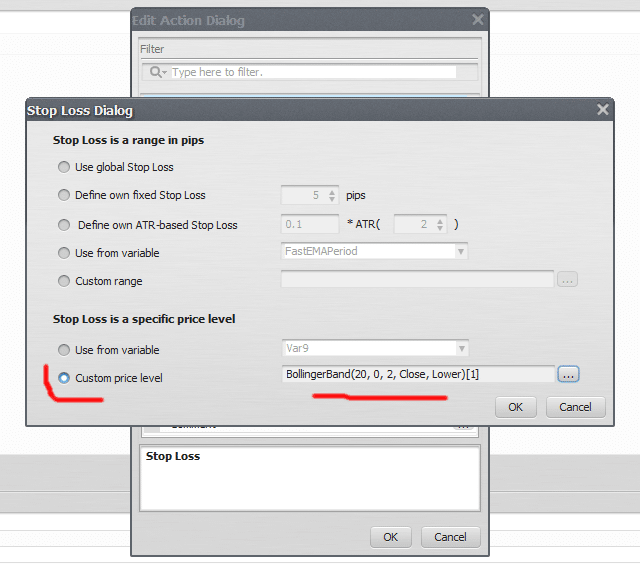 sl2.png
マーク
StrategyQuantアーキテクト
0
1件の返信を表示中 - 1 - 1件目 (全1件中)