


 英語
英語 スペイン語
スペイン語 ポルトガル語
 フランス語
フランス語 イタリア語
イタリア語 ドイツ語
ドイツ語How do I nest conditions in the IF section
7件の返信

How do I nest conditions in the IF section
That is –
If A is True and ((B and C are true) or (D and E are true))
I cannot find an area where the brackets () can be added.
0

こんにちは,
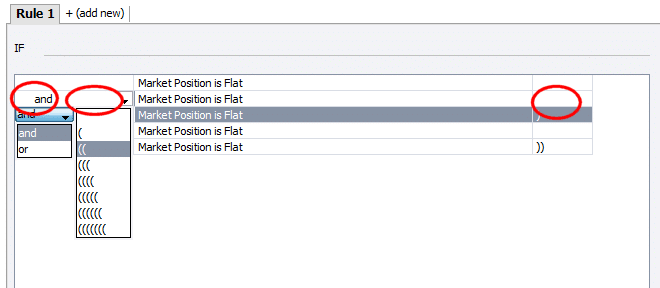
there is a possibility to specify and/or conditions and to select brackets in every trading rules line, see attached image.
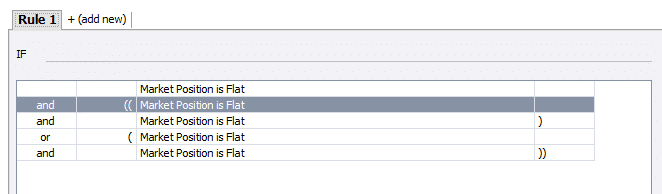
The condition in the second screenshot corresponds to your example, the ‘Market Condition is Flat’ is only an example.
 nested.png
 condition.png
マーク
StrategyQuantアーキテクト
0

The nesting condition is not so easy for newbie like me but it is much interest. Kindly,give an example of how to use brackets in conjuction with the AND/OR connectors.For instance if( A or B or C and D,E) then……..How/where do you place the brackets.Kindly attach an image.
Machairu
0
I can see what you are saying but this is very obtuse.
How do I close the brackets in correct sequence?
0
Hey Dave,
I meant something like this: Is there the correct way to place the brackets.
Case 1 (A or B or C and D or E)
Case 2 ((A or B or C) and (D or E))
Case 3 (((((A ) or (B ) or (C ) and ((D) or (E)))))
Sorry for being obtuse.
Machairu
0
Hi Machairu
I think you misinterpreted my request. I was not directed at you. We have a common request.
This was directed at SQ support.
よろしくお願いいたします
デビッド
0
Hey Dave,
I meant something like this: Is there the correct way to place the brackets.
Case 1 (A or B or C and D or E)
Case 2 ((A or B or C) and (D or E))
Case 3 (((((A ) or (B ) or (C ) and ((D) or (E)))))
I understand it could be little bit complicated at first, but after you’ll understand it it is actually very simple.
The only difference between how you wrote it and EA Wizard is that in EA Wizard each condition A, B, C, D, E is in its own line.
But you’ll use the same brackets.
For example Case 2 : ((A or B or C) and (D or E))
can be made in EA Wizard like:
(( A
or B
or C )
そして
(D
or E))
マーク
StrategyQuantアーキテクト
0
Thanks for your reply Mark.
Only now have I woken up to the fact that when adding conditions, the second and last columns contain the dropdowns for the brackets.
Your support is really appreciated.
0
7件の返信を表示中 - 1 - 7件目 (全7件中)