


 英語
英語 スペイン語
スペイン語 ポルトガル語
 フランス語
フランス語 イタリア語
イタリア語 ドイツ語
ドイツ語Limit order 10 pips below Shooting Star
3件の返信

Hi 🙂
もし
Candle patern[0] is Shooting Star
そして
RSI > 75
then
Enter at Limit
10 pips below the Shooting Star
Direction Short
Questions:
1. Howto set Limit Order 10 pips below the Shooting Star?
2. Is Candle patern[0] the last closed candle,
or should I use Candle patern[1] to address the last closed candle?
/Jon
0

Jon,
1. For a limit order that is 10 pips above the candle, you would use a rule to say that Candle[1] is a shooting star pattern like you were talking about.
Then, in the order section, click on Limit Order.
 price.jpg
In the Price field, click on Formula
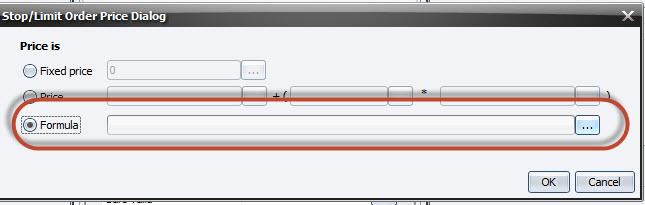 formula.jpg
Then choose Addition (+)
 addition.jpg
Then choose the candle’s high[1]
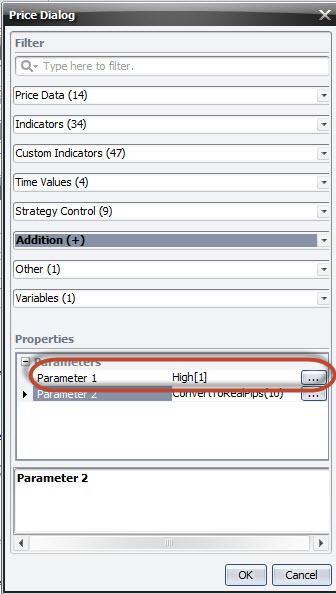 high.jpg
Then choose converttorealpips and put int he field 10
 converttopips.jpg
then your rule should look something like:
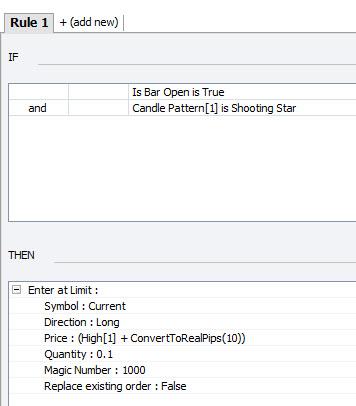 rule.jpg
2. You will need to use Candle Pattern[1] as it is the last closed candle. [0] is not closed yet; it is the current candle that is still in progress. So if you want to use the close of a candle, then the first one you can use is Candle Pattern [1].
ステアルノ
0
Thanks for Your help 🙂
I appreciate the information you have provided me with and I appreciate the prompt reply.
0
Not a problem. Glad could help!
-stearno
0
3件の返信を表示中 - 1 - 3件目 (全3件中)