


 英語
 スペイン語
 ポルトガル語
 フランス語
 イタリア語
 ドイツ語
WalkForwardOptimisationEngineReport – Cannot see full table below
2件の返信

こんにちは
I dont seem to be able to adjust the viewing size of the bottom half of the page which contains the
– Robustness Score Components and WF Results and Parameters
The only way for me to see the subsequent rows below is to scroll down and only 1 row is visible at a time. Would I be able to adjust the size and see all the rows together as shown in the SQ articles?
A copy of the page is attached
Tq
トニー
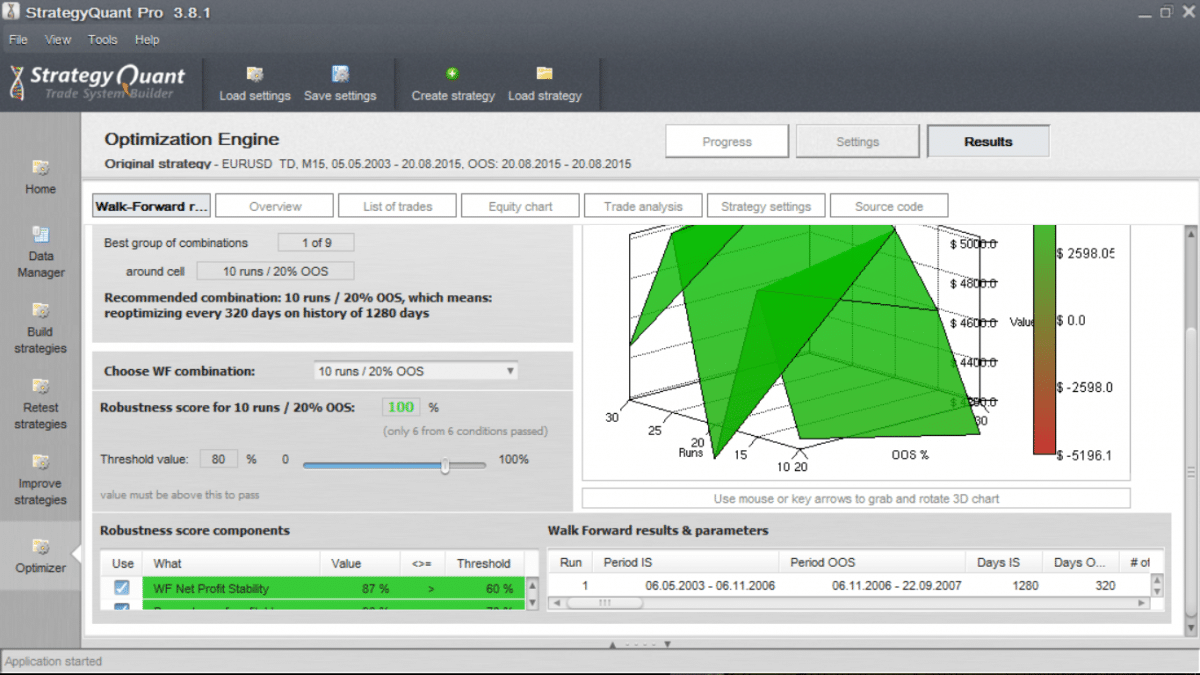 WFMSample.png
0

change your PC’s resolution..,
OR just wait for SQ4..
0
Dear Karish
Tq for your assistance.
I tend to agree with you that it has got to do with the resolution. But when I tried to adjust it on my Lenovo ideapad 300, it allows for screen resolution up to 1366 X 768 only. There is a message which appears by the side that says the resolution is lower than 1200 X 900 and hence some items will not fit your screen.
Have to wait for SQ4 then
トニー
0
2件の返信を表示中 - 1 - 2件目 (全2件中)