


 英語
 スペイン語
 ポルトガル語
 フランス語
 イタリア語
 ドイツ語
Xmlを使用して、読み取り戦略の設定、変数、ルール、および構築ブロックを数ステップで簡単に設定できます。
ページのコンテンツ
以前の例のおかげで: https://strategyquant.com/doc/programming-for-sq/viewing-and-changing-strategy-parameters-version-2/, ここで、戦略とその変数を読み取ることができます。.
このコード例は、戦略のXML、その変数の内容、そしてそのルールを読み込むことでさらに一歩進んでいます。.
1/ 戦略の概要
- Strategy Xml を読み込むことができます with the XMLUtil.elementToString()関数。.
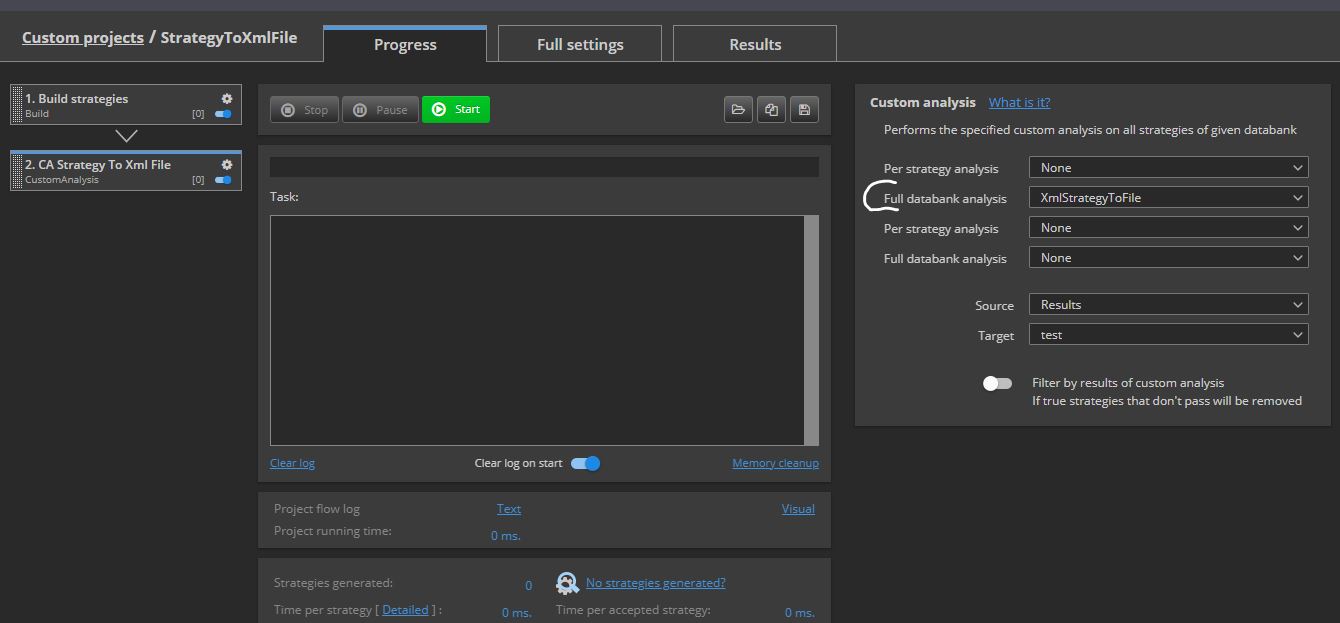
カスタム分析を実行できます XmlStrategyToFile または XmlStrategyToFileSym (対称的な戦略の場合)Databankからドライブに任意の戦略を変換するには、出力パスとして「“C:\Temp”
その後、このXMLファイルを任意のXMLリーダーで開くことができます(例えば https://jsonformatter.org/xml-editor 例えば。)
もし Databank にテンプレートを読み込むのであれば、テンプレートを読み込むこともできます。.
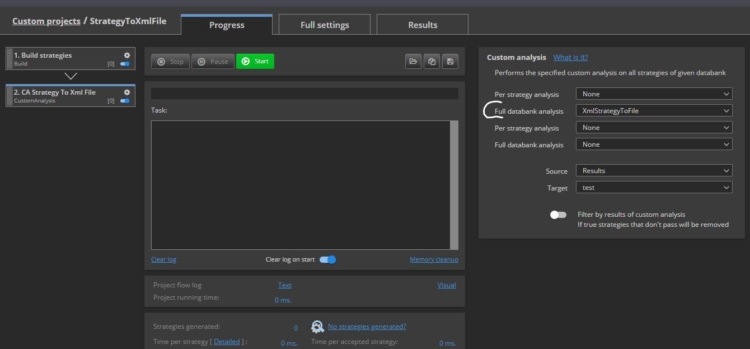
(添付のカスタム Proジェスチャーをご覧ください。) StrategyToXmlFile そして、その戦略の添付された Xml 戦略 1.6.22(1)B)
- ストラテジーにはルールと変数があります:
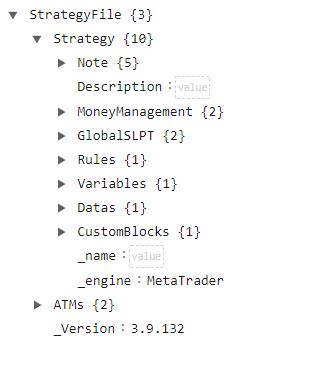
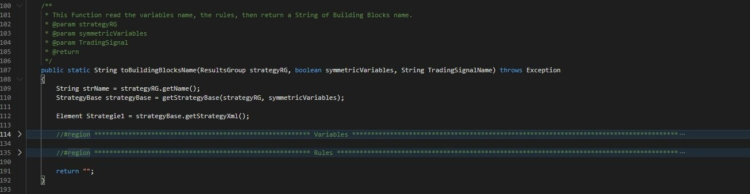
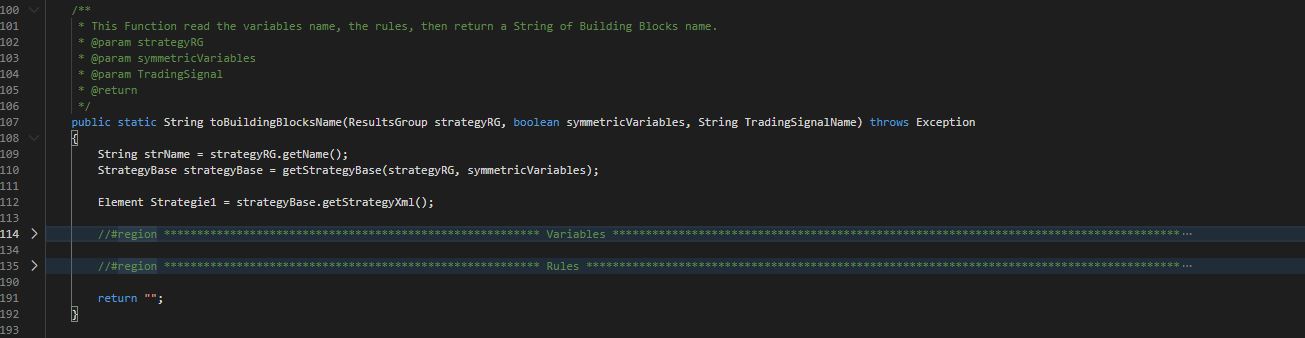
もし開く SQ.utils.Bouillant拡張機能, 戦略の開設に似た構造を見つけるでしょう:
「In」“toBuildingBlocksName”関数では、コードの2つの領域を見ることができます。 , 変数とルール 同様に
2/ 私たちはそれを使っています XMLUtil クラス そして JDOM 要素
https://strategyquant.com/sqxapi/com/strategyquant/lib/XMLUtil.html
3/ 戦略変数の読み方
一度、StrategyからXMLを取得すると、その変数の値を取得する必要があります。それらは以下のようになります。 ブール型, 整数, 、または ダブル.
それらを得るには、3つの機能があります:
-
getVariableValueToBoolean
-
getVariableValueToInt
-
getVariableValueToDouble
これらの関数から、戦略の任意の変数の値を取得できます。.
4/ 例えば、ストラテジー設定からストップロス値やフィ Proットターゲット値を取得し、その結果をデータバンクに挿入することができます。
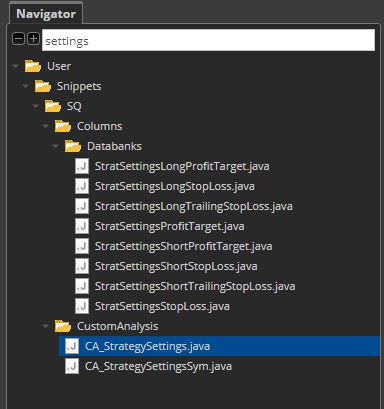
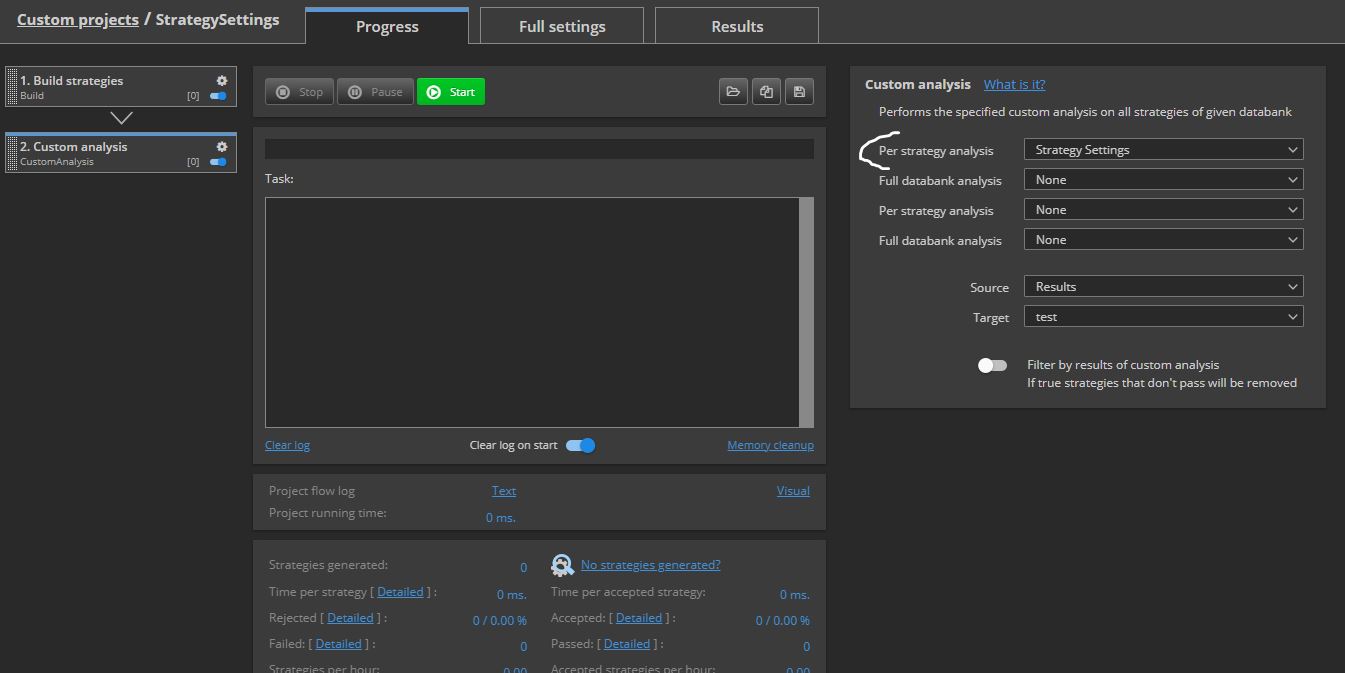
この拡張機能を使用すると、カスタム分析を見つけることができます。“CA_StrategySettings”「または」“CA_StrategySettingsSym”(対称的な戦略の場合)
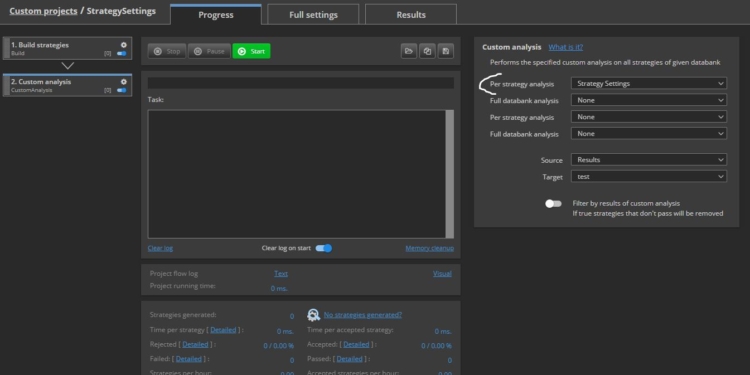
これらのカスタム分析は呼び出されます SQ.utils.Bouillant拡張機能を使用し、シグナルからストップロス値またはフィ Proットターゲット値をリクエストする:
@Override
public boolean filterStrategy(String project, String task, String databankName, ResultsGroup rg) throws Exception
{
    Bouillant BouilltParaObj1 = new Bouillant();
    int IntTemp = BouilltParaObj1.getVariableValueToInt(rg, false,"LongProfitTarget");
 	rg.specialValues().set("CA_Long_ProfitTarget", IntTemp);
    IntTemp = BouilltParaObj1.getVariableValueToInt(rg, false,"ShortProfitTarget");
 	rg.specialValues().set("CA_Short_ProfitTarget", IntTemp);
    IntTemp = BouilltParaObj1.getVariableValueToInt(rg, false,"LongStopLoss");
 	rg.specialValues().set("CA_Long_StopLoss", IntTemp);
    IntTemp = BouilltParaObj1.getVariableValueToInt(rg, false,"ShortStopLoss");
 	rg.specialValues().set("CA_Short_StopLoss", IntTemp);
    IntTemp = BouilltParaObj1.getVariableValueToInt(rg, false,"LongTrailingStop");
 	rg.specialValues().set("CA_Long_TrailingStop", IntTemp);
    IntTemp = BouilltParaObj1.getVariableValueToInt(rg, false,"ShortTrailingStop");
 	rg.specialValues().set("CA_Short_TrailingStop", IntTemp);
    return true;
}
(添付のカスタム Proジェクストでご覧いただけます: StrategySettings)
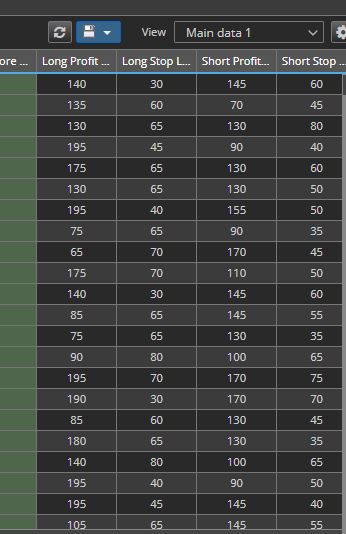
「」を実行すると“CA_StrategySettings” カスタム分析 または「“CA_StrategySettingsSym” カスタム分析 , 任意のストラテジー設定からストップロス値または利益目標値を読み取り、以下のスクリプトを使用してデータバンクを更新できます:
以下は、戦略設定から算出された Pro適合ターゲット値とストップロス値です。
5/ XML戦略の読み方(ステップバイステップ)
(私たちの関数であるBuildingBlocksNameを、 SQ.Utils.Bouillant に移します)
A/私たちの例は、 getStrategyBase 関数を呼び出して、 ルート要素 戦略の要素:
StrategyBase = getStrategyBase(strategyRG, symmetricVariables);

Element Strategie1 = strategyBase.getStrategyXml();
B/から 戦略1 エレメント, それは、着実に進んでいる。 特定の子供 エレメント
Element elParams = Strategie1.getChild("Strategy").getChild("Variables");
または
elParams = Strategie1.getChild("Strategy").getChild("Rules").getChild("Events"); // Strategy Xml の [Rules] セクションに進む
C/ From the elParams エレメント, それは、実現されるのです。 子供向け要素 to a 元素のリスト paramElems
リスト paramElems = elParams.getChildren();
D/ From 元素のリスト paramElems, できる 取得 それぞれ エレメント そしてそれを読んで NodeValue 使用することによって ノードの値を取得する :
for (i = 0; i < paramElems.size(); i++)
{
    Element elParam = paramElems.get(i);

    String name = XMLUtil.getNodeValue(elParam,"name");
    String id = XMLUtil.getNodeValue(elParam,"id");

    if (name.equals(TradingSignalName))   																					// We search the Id of the TradingSignalName, necessary to find the corresponding rule
    {
        SignalID = id;
    }
}
E/ From 元素のリスト paramElems, それぞれを手に入れることができます AttributeValue of an エレメント :
String elParamKey = elParam.getAttributeValue("key");
F/ から文字列へ
例えば戦略の場合、Elementを読み取り、その構造を調べるにはどうすればいいでしょうか。, この機能を使用できます XMLUtil.elementToString 同様にファイルを生成して保存します。.
String String1 = XMLUtil.elementToString(elParam);
6/ アプリケーション :この関数を呼び出す方法、そしてその使い方 .
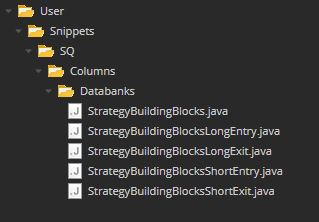
この例では、DataBank Column スニペットを使用してこの関数を適用します。
Bouillant BouilltParaObj1 = new Bouillant();
String StringTotal = BouilltParaObj1.toBuildingBlocksName(results,false, "LongEntrySignal",100);
この関数は Building Blocks に問いかけています。 で a ResultsGroup そして 取引シグナルの名称。. (LongEntrySignal、短入出信号、長出入信号、短出入信号…)
それは本当に実用的です。なぜなら エントリーロング、エントリーショート、エグジットロングまたはショートのいずれか、またはそれらのすべてを同時に選択できます。
テンプレートから任意の信号名を選択することもできます。.
以下はそのコードです:
package SQ.Columns.Databanks;

import SQ.Utils.Bouillant;
import com.strategyquant.lib.L;
import com.strategyquant.tradinglib.*;
import com.strategyquant.tradinglib.optimization.WalkForwardMatrixResult;
import com.strategyquant.lib.ValuesMap;
import org.slf4j.Logger;
import org.slf4j.LoggerFactory;

// Created in France by Emmanuel Bouillant-Evrard for the StrategyQuantX Community :)
public class StrategyBuildingBlocks extends DatabankColumn
{
    public static final Logger Log = LoggerFactory.getLogger(StrategyBuildingBlocks.class);

    public StrategyBuildingBlocks() {
        super(L.tsq("Strategy Building Blocks"), DatabankColumn.Text, ValueTypes.Maximize, 0, 0, 1);

        setWidth(1000);
    }

    //------------------------------------------------------------------------

    @Override
    public double getNumericValue(ResultsGroup results, String resultKey, byte direction, byte plType, byte sampleType) throws Exception {
        return 0;
    }

    //------------------------------------------------------------------------

    @Override
    public String getValue(ResultsGroup results, String resultKey, byte direction, byte plType, byte sampleType) throws Exception
    {
        try
        {
            String StringTotal = "";
            Bouillant BouilltParaObj1 = new Bouillant();
            String String1 = BouilltParaObj1.toBuildingBlocksName(results,false, "LongEntrySignal",100);														// 100 to have the name of Building blocks
            BouilltParaObj1 = new Bouillant();
            String String2 = BouilltParaObj1.toBuildingBlocksName(results,false, "ShortEntrySignal",100);

            if (String1 == null || String2 == null) { return "";}

            int maxLength = (String1.length() < 100)?String1.length():100;
            String1 = String1.substring(0, maxLength);

            maxLength = (String2.length() < 100)?String2.length():100;
            String2 = String2.substring(0, maxLength);

            if (!String1.equals("") && !String2.equals(""))
            {
                StringTotal += String1 + "," + String2;
            }
            else if (!String1.equals(""))
            {
                StringTotal += String1;
            }
            else if (!String2.equals(""))
            {
                StringTotal += String2;
            }
            return StringTotal;

        } catch(Exception e)
        {
            Log.error("Error StrategyBuildingBlocks", e);
            return "";																																							       // "Error: " + e.getMessage();
        }
    }
}
7/ データバンク内の各戦略の名称
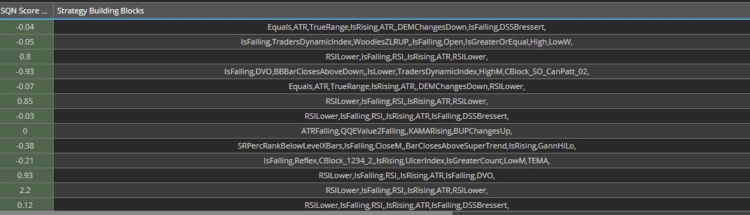
8/ toBuildingBlocksName 関数コード
/**
* This Function read the variables name, the rules, then return a String of Building Blocks name.
* @param strategyRG
* @param symmetricVariables
* @param TradingSignal
* @return
*/
public String toBuildingBlocksName(ResultsGroup strategyRG, boolean symmetricVariables, String TradingSignalName, int breakdownLevelMax) throws Exception
{
try
{
int i;
String SignalID = "";
String strName = strategyRG.getName();
if(strName.startsWith("Filtered portfolio") || strName.startsWith("Portfolio"))
{
return "";
}
StrategyBase strategyBase = getStrategyBase(strategyRG, symmetricVariables);
Element Strategie1 = strategyBase.getStrategyXml();
if (DebugMode){
OutputPath = "C:\\Temp\\"+strName+".txt";
FileWriter myWriter = new FileWriter(OutputPath , true); }
if (Strategie1 != null)
{
//#region ********************************************************* Variables **************************************************************************************
String test4 = "" ;
Element elParams = Strategie1.getChild("Strategy").getChild("Variables");
if (elParams != null)
{
List<Element> paramElems = elParams.getChildren();
VariableValues = new HashMap<String, String>();
VariableID = new HashMap<String, String>();
VariableType = new HashMap<String, String>();
for (i = 0; i < paramElems.size(); i++)
{
Element elParam = paramElems.get(i);
if (elParam != null)
{
String name = XMLUtil.getNodeValue(elParam,"name");
String id = XMLUtil.getNodeValue(elParam,"id");
String value = XMLUtil.getNodeValue(elParam,"value");
String Type = XMLUtil.getNodeValue(elParam,"type");
VariableID.put(name, id);
VariableValues.put(name, value);
VariableType.put(name, Type);
if (DebugMode){
test4 = XMLUtil.getNodeValue(elParam,"name") + " " + XMLUtil.getNodeValue(elParam,"id");
myWriter.write("name + id : "+ test4 + "\r\n");
myWriter.write("VariableID : "+ VariableID.get(name) + "\r\n");
test4 = XMLUtil.getNodeValue(elParam,"name") + " " + XMLUtil.getNodeValue(elParam,"value");
myWriter.write("name + value : "+ test4 + "\r\n");
myWriter.write("VariableValues : "+ VariableValues.get(name) + "\r\n");
test4 = XMLUtil.getNodeValue(elParam,"name") + " " + XMLUtil.getNodeValue(elParam,"type");
myWriter.write("name + type : "+ test4 + "\r\n");
myWriter.write("VariableType : "+ VariableType.get(name) + "\r\n");}
if (name.equals(TradingSignalName)) // We search the Id of the TradingSignalName, necessary to find the corresponding rule
{
SignalID = id;
}
}
}
if (DebugMode){
myWriter.close();}
}
//#endregion
//#region ********************************************************* Rules ******************************************************************************************
elParams = Strategie1.getChild("Strategy").getChild("Rules").getChild("Events"); // go to Rules section of the Strategy Xml
if (elParams != null)
{
List<Element> paramElems = elParams.getChildren();
for (i = 0; i < paramElems.size(); i++)
{
Element elParam2 = paramElems.get(i);
if (elParam2 != null) {
String elParamKey2 = elParam2.getAttributeValue("key");
if (elParamKey2.equals("OnBarUpdate")) // Looks for OnBarUpdate rule
{
List<Element> paramElems3 = elParam2.getChildren();
for (int i2 = 0; i2 < paramElems3.size(); i2++)
{
Element elParam3 = paramElems3.get(i2);
if (elParam3 != null) {
String elParamKey3 = elParam3.getAttributeValue("name");
if (elParamKey3.equals("Trading signals")) // Look for Trading signals rule
{
Element elParams4 = elParam3.getChild("signals");
List<Element> paramElems4 = elParams4.getChildren();
for (int i3 = 0; i3 < paramElems4.size(); i3++)
{
Element elParam4 = paramElems4.get(i3);
if (elParam4 != null) {
String elParamKey4 = elParam4.getAttributeValue("variable");
if (elParamKey4.equals(SignalID)) // Look for the requested TradingSignalName from its ID : SignalID
{
if (DebugMode){
myWriter = new FileWriter(OutputPath , true);
String String1 = XMLUtil.elementToString(elParam4);
myWriter.write(String1);
myWriter.close();}
Element elParams5 = elParam4.getChild("Item");
if (DebugMode){
myWriter = new FileWriter(OutputPath , true);
String String1 = XMLUtil.elementToString(elParams5);
myWriter.write(String1);
myWriter.close();}
if (elParams5 != null) {
String key = elParams5.getAttributeValue("key"); // the name
if (!key.equals("Boolean"))
{
Element elParam5Temp = elParams5;
Element elParam6Temp = elParams5;
strName = strategyRG.getName();
ArrayListElemsAll = new ArrayList<Element>();
UpdateNodesValues(strategyRG, symmetricVariables, elParams5, breakdownLevelMax, 0);
AddToList(strategyRG, symmetricVariables, elParams5, breakdownLevelMax, 0);
if (!StrategyName2.equals(strName) && OutPutBlockMode)
{
StrategyName2 = strName;
strategyBase = getStrategyBase(strategyRG, symmetricVariables);
Strategie1 = strategyBase.getStrategyXml();
OutputPath = "C:\\Temp\\"+strName+"B.txt";
FileWriter myWriter = new FileWriter(OutputPath , false);
String String1 = XMLUtil.elementToString(Strategie1);
myWriter.write(String1+"\r\n");
myWriter.close();
}
StringBuilder sb = new StringBuilder(); // create the Building Blocks Name String
if (ArrayListElemsAll.size()>=1)
{
if (DebugMode){
myWriter = new FileWriter(OutputPath , true);
myWriter.write("ArrayListElemsAll.size() : "+ String.valueOf(ArrayListElemsAll.size()) + "\r\n");
String String1 = XMLUtil.elementToString(elParam5Temp);
myWriter.write(String1);
myWriter.close();}
for (int i5 = 0; i5 < ArrayListElemsAll.size(); i5++)
{
elParam6Temp = ArrayListElemsAll.get(i5);
if (elParam6Temp != null) {
String elParamKey8Temp = elParam6Temp.getAttributeValue("name"); // elParam6Temp.getAttributeValue("key");
sb.append(elParamKey8Temp);
sb.append(ParamDelimiter);
}
}
}
return sb.toString();
}}
}}
}
}}
}
}}
}
}
//#endregion
}
return "";
} catch (Exception e) {
if (DebugMode2){
String strName = strategyRG.getName();
OutputPath = "C:\\Temp\\toBuildingBlocksName "+strName+".txt";
FileWriter myWriter = new FileWriter(OutputPath , true);
myWriter.write("Error : "+ strName +" "+ "\r\n");
myWriter.write("Error : "+ e + "\r\n");
StrategyBase strategyBase = getStrategyBase(strategyRG, symmetricVariables);
Element Strategie1 = strategyBase.getStrategyXml();
String String1 = XMLUtil.elementToString(Strategie1);
myWriter.write(String1 + "\r\n");
myWriter.close();}
Log.error("Error toBuildingBlocksName", e);
return "";
}
}
9/ 各ビルディングブロックを読むために、この例では2つの再帰関数を使用しています:UpdateNodesValuesとAddToList。.
これらの関数は、XML構造がどのようであるかに関わらず、各ビルディングブロックを検索します。.
以下はそのコードです:
   /**
    * Recursive function that read the Building Blocks Name from the Xml to update Nodes Values
    * @param strategyRG
    * @param symmetricVariables
    * @param Element
    * @param breakdownLevelMax
	 * @param breakdownLevel
    * @return
    */
   public void UpdateNodesValues(ResultsGroup strategyRG,  boolean symmetricVariables, Element element, int breakdownLevelMax, int breakdownLevel) throws Exception
   {
       int i;
       if (element != null)
       {
           breakdownLevel = breakdownLevel + 1 ;
           List<Element> element1 = element.getChildren();
           if (element1.size() >= 1)
           {
               for (i = 0; i < element1.size(); i++)
               {
                   Element element11 = element1.get(i);
                   if (element11 != null)
                   {
                       UpdateNodesValues(strategyRG, symmetricVariables, element11, breakdownLevelMax, breakdownLevel);
                   }
               }
           }
       }

       if (element != null)
       {
           List<Element> listParams = element.getChildren("Param");
           if (listParams.size() >= 1)
           {
               boolean VariableFounded = false;
               for (i = 0; i < listParams.size(); i++)
               {
                   Element courant = listParams.get(i);
                   if (courant != null)
                   {
                       String elParamKey5 = courant.getAttributeValue("key");					    			// the name
                       String elParamVariable3 = courant.getAttributeValue("variable");					    // the variable
                       if (elParamKey5.startsWith("#") && elParamVariable3=="true")
                       {
                           String Temp1 =  VariableValues.get(courant.getText());
                           String Temp2 =  courant.getText();
                           if (Temp1 != null)
                           {
                               courant.setText(Temp1);
                           }
                           VariableFounded = true;
                       }
                   }
               }
           }
       }
   }

   /**
    * Recursive function that read the Building Blocks Name from the Xml to the ArrayList : ArrayListElemsAll
    * @param strategyRG
    * @param symmetricVariables
    * @param Element
    * @param breakdownLevelMax
	 * @param breakdownLevel
    * @return
    */
   public void AddToList(ResultsGroup strategyRG,  boolean symmetricVariables, Element element, int breakdownLevelMax, int breakdownLevel) throws Exception
   {
       int i;
       boolean Condition1 = false;
       if (element != null)
       {
           breakdownLevel = breakdownLevel + 1 ;

           String elParamKey = element.getAttributeValue("key");
           String categoryType = element.getAttributeValue("categoryType");
           if (categoryType == null){categoryType = "";}
           if (breakdownLevelMax < 100)  { Condition1 = (elParamKey.equals("IsRising") || elParamKey.equals("IsFalling") || elParamKey.equals("IsLowerCount") || elParamKey.equals("IsGreaterCount") || elParamKey.equals("IsLower") || elParamKey.equals("IsLowerOrEqual") || elParamKey.equals("IsGreater") || elParamKey.equals("IsGreaterOrEqual") || elParamKey.equals("CrossesAbove") || elParamKey.equals("CrossesBelow") || elParamKey.startsWith("CBlock")); }
           if (!Condition1)
           {
               List<Element> element1 = element.getChildren();
               if (element1.size() >= 1)
               {
                   for (i = 0; i < element1.size(); i++)
                   {
                       Element element11 = element1.get(i);
                       if (element11 != null)
                       {
                           AddToList(strategyRG, symmetricVariables, element11, breakdownLevelMax, breakdownLevel);
                       }
                   }
               }
           }

           List<Element> listParams = element.getChildren("Param");
           if (listParams.size() >= 1 || Condition1)
           {
               Element elementCopy = (Element)element.clone();
               elParamKey = elementCopy.getAttributeValue("key");
                   listParams = elementCopy.getChildren("Param");
                   List<Element> listParamsBlock = element.getChildren("Block");

                   if (listParamsBlock.size() == 0 || Condition1)
                   {
                           if ((listParams.size() == 1 && !elParamKey.equals("Number")) || !elParamKey.equals("Number"))
                           {
                               if (breakdownLevel <= breakdownLevelMax)
                               {
                                   ArrayListElemsAll.add(elementCopy);
                               }
                           }
                   }

                   if (breakdownLevel <= breakdownLevelMax && OutPutBlockMode)
                   {
                       String strName = strategyRG.getName();
                       OutputPath = "C:\\Temp\\"+strName+".txt";
                       FileWriter myWriter = new FileWriter(OutputPath , true);
                       String String1 = XMLUtil.elementToString(elementCopy);
                       myWriter.write(String1+"\r\n");
                       myWriter.write("________________________________________________________________________________________________________________________________________________________________________________________________________________"+"\r\n");
                       myWriter.close();
                   }

           }
       }
   }
10/ 結論
要約すると、単純です。通常は、XMLファイルの構造を読み込んでから始めます。 XMLUtil.elementToString 関数を定義した場合は、上記の関数(A、B、C、D、E)を使用しています。
必要に応じて、以下のようなその他の機能を見つけることができます:
https://strategyquant.com/sqxapi/com/strategyquant/lib/XMLUtil.html
情報源:
https://strategyquant.com/doc/programming-for-sq/viewing-and-changing-strategy-parameters-version-2/
https://www.w3schools.com/xml/default.asp
https://strategyquant.com/sqxapi/com/strategyquant/lib/XMLUtil.html
https://www.tutorialspoint.com/java_xml/java_jdom_parse_document.htm
有用な Xml リーダー:
https://jsonformatter.org/xml-editor
私の名前はエマニュエル・ブイアルン=エヴァルドで、金融分野のエンジニアです。私は米国、カナダ、フランスで24年間、金融分野の研究開発に従事してきました。.


素晴らしい
ありがとうございます
ありがとうございます、エマニュエル!
素晴らしい仕事でした