


 Inglese
 Spagnolo
 Portoghese
 Francese
 Tedesco
 Giapponese
Leggere le impostazioni della strategia, le variabili, le regole e i blocchi di costruzione in pochi semplici passi utilizzando Xml.
Contenuto della pagina
Grazie ad un esempio precedente : https://strategyquant.com/doc/programming-for-sq/viewing-and-changing-strategy-parameters-version-2/, possiamo leggere una strategia e le sue variabili.
Questo esempio di codice si spinge oltre, leggendo l'XML di una strategia, le sue variabili e le sue regole.
1/ Panoramica di una strategia
- Una strategia Xml può essere letta con il Funzione XMLUtil.elementToString().
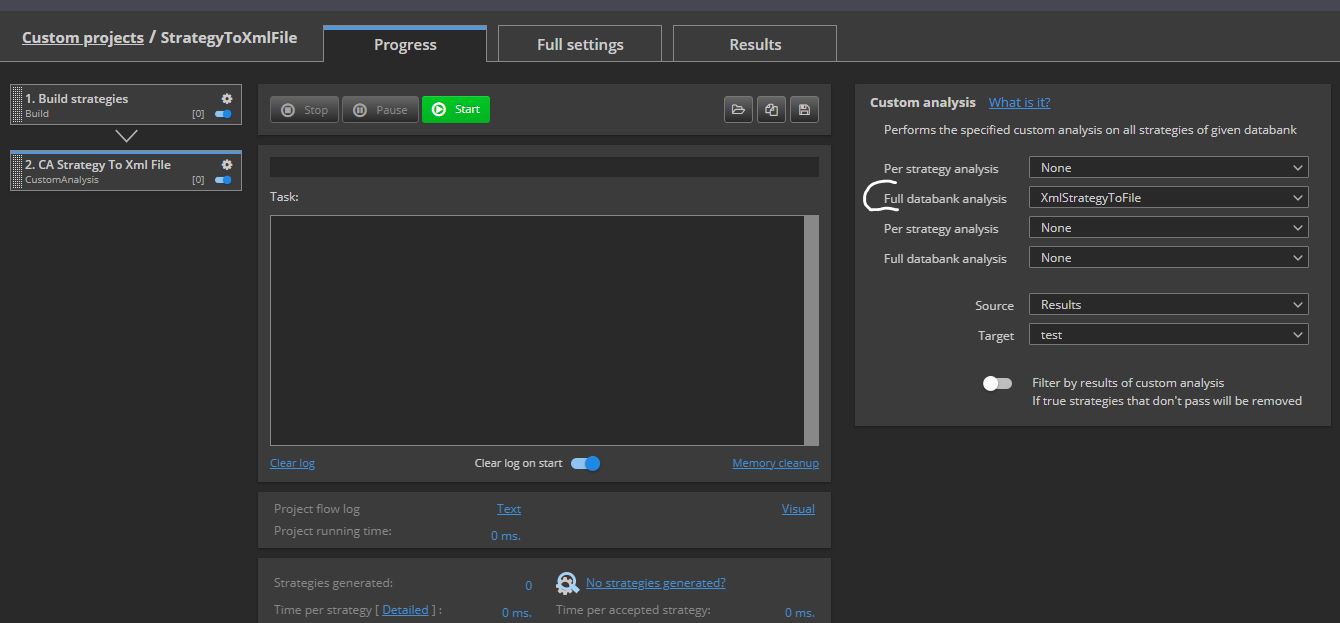
È possibile eseguire un'analisi personalizzata XmlStrategiaPerFile o XmlStrategiaPerFileSym (per le strategie simmetriche) per trasformare qualsiasi strategia dalla banca dati all'unità in un percorso di uscita come "C:\Temp"
Poi si può aprire questo file XML in qualsiasi lettore xml (come ad esempio https://jsonformatter.org/xml-editor per esempio).
È possibile leggere anche un modello, se si carica il modello in Databank.
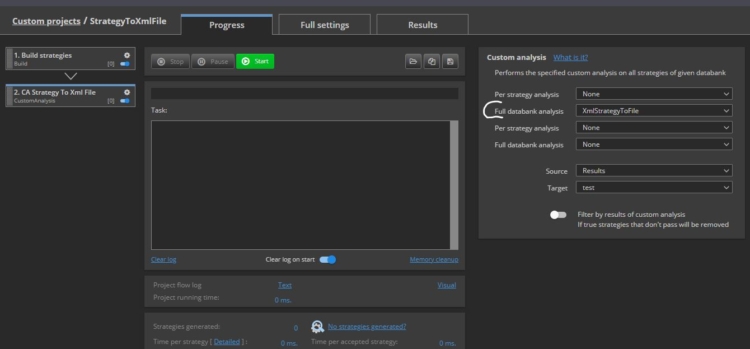
(Si veda l'allegato Progetto personalizzato StrategiaPerXmlFile e l'Xml allegato di una strategia Strategia 1.6.22(1)B)
- Le strategie A hanno regole e variabili :
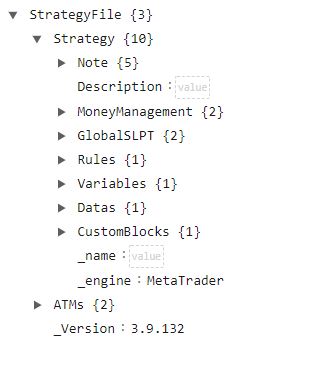
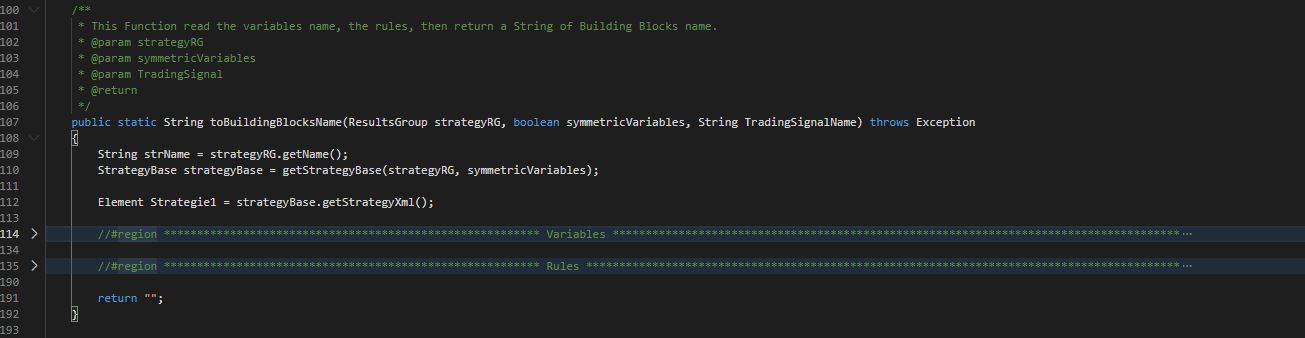
Se si apre la finestra Estensione SQ.utils.Bouillant, troverete una struttura simile per aprire una strategia:
In "toBuildingBlocksName", possiamo vedere due regioni del codice, Variabili e regole anche
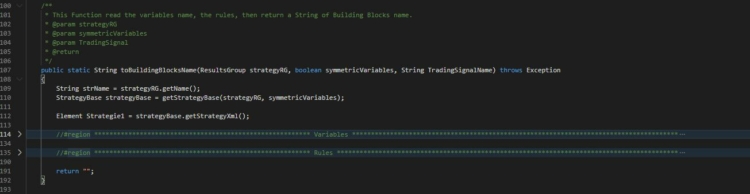
2/ Stiamo utilizzando Classe XMLUtil e l'elemento JDOM
https://strategyquant.com/sqxapi/com/strategyquant/lib/XMLUtil.html
3/ Come leggere le variabili della strategia
Una volta ottenuto l'XML da una strategia, dobbiamo ottenere i valori delle sue variabili. Esse possono essere Booleano, Intero, o Doppio.
Per ottenerli, sono disponibili tre funzioni :
-
getVariableValueToBoolean
-
getVariableValueToInt
-
getVariableValueToDouble
Da queste funzioni si possono ottenere i valori di qualsiasi variabile di una strategia.
4/ Ad esempio, possiamo ottenere un valore di Stop loss o un valore di Profit Target dalle impostazioni della strategia e inserire i risultati in una banca dati:
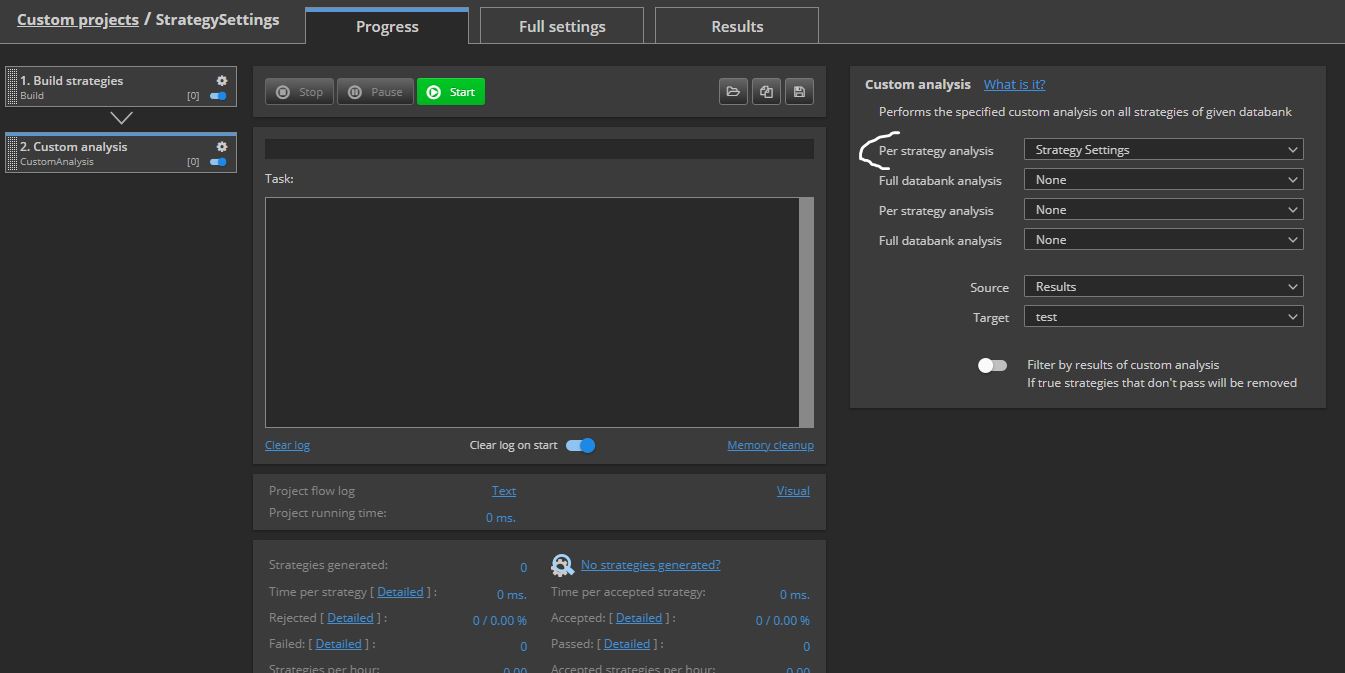
Con questa estensione, è possibile trovare un'analisi personalizzata "CA_StrategySettings" o "CA_StrategySettingsSym" (per strategie simmetriche)
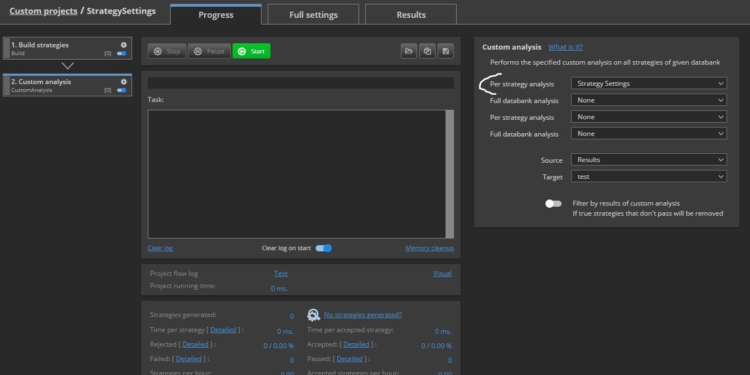
Queste analisi personalizzate chiameranno SQ.utils.Bouillant e richiedere un valore di Stop Loss o un valore di Profit Target da un segnale :
@Override
public boolean filterStrategy(String project, String task, String databankName, ResultsGroup rg) throws Exception
{
    Bouillant BouilltParaObj1 = new Bouillant();
    int IntTemp = BouilltParaObj1.getVariableValueToInt(rg, false, "LongProfitTarget");
 	rg.specialValues().set("CA_Long_ProfitTarget", IntTemp);
    IntTemp = BouilltParaObj1.getVariableValueToInt(rg, false, "ShortProfitTarget");
 	rg.specialValues().set("CA_Short_ProfitTarget", IntTemp);
    IntTemp = BouilltParaObj1.getVariableValueToInt(rg, false, "LongStopLoss");
 	rg.specialValues().set("CA_Long_StopLoss", IntTemp);
    IntTemp = BouilltParaObj1.getVariableValueToInt(rg, false, "ShortStopLoss");
 	rg.specialValues().set("CA_Short_StopLoss", IntTemp);
    IntTemp = BouilltParaObj1.getVariableValueToInt(rg, false, "LongTrailingStop");
 	rg.specialValues().set("CA_Long_TrailingStop", IntTemp);
    IntTemp = BouilltParaObj1.getVariableValueToInt(rg, false, "ShortTrailingStop");
 	rg.specialValues().set("CA_Short_TrailingStop", IntTemp);
    restituire true;
}
(Come si può vedere nell'allegato Progetto personalizzato : StrategySettings)
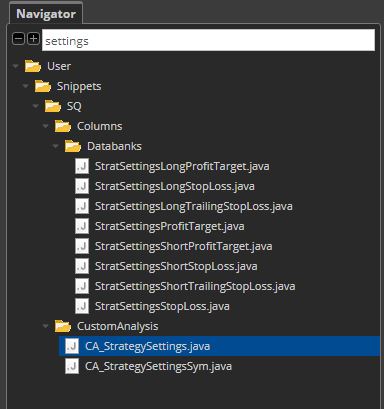
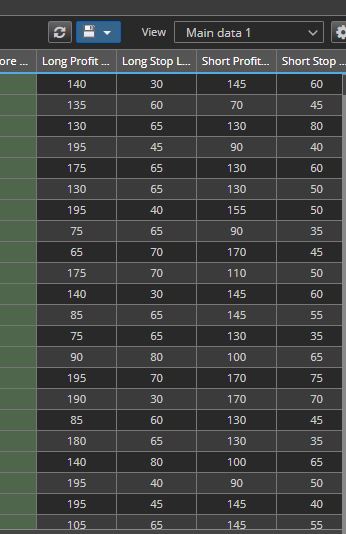
Una volta eseguito "CA_StrategySettings" analisi personalizzata o "CA_StrategySettingsSym" analisi personalizzata , è possibile leggere un valore di stop loss o un valore di obiettivo di profitto da qualsiasi impostazione della strategia e aggiornare la banca dati con i seguenti snippet:
Ecco i valori di Profit Target e Stop Loss delle impostazioni della strategia.
5/ Come leggere la strategia XML passo dopo passo
(dalla nostra funzione toBuildingBlocksName in SQ.Utils.Bouillant)
A/ Il nostro esempio utilizza getStrategiaBase per ottenere la funzione Elemento radice di una strategia :
StrategyBase strategyBase = getStrategyBase(strategyRG, symmetricVariables);

Element Strategie1 = strategyBase.getStrategyXml();
B/ Dal Strategia1 Elemento, sta diventando un bambino specifico Elemento
Element elParams = Strategie1.getChild("Strategy").getChild("Variables");
o
elParams = Strategie1.getChild("Strategy").getChild("Rules").getChild("Events"); // andare alla sezione Regole dell'Xml di Strategia
C/ Dal elParam Elemento, sta ottenendo il elementi per bambini a un Elenco degli elementi paramElementi
List paramElems = elParams.getChildren();
D/ Da Elenco degli elementi paramElementi, è possibile ottenere ciascuno Elemento e leggere il Valore del nodo utilizzando getNodeValue :
per (i = 0; i < paramElems.size(); i++)
{
    Element elParam = paramElems.get(i);

    String name = XMLUtil.getNodeValue(elParam, "name");
    String id = XMLUtil.getNodeValue(elParam, "id");

    if (name.equals(TradingSignalName)) // Cerchiamo l'id del TradingSignalName, necessario per trovare la regola corrispondente
    {
        SignalID = id;
    }
}
E/ Da Elenco degli elementi paramElementi, è possibile ottenere ogni AttributoValore di un Elemento :
String elParamKey = elParam.getAttributeValue("key");
F/ Da un elemento a una stringa
Come nel caso di una strategia, se si vuole leggere un elemento e osservarne la strutturaè possibile utilizzare la funzione XMLUtil.elementToString e inviarlo a un file.
String1 = XMLUtil.elementToString(elParam);
6/ Applicazione: come chiamare questa funzione, come utilizzarla.
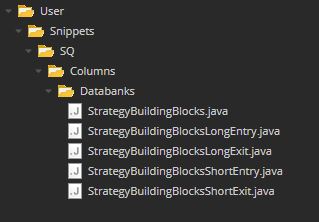
In questo esempio, abbiamo gli snippet delle colonne di DataBank per applicare questa funzione:
Bouillant BouilltParaObj1 = new Bouillant();
StringTotal = BouilltParaObj1.toBuildingBlocksName(results,false, "LongEntrySignal",100);
Questa funzione chiede ai Building Blocks con un Gruppo di risultati e un TradingSignal Nome. (LongEntrySignal, ShortEntrySignal, LongExitSignal, ShortExitSignal,...)
È davvero pratico perché è possibile selezionare un segnale di entrata lunga, un segnale di entrata corta, un segnale di uscita lunga o corta o tutti insieme.
È anche possibile selezionare il nome del segnale dal modello.
Ecco il codice :
pacchetto SQ.Columns.Databanks;

importare SQ.Utils.Bouillant;
importare com.strategyquant.lib.L;
import com.strategyquant.tradinglib.*;
importare com.strategyquant.tradinglib.optimization.WalkForwardMatrixResult;
importare com.strategyquant.lib.ValuesMap;
importare org.slf4j.Logger;
import org.slf4j.LoggerFactory;

// Creato in Francia da Emmanuel Bouillant-Evrard per la comunità StrategyQuantX :)
public class StrategyBuildingBlocks extends DatabankColumn
{
    public static final Logger Log = LoggerFactory.getLogger(StrategyBuildingBlocks.class);

    public StrategyBuildingBlocks() {
        super(L.tsq("Strategy Building Blocks"), DatabankColumn.Text, ValueTypes.Maximize, 0, 0, 1);

        setWidth(1000);
    }

    //------------------------------------------------------------------------

    @Override
    public double getNumericValue(ResultsGroup results, String resultKey, byte direction, byte plType, byte sampleType) throws Exception {
        return 0;
    }

    //------------------------------------------------------------------------

    @Override
    public String getValue(ResultsGroup results, String resultKey, byte direction, byte plType, byte sampleType) throws Exception
    {
        try
        {
            StringTotal = "";
            Bouillant BouilltParaObj1 = new Bouillant();
            String1 = BouilltParaObj1.toBuildingBlocksName(results,false, "LongEntrySignal",100); // 100 per avere il nome dei blocchi di edifici
            BouilltParaObj1 = new Bouillant();
            String String2 = BouilltParaObj1.toBuildingBlocksName(results,false, "ShortEntrySignal",100);

            if (String1 == null || String2 == null) { return "";}

            int maxLength = (String1.length() < 100)?String1.length():100;
            String1 = String1.substring(0, maxLength);

            maxLength = (String2.length() < 100)?String2.length():100;
            String2 = String2.substring(0, maxLength);

            if (!String1.equals("") && !String2.equals(""))
            {
                StringTotal += String1 + "," + String2;
            }
            else if (!String1.equals(""))
            {
                StringTotal += String1;
            }
            else if (!String2.equals(""))
            {
                StringTotal += String2;
            }
            return StringTotal;

        } catch(Exception e)
        {
            Log.error("Errore StrategyBuildingBlocks", e);
            return ""; // "Errore: " + e.getMessage();
        }
    }
}
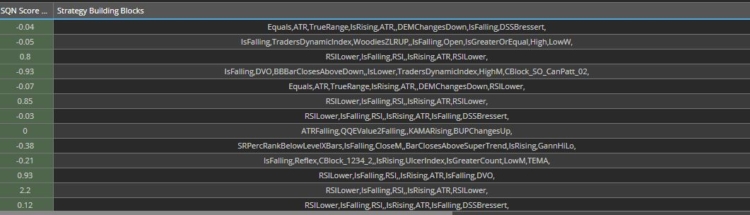
7/ Gli elementi costitutivi Nome di ogni strategia nella banca dati
8/ Il codice della funzione toBuildingBlocksName
/**
* Questa funzione legge il nome delle variabili, le regole e restituisce una stringa di nomi di blocchi di costruzione.
* @param strategiaRG
* @param variabili simmetriche
* @param TradingSignal
* @Ritorno
*/
public String toBuildingBlocksName(ResultsGroup strategyRG, boolean symmetricVariables, String TradingSignalName, int breakdownLevelMax) throws Exception
{
try
{
int i;
String SignalID = "";
String strName = strategyRG.getName();
if(strName.startsWith("Portafoglio filtrato") || strName.startsWith("Portafoglio"))
{
return "";
}
StrategyBase strategyBase = getStrategyBase(strategyRG, symmetricVariables);
Element Strategie1 = strategyBase.getStrategyXml();
se (DebugMode){
OutputPath = "C:\\Tempi\"+strName+".txt";
FileWriter myWriter = new FileWriter(OutputPath , true); }
if (Strategie1 != null)
{
//#region ********************************************************* Variables **************************************************************************************
Stringa test4 = "" ;
Element elParams = Strategie1.getChild("Strategy").getChild("Variables");
if (elParams != null)
{
List paramElems = elParams.getChildren();
VariableValues = new HashMap();
VariableID = new HashMap();
VariableType = new HashMap();
per (i = 0; i < paramElems.size(); i++)
{
Elemento elParam = paramElems.get(i);
if (elParam = null)
{
String name = XMLUtil.getNodeValue(elParam, "name");
String id = XMLUtil.getNodeValue(elParam, "id");
String value = XMLUtil.getNodeValue(elParam, "value");
String Type = XMLUtil.getNodeValue(elParam, "type");
VariableID.put(nome, id);
VariableValues.put(nome, valore);
VariableType.put(nome, Tipo);
se (DebugMode){
test4 = XMLUtil.getNodeValue(elParam, "nome") + " " + XMLUtil.getNodeValue(elParam, "id");
myWriter.write("nome + id : "+ test4 + "\r\n");
myWriter.write("VariableID : "+ VariableID.get(name) + "\r\n");
test4 = XMLUtil.getNodeValue(elParam, "nome") + " " + XMLUtil.getNodeValue(elParam, "valore");
myWriter.write("nome + valore : "+ test4 + "\r\n");
myWriter.write("VariableValues : "+ VariableValues.get(name) + "\r\n");
test4 = XMLUtil.getNodeValue(elParam, "nome") + " " + XMLUtil.getNodeValue(elParam, "tipo");
myWriter.write("nome + tipo : "+ test4 + "\r\n");
myWriter.write("VariableType : " + VariableType.get(name) + "\r\n");}
if (name.equals(TradingSignalName)) // Cerchiamo l'Id del TradingSignalName, necessario per trovare la regola corrispondente
{
SignalID = id;
}
}
}
se (DebugMode){
myWriter.close();}
}
//#endregion
//#region ********************************************************* Rules ******************************************************************************************
elParams = Strategie1.getChild("Strategy").getChild("Rules").getChild("Events"); // andare alla sezione Regole dell'Xml della Strategia
if (elParams != null)
{
List paramElems = elParams.getChildren();
for (i = 0; i < paramElems.size(); i++)
{
Element elParam2 = paramElems.get(i);
if (elParam2 != null) {
String elParamKey2 = elParam2.getAttributeValue("key");
if (elParamKey2.equals("OnBarUpdate")) // Cerca la regola OnBarUpdate
{
List paramElems3 = elParam2.getChildren();
for (int i2 = 0; i2 < paramElems3.size(); i2++)
{
Elemento elParam3 = paramElems3.get(i2);
if (elParam3 != null) {
String elParamKey3 = elParam3.getAttributeValue("name");
if (elParamKey3.equals("Segnali di trading")) // Cerca la regola dei segnali di trading
{
Element elParams4 = elParam3.getChild("signals");
List paramElems4 = elParams4.getChildren();
for (int i3 = 0; i3 < paramElems4.size(); i3++)
{
Elemento elParam4 = paramElems4.get(i3);
if (elParam4 != null) {
String elParamKey4 = elParam4.getAttributeValue("variabile");
if (elParamKey4.equals(SignalID)) // Cerca il TradingSignalName richiesto dal suo ID : SignalID
{
se (DebugMode){
myWriter = new FileWriter(OutputPath , true);
String String1 = XMLUtil.elementToString(elParam4);
myWriter.write(String1);
myWriter.close();}
Element elParams5 = elParam4.getChild("Item");
se (DebugMode){
myWriter = new FileWriter(OutputPath , true);
String1 = XMLUtil.elementToString(elParams5);
myWriter.write(String1);
myWriter.close();}
if (elParams5 != null) {
String key = elParams5.getAttributeValue("key"); // il nome
if (!key.equals("Boolean"))
{
Elemento elParam5Temp = elParams5;
Elemento elParam6Temp = elParams5;
strName = strategyRG.getName();
ArrayListElemsAll = new ArrayList();
UpdateNodesValues(strategyRG, symmetricVariables, elParams5, breakdownLevelMax, 0);
AddToList(strategyRG, symmetricVariables, elParams5, breakdownLevelMax, 0);
se (!StrategyName2.equals(strName) && OutPutBlockMode)
{
StrategyName2 = strName;
strategyBase = getStrategyBase(strategyRG, symmetricVariables);
Strategie1 = strategyBase.getStrategyXml();
OutputPath = "C:\\Temp\"+strName+"B.txt";
FileWriter myWriter = new FileWriter(OutputPath , false);
String1 = XMLUtil.elementToString(Strategia1);
myWriter.write(String1+"\r\n");
myWriter.close();
}
StringBuilder sb = new StringBuilder(); // crea la stringa del nome del blocco di costruzione
if (ArrayListElemsAll.size()>=1)
{
se (DebugMode){
myWriter = new FileWriter(OutputPath , true);
myWriter.write("ArrayListElemsAll.size() : " + String.valueOf(ArrayListElemsAll.size()) + "\r\n");
String1 = XMLUtil.elementToString(elParam5Temp);
myWriter.write(String1);
myWriter.close();}
for (int i5 = 0; i5 < ArrayListElemsAll.size(); i5++)
{
elParam6Temp = ArrayListElemsAll.get(i5);
if (elParam6Temp != null) {
String elParamKey8Temp = elParam6Temp.getAttributeValue("name"); // elParam6Temp.getAttributeValue("key");
sb.append(elParamKey8Temp);
sb.append(ParamDelimiter);
}
}
}
return sb.toString();
}}
}}
}
}}
}
}}
}
}
//#endregion
}
return "";
} catch (Exception e) {
if (DebugMode2){
String strName = strategyRG.getName();
OutputPath = "C:\\Tempi\i}aBuildingBlocksName "+strName+".txt";
FileWriter myWriter = new FileWriter(OutputPath , true);
myWriter.write("Errore : "+ strName +" "+ "\r\n");
myWriter.write("Errore : "+ e + "\r\n");
StrategyBase strategyBase = getStrategyBase(strategyRG, symmetricVariables);
Element Strategie1 = strategyBase.getStrategyXml();
String String1 = XMLUtil.elementToString(Strategie1);
myWriter.write(String1 + "\r\n");
myWriter.close();}
Log.error("Errore toBuildingBlocksName", e);
restituire "";
}
}
9/ Per leggere ogni blocco, questo esempio utilizza due funzioni ricorsive: UpdateNodesValues e AddToList.
Queste funzioni cercano ogni blocco di costruzione, qualunque sia la struttura XML della strategia.
Ecco il Codice :
   /**
    * Recursive function that read the Building Blocks Name from the Xml to update Nodes Values
    * @param strategyRG
    * @param symmetricVariables
    * @param Element
    * @param breakdownLevelMax
	 * @param breakdownLevel
    * @return
    */
   public void UpdateNodesValues(ResultsGroup strategyRG,  boolean symmetricVariables, Element element, int breakdownLevelMax, int breakdownLevel) throws Exception
   {
       int i;
       if (element != null)
       {
           breakdownLevel = breakdownLevel + 1 ;
           List<Element> element1 = element.getChildren();
           if (element1.size() >= 1)
           {
               for (i = 0; i < element1.size(); i++)
               {
                   Element element11 = element1.get(i);
                   if (element11 != null)
                   {
                       UpdateNodesValues(strategyRG, symmetricVariables, element11, breakdownLevelMax, breakdownLevel);
                   }
               }
           }
       }

       if (element != null)
       {
           List<Element> listParams = element.getChildren("Param");
           if (listParams.size() >= 1)
           {
               boolean VariableFounded = false;
               for (i = 0; i < listParams.size(); i++)
               {
                   Element courant = listParams.get(i);
                   if (courant != null)
                   {
                       String elParamKey5 = courant.getAttributeValue("key");					    			// the name
                       String elParamVariable3 = courant.getAttributeValue("variable");					    // the variable
                       if (elParamKey5.startsWith("#") && elParamVariable3=="true")
                       {
                           String Temp1 =  VariableValues.get(courant.getText());
                           String Temp2 =  courant.getText();
                           if (Temp1 != null)
                           {
                               courant.setText(Temp1);
                           }
                           VariableFounded = true;
                       }
                   }
               }
           }
       }
   }

   /**
    * Recursive function that read the Building Blocks Name from the Xml to the ArrayList : ArrayListElemsAll
    * @param strategyRG
    * @param symmetricVariables
    * @param Element
    * @param breakdownLevelMax
	 * @param breakdownLevel
    * @return
    */
   public void AddToList(ResultsGroup strategyRG,  boolean symmetricVariables, Element element, int breakdownLevelMax, int breakdownLevel) throws Exception
   {
       int i;
       boolean Condition1 = false;
       if (element != null)
       {
           breakdownLevel = breakdownLevel + 1 ;

           String elParamKey = element.getAttributeValue("key");
           String categoryType = element.getAttributeValue("categoryType");
           if (categoryType == null){categoryType = "";}
           if (breakdownLevelMax < 100)  { Condition1 = (elParamKey.equals("IsRising") || elParamKey.equals("IsFalling") || elParamKey.equals("IsLowerCount") || elParamKey.equals("IsGreaterCount") || elParamKey.equals("IsLower") || elParamKey.equals("IsLowerOrEqual") || elParamKey.equals("IsGreater") || elParamKey.equals("IsGreaterOrEqual") || elParamKey.equals("CrossesAbove") || elParamKey.equals("CrossesBelow") || elParamKey.startsWith("CBlock")); }
           if (!Condition1)
           {
               List<Element> element1 = element.getChildren();
               if (element1.size() >= 1)
               {
                   for (i = 0; i < element1.size(); i++)
                   {
                       Element element11 = element1.get(i);
                       if (element11 != null)
                       {
                           AddToList(strategyRG, symmetricVariables, element11, breakdownLevelMax, breakdownLevel);
                       }
                   }
               }
           }

           List<Element> listParams = element.getChildren("Param");
           if (listParams.size() >= 1 || Condition1)
           {
               Element elementCopy = (Element)element.clone();
               elParamKey = elementCopy.getAttributeValue("key");
                   listParams = elementCopy.getChildren("Param");
                   List<Element> listParamsBlock = element.getChildren("Block");

                   if (listParamsBlock.size() == 0 || Condition1)
                   {
                           if ((listParams.size() == 1 && !elParamKey.equals("Number")) || !elParamKey.equals("Number"))
                           {
                               if (breakdownLevel <= breakdownLevelMax)
                               {
                                   ArrayListElemsAll.add(elementCopy);
                               }
                           }
                   }

                   if (breakdownLevel <= breakdownLevelMax && OutPutBlockMode)
                   {
                       String strName = strategyRG.getName();
                       OutputPath = "C:\\Temp\\"+strName+".txt";
                       FileWriter myWriter = new FileWriter(OutputPath , true);
                       String String1 = XMLUtil.elementToString(elementCopy);
                       myWriter.write(String1+"\r\n");
                       myWriter.write("________________________________________________________________________________________________________________________________________________________________________________________________________________"+"\r\n");
                       myWriter.close();
                   }

           }
       }
   }
10/ Conclusione
In sintesi, è semplice, di solito si inizia leggendo la struttura del file XML dal file XMLUtil.elementToString si utilizzano le funzioni di cui sopra (A,B,C,D,E).
Se necessario, possiamo trovare altre funzioni a :
https://strategyquant.com/sqxapi/com/strategyquant/lib/XMLUtil.html
Fonte dell'informazione :
https://strategyquant.com/doc/programming-for-sq/viewing-and-changing-strategy-parameters-version-2/
https://www.w3schools.com/xml/default.asp
https://strategyquant.com/sqxapi/com/strategyquant/lib/XMLUtil.html
https://www.tutorialspoint.com/java_xml/java_jdom_parse_document.htm
Un utile lettore Xml :
https://jsonformatter.org/xml-editor
Mi chiamo Emmanuel Bouillant-Evrard, ingegnere specializzato in finanza. Ho lavorato per 24 anni nella ricerca e nello sviluppo nel settore finanziario negli Stati Uniti, in Canada e in Francia.


eccellente
Grazie
Grazie Emmanuel !
Ottimo lavoro svolto