


 英語
英語 スペイン語
スペイン語 ポルトガル語
 フランス語
フランス語 イタリア語
イタリア語 ドイツ語
ドイツ語エッジ減衰アナライザー
ページのコンテンツ
もしあなたが StrategyQuant Xでアルゴリズム戦略を構築しているなら、難しい部分はまだ終わっていないことをすでに知っているはずだ。 生成する 候補者 — それがどれが本物かを判断する。バックテストは壮観に見えるが、アウトオブサンプルでは静かに崩壊する。. エッジ減衰アナライザー これは無料のカスタム Results プラグインで、 SQX 144+ それは客観的で設定可能な答えを与えてくれます:一つだけ A~Fのグレードで0~100のスコア, それに、それを裏付けるための細分化も含まれます。.
実際にはどのような作用をするのか
このプラグインは新しいタブとしてインストールされます。 結果 あらゆる戦略のセクションです。戦略を選択してタブを開くと、その戦略が測定されます。 エッジの品質 そして、そして — 最重要事項 — インサンプルからアウトオブサンプルの場合、そのエッジがどれだけ劣化するのか.
これを使って:
- 候補者を素早く絞り込む — A/B = 強力な手法、C = 検証が必要、D/F = 廃棄。戦略ごとに約30秒。.
- 過学習を検出する — IS が単に OOS で生き残れないような戦略。.
- 2つの戦略を比較する 客観的に、直感ではなく数字で判断します。.
- 本当の心理的リスクを理解する 損失と勝利の連鎖を視覚化することによって。.
それと同じくらい重要なのは、それがどういうものなのかということだ。 ない これを行うという主張です。これはモンキーテスト、ウォークフォーワード・マトリックス、あるいはモンテカルロの代わりではありません。ライブの収益性を保証するものではありません。デモとフォワードテストだけが可能です。そして、 100% 読み取り専用: PostMessage API を介してデータを読み込み、データバンクに書き込むことは一切なく、戦略にも一切触れません。.
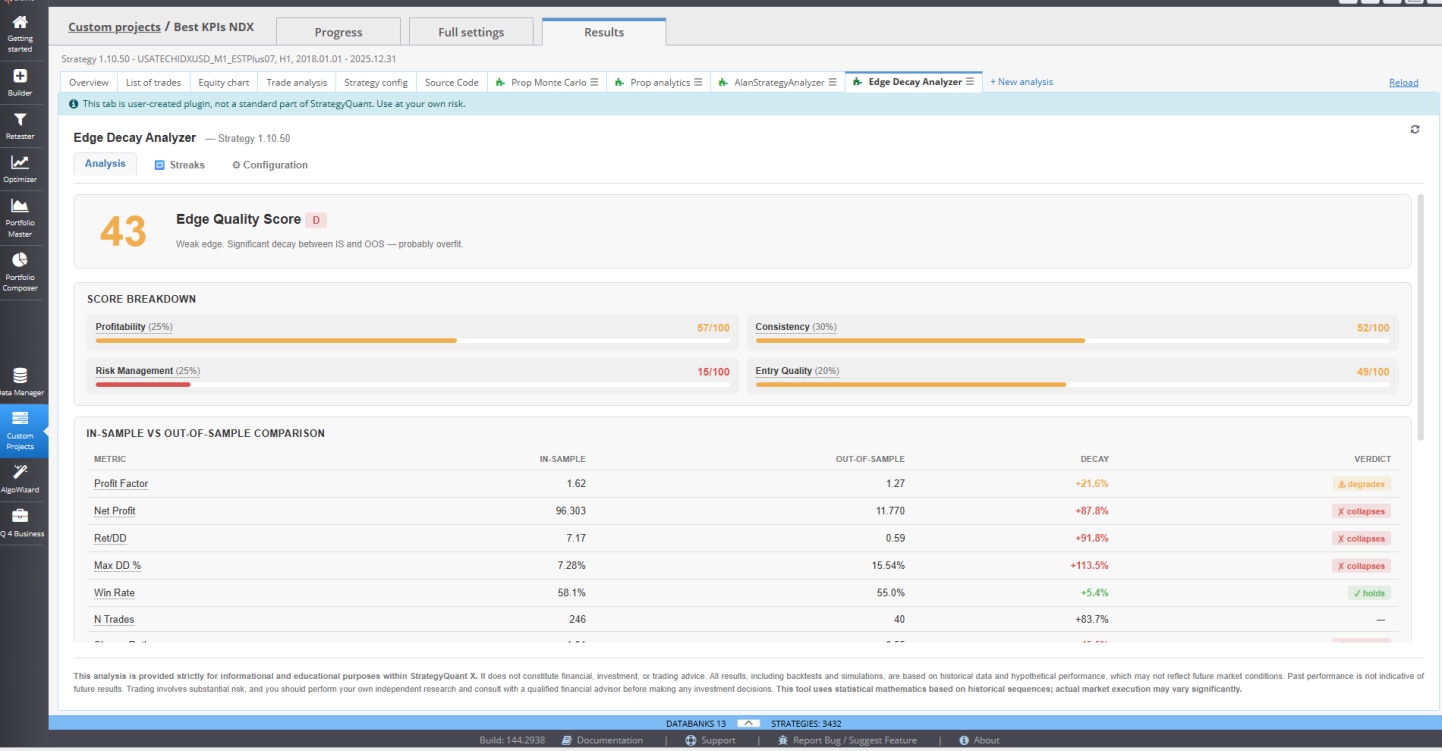
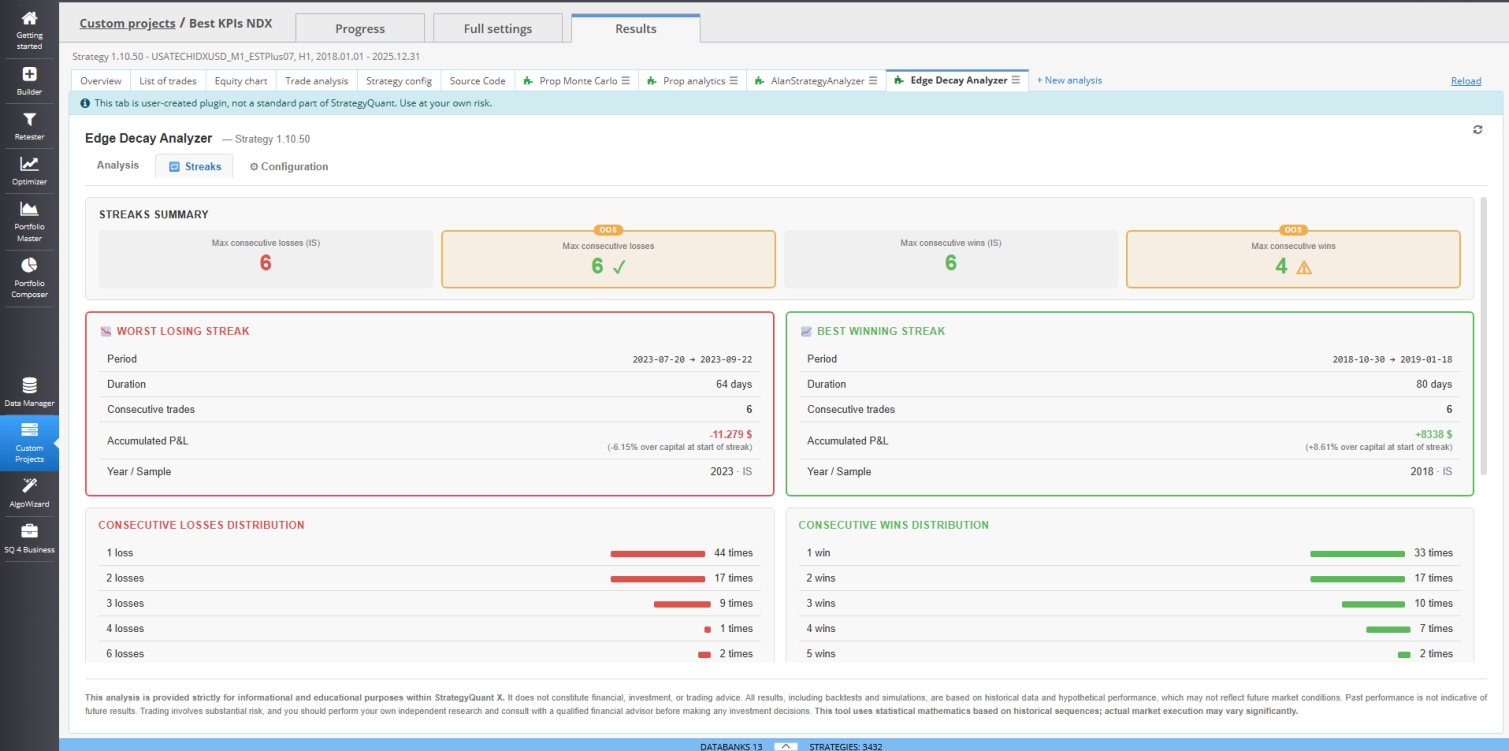
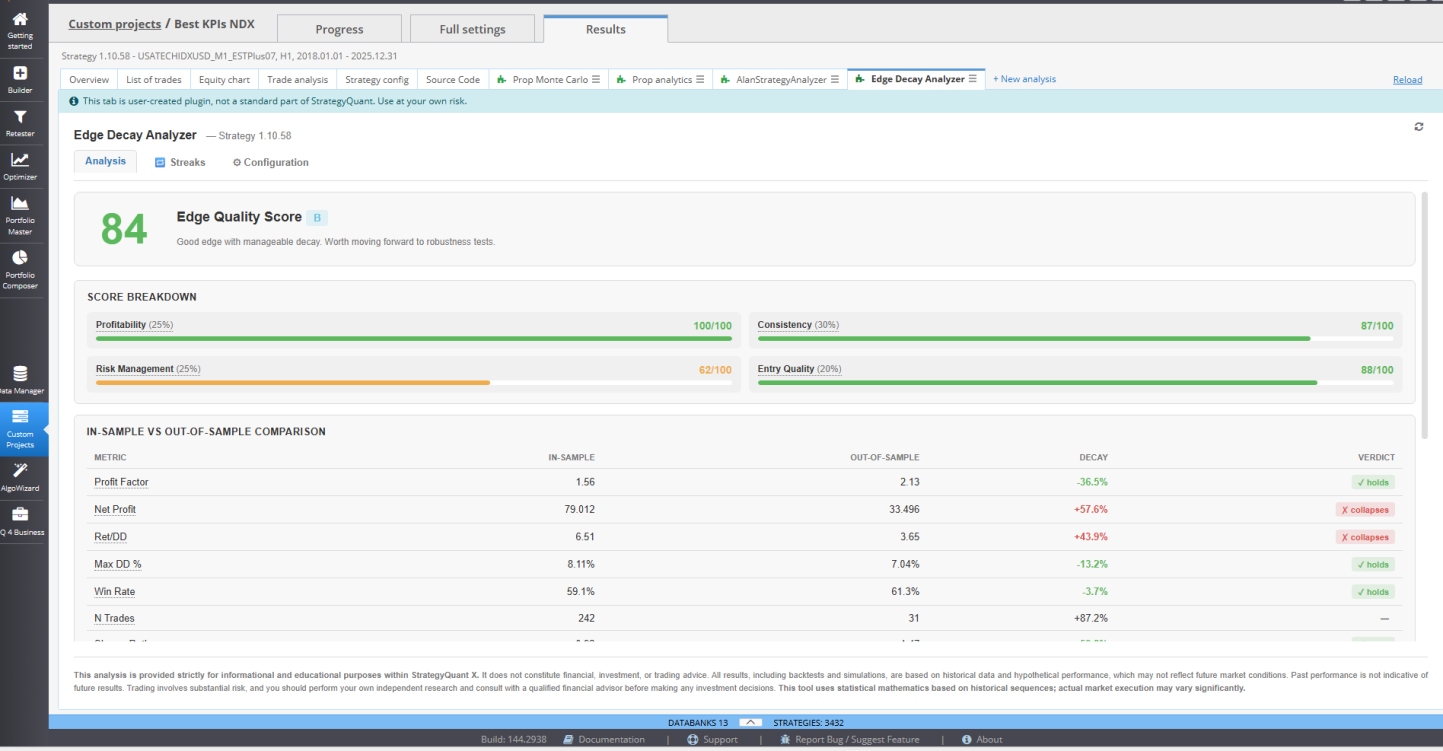
得点:4つの柱
合計スコアは、4つの柱(デフォルトの「戦略」モードのウェイト)の加重平均です:
| 柱 | 重量 | 測定する対象 |
|---|---|---|
| Pro適合性 | 25% | Proフィットファクター、ネット Proフィット、平均トレード — 全てがOOS |
| 一貫性 | 30% | 安定性、, PFの崩壊は→OOS, 勝率 — 最も高い評価を得ている要因は、粘り強さが将来の成功の最良の予測因子だからです。 |
| リスク管理 | 25% | リターン/DD%、最大DD、シャープ比 |
| エントリー品質 | 20% | メディアン XS (MFE/MAE) — 純粋なエントリー信号の品質 |
各指標は透明な手法を用いています。 線形閾値システム (0 / 50 / 100ポイントのアンカーで補間あり)なので、常に把握できます なぜ その戦略は望んだ結果をもたらした。.
グレードの基準:
| スコア | グレード | 判決 |
|---|---|---|
| 85–100 | A | エッジが非常に良好。OOSが続く可能性が高い |
| 70–84 | B | 刃先が良好で、処理が容易です。堅牢性試験に進めます |
| 55–69 | C | 妥当だが、侮辱的である。慎重に検証する。 |
| 40–54 | D | エッジが弱い、有意な劣化。 Probably 過学習 |
| <40 | F | エッジがOOSに陥る。推奨されない |
3つのタブ
- 分析 — 標題スコア、4つの柱、8つの指標に基づくIS対OOS比較表(色分け) 保持する/劣化する/崩壊する), 年別チャートの XS、およびエッジが秘密裏に依存している場合に警告する同時実行チェック 重複した取引を許可する.
- ストライク — 日付、期間、累積P&Lに基づく最悪かつ最高の連勝数;6連敗が単発の異常値なのか、通常の動きなのかを示すヒストグラム;年別の勝敗のミラーチャート。 それが答える本当の疑問: プラグを抜かない限り、最悪の連勝を耐えられるでしょうか?
- 設定 — 切り替え エッジ そして 戦略 モード(プラグインはウェイトとスレッショルドを自動調整)、アセットプリセット(インデックス、外国為替、商品、仮想通貨)、そして各スレッショルドの微調整が可能。設定はlocalStorageに保存されます。.
エッジモード vs 戦略モード
これは最も有用な機能の一つです。もしあなたが生の信号を評価している場合 — バーのみでの出金、SL/TPなし、固定ロットサイズ — エッジモード リスク指標を緩和(ストップなしでは引き下げは当然大きくなります)し、コンシステンシーとエントリー品質に重み付けを調整するため、測定結果は 信号 トレード管理ノイズなし。SL/TP/トラッキング機能付きの完全システム向け, 戦略モード 標準的な重量を用いて全体を確認します。.
インストール
- StrategyQuant Xを完全に閉じます。.
- Edge Decay Analyzer のフォルダー ( index.html、locale/、 vue.global.prod.js を含む) を [SQX Installation]/user/extend/ResultsPlugins/Edge Decay Analyzer/ にすべて貼り付けます。
- SQXを再オープンします。.
- 戦略を選択 → 結果 タブ → エッジ減衰アナライザー.
要件: SQX 144+ とライ Pro センス(最大3つのプラグイン)または Ultimate (無制限)です。 Starter ライセンスではカスタムプラグインはサポートされません。.
言語: 英語とスペイン語。SQX設定から自動検出されます。.
アンインストールも同様に簡単です。SQXを終了し、フォルダを削除して再度開きます。残留物はなく、コアの変更もありません。.
哲学
このプラグインは以下の4つの原則に基づいています: 推測に基づく判断の透明性 (データが正しく計算できない場合は警告が表示されます — それは数字を全く作り出さないのです), 設定可能性 (閾値は資産や戦略の種類に応じて調整されます)、, 補完的なものではなく代替するもの (これは高速フィルタであり、完全な堅牢性テストの代わりではありません)、そして 一貫性に重点を置く (なぜなら、IS から OOS へのエッジの持続性が、実際に未来を予測する要因だからです)。.
エッジ デケーシ分析ツールをパイプラインの最初のゲートとして考えてください。これは、どの戦略がコストのかかる堅牢性テストに耐える価値があるかを迅速かつ客観的に判断する手段であり、それよりも時間を無駄にするような戦略は排除するのに役立ちます。.
エッジ・デケーシ・アナライザー v1.0 · StrategyQuant X 144+用
クレジット:

こんにちは、,
このプラグインを試しています。しかし、戦略の分析を行う際に、このメッセージが表示されます。どうすればいいでしょうか? >>>> この戦略にはアウトオブサンプルの期間が検出されません。.
ありがとう
問題となっているのは、このプラグインが機能するためには、ISとOOSの両方を包含したデータに基づいて以前に戦略のテストが実施されなければならないということである。なぜなら、エッジスコアはこれらの領域における戦略の動作に基づいて作成されるためだ。.