


 英語
 スペイン語
 ポルトガル語
 フランス語
 イタリア語
 ドイツ語
Problems importing Custom Indicator from Ninjatrader 7
3件の返信

I have been trying to import custom indicator data using the NT indicator SQIndyExport. I have had no success in getting the custom indicator data from NT7 to SQ.
Can you please have a look at the screen prints I’ve upload and tell me what I have done wrong and how to correctly import custom indicator data from NT into SQ ?
These are the steps I followed.
Using SQIndyExport after changing the OnStartup & OnBarUpdate methods to the correct filename produces a file with data like this:
4/25/2016,6:30:00,PM,2083.75,2083.75
4/25/2016,7:00:00,PM,2083.5,2080.625
When I try to import this custom indicator into SQ, the import data window columns are wrong. It has “PM” in a separate column. See upload file “SQ Custom Indicator Import 01.JPG”
I then tried changing the “string data” assignment in method private void appendFile(string name, double value)
From: string data = (Time[0] + dataSeparator + Close[0] + dataSeparator+value);
To: string data = (Time[0].ToString(“dd/MM/yyyy HH:mm”) + dataSeparator + Close[0] + dataSeparator+ value);
After that code change, the file data looked like:
25/04/2016,18:30,2083.75,2083.75
25/04/2016,19:00,2083.5,2080.625
SQ was now able to finish importing the data, and the Import Custom indicator window looked like the uploaded file “SQ Custom Indicator Import 02.JPG”
I then tried to import the data, SQ gave back a message that appeared to be correct since it imported all rows. See upload file “SQ Custom Indicator Import 03.JPG”
But even though SQ imported all rows, the total number of days imported is wrong. SQ says 274 Total days were imported. See Yellow area in upload file “SQ Custom Indicator Import 04.JPG”
The Total days I imported for ES ##-## is 54, which is the number of days I told NT to load to the chart while using the SQ export indicators. See Yellow area in upload file “SQ Custom Indicator Import 05.JPG”
I have also uploaded the small ES##-## Futures data file “ES_##_##_30_Minute.txt”, the SuperTrend indicator file “anaSuperTrendU11_HMA.txt”, and a screen print of the indicator definition in file “SQ Custom Indicator Definition.JPG”
ありがとうございます
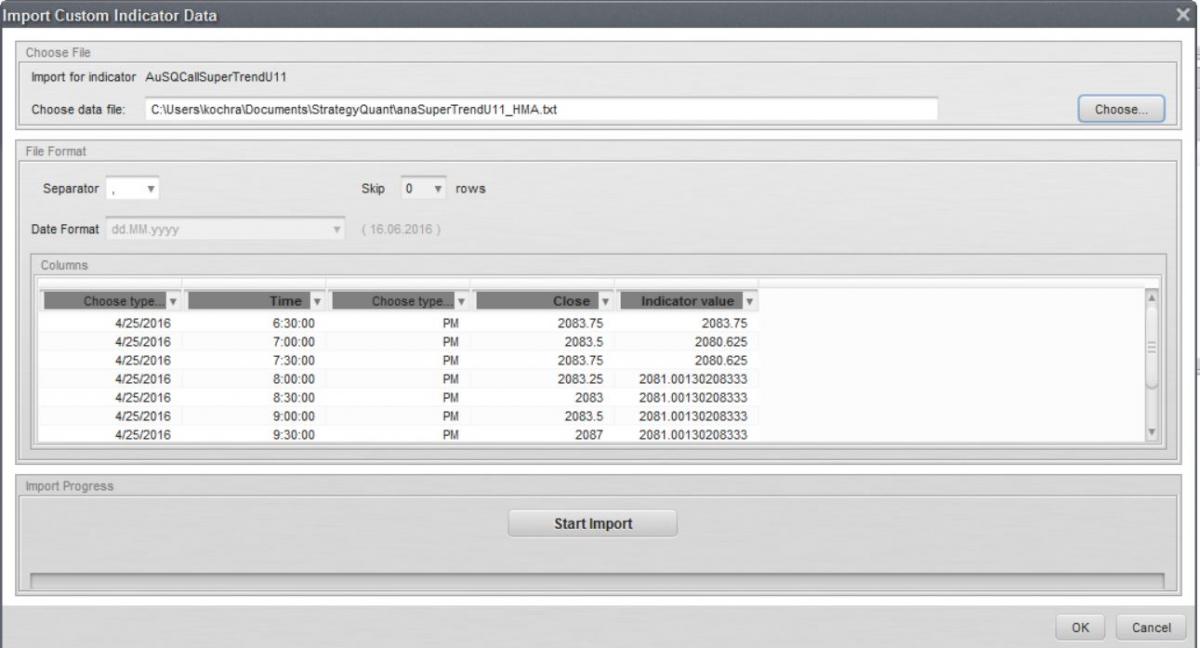 SQ Custom Indicator Import 01.JPG
 SQ Custom Indicator Import 02.JPG
 SQ Custom Indicator Import 03.JPG
 SQ Custom Indicator Import 04.JPG
 SQ Custom Indicator Import 05.JPG
 SQ Custom Indicator Definition.JPG
0

Hello Robbie,
I can check this where the issue could be
0
I have tried to import your supertrend indi data sample and it recognized 52 days which corresponds to number of days in the file
0
I finally managed to import the indicator as well. However I had to modify method “appendFile” so that the Date definition would be “dd.MM.yyyy HH:mm”. The code I need to use looked like this:
private void appendFile(string name, double value) {
string data = (Time[0].ToString(“dd.MM.yyyy HH:mm”) + dataSeparator + Close[0] + dataSeparator+ value);
// string data = (Time[0] + dataSeparator + Close[0] + dataSeparator+value);
data = data.Replace(@” “,dataSeparator);
sw = File.AppendText(path + @”\”+name+”.txt”);
sw.WriteLine(data);
sw.Close();
}
0
3件の返信を表示中 - 1 - 3件目 (全3件中)