


 Inglés
 Portugués
 Francés
 Italiano
 Alemán
 japonés
Documentación y guías del usuario
Aprenda los conceptos básicos o perfeccione sus habilidades con tutoriales diseñados para inspirarle.
Last updated on 23. 11. 2017 by Kornel Mazur
Clasificación
Contenido de la página
Settings → Ranking
The Ranking tab controls how StrategyQuant X evaluates, filters, and stores generated strategies based on their performance metrics. It governs fitness calculation, databank population, and automated filtering rules.
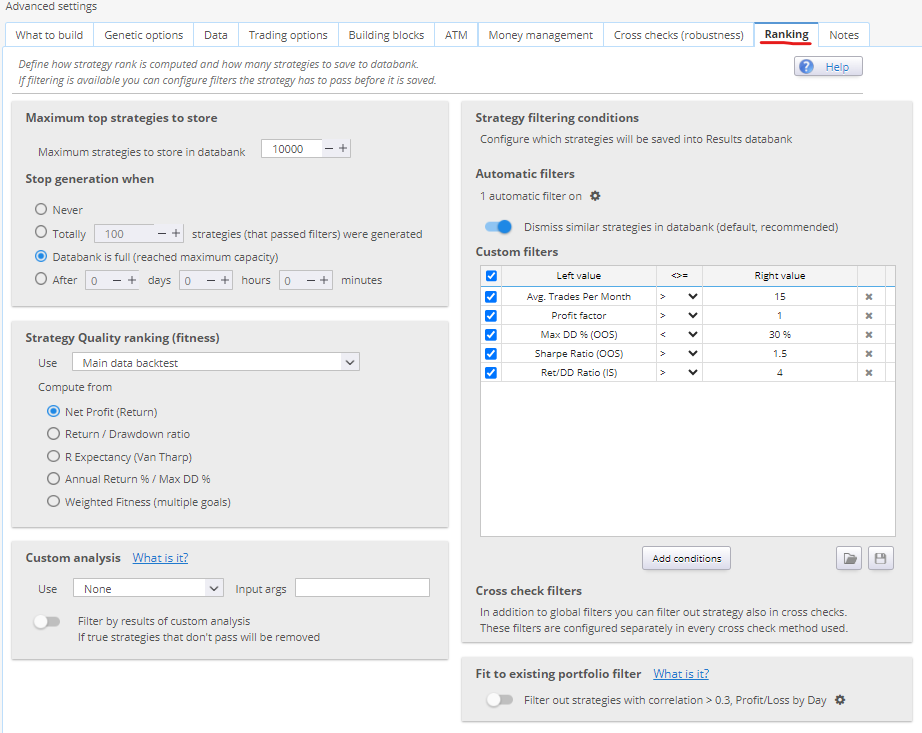
1. Databank Options
Estrategias máximas para almacenar en el banco de datos
- Sets the upper limit of strategies retained in the databank.
- StrategyQuant may generate thousands of strategies per hour; this setting ensures only the top performers are saved.
Stop Generation When
- Choose whether the build process:
- Stops automatically when the databank is full, or
- Continues indefinitely until manually stopped
2. Strategy Quality Ranking (Fitness)
What is Fitness?
Fitness is a normalized score (range: 0 to 1) used to represent the quality of a strategy. It is derived from backtest results using selected performance criteria.
Use (Main Data Backtest / Cross Checks)
- Choose the data source for fitness evaluation:
- Main Data (default): Fitness is computed from a single-symbol backtest.
- Portfolio: Fitness is computed across all symbols if using multi-symbol testing. Falls back to main data if no additional datasets are defined.
Determine Best Strategies By
- Select from predefined metrics (e.g., Profit Factor, Net Profit, Return/Drawdown Ratio), or
- Create a custom fitness formula by combining multiple metrics with individual weights.
Caution: Overcomplicating the fitness function may result in conflicting objectives and suboptimal selection.
3. Strategy Filtering Conditions
Used to automatically discard strategies that don’t meet minimum performance criteria.
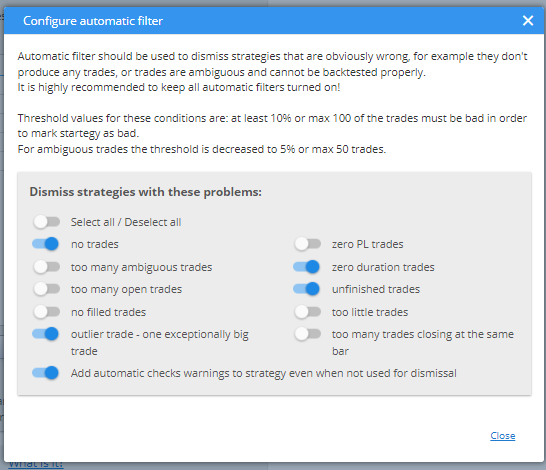
Automatic Filters
- Quickly eliminate:
- Strategies with zero trades
- Unprofitable strategies
- Strategies with no filled orders
- Designed for rapid dismissal of obviously invalid results.
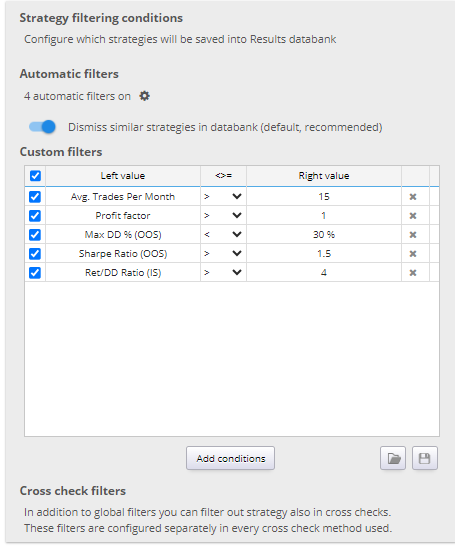
Custom Filters
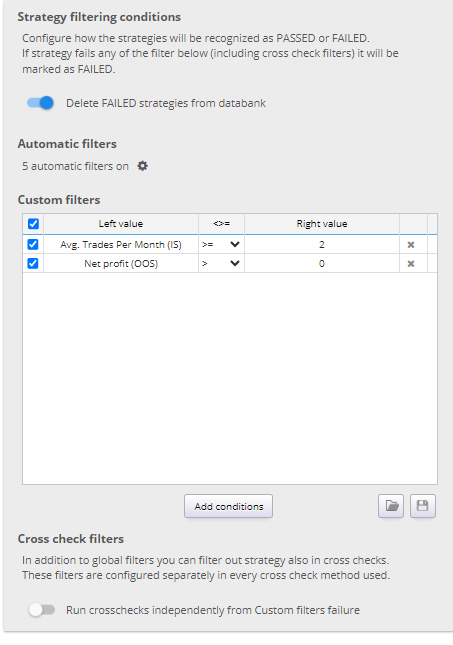
- Define user-specific rules using logical conditions.
- Filters can evaluate results in:
- In Sample (IS)
- Fuera de la muestra (OOS)
- Robustness Tests (RT)
- Portfolio results (P)
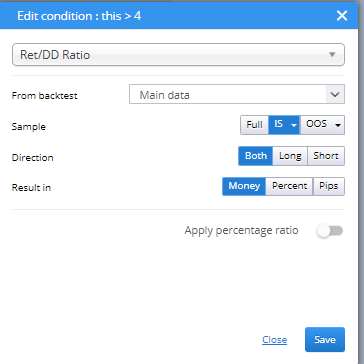
Supported result types:
- Money, Percent, or Pips
- Evaluated independently for Long, Short, or combined trade directions
Ejemplo:
Dismiss all strategies where Net Profit (OOS) < 0 and Avg. Trades Per Month (IS) <= 2
Fit Strategy to Existing Portfolio
Fit Strategy to Existing Portfolio is a feature introduced in StrategyQuant X Build 130 that enables you to evaluate new strategies in the context of an existing strategy portfolio. The goal is to identify strategies that not only perform well individually but also complement your current portfolio by improving overall performance and reducing correlation.
Visión general
This feature allows you to:
- Compute fitness of new strategies based on how they impact your existing portfolio
- Filter out correlated strategies to avoid redundancy and improve diversification
This functionality is particularly valuable for users managing multi-strategy portfolios and seeking to maintain robust, diversified performance profiles.
How to Use the Feature
- Access the Configuration
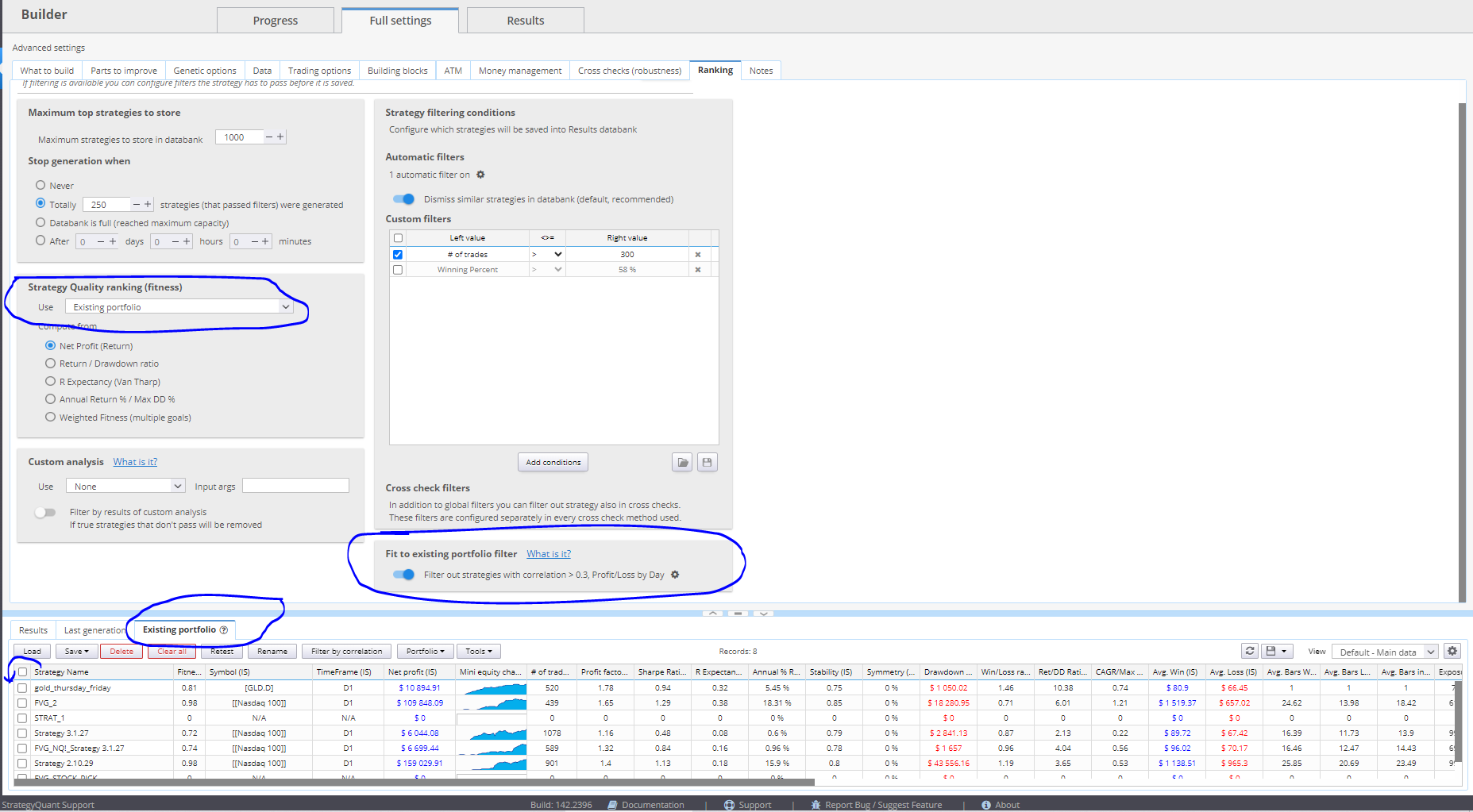
- Vaya a Settings → Ranking tab en el Constructor módulo.
- Ensure you are using a StrategyQuant version Build 130 or later.
- Locate the Existing Portfolio databank and load your existing strategies into it.
- Load Existing Strategies
- Import several previously developed or selected strategies into the Existing Portfolio banco de datos.
- These will be used as the reference portfolio against which new strategies will be evaluated.
Compute Fitness Based on Existing Portfolio
To calculate a new strategy’s fitness based on how it fits into your existing portfolio:
- Abrir Fitness Configuration in the Builder settings.
- Establecer Use = Existing Portfolio.
This setting triggers a portfolio simulation, combining the newly generated strategy with the existing portfolio, and computes fitness metrics based on the combined portfolio performance.
This allows you to prioritize strategies that enhance the overall portfolio, rather than selecting those that perform well in isolation.

Dismiss Correlated Strategies
To avoid adding strategies that are highly correlated with your existing ones:
- Scroll to the bottom of the Filtering Conditions sección.
- Activa la correlation filter under the Fit Strategy to Portfolio sección.
- Configure the filter by setting:
- Maximum allowed correlation threshold
- Correlation type (e.g., Profit/Loss by day, week, or month)
- Additional parameters such as the minimum number of overlapping data points
When active, this filter compares each newly generated strategy to all strategies in your Existing Portfolio databank. If the correlation exceeds the defined threshold, the strategy is automatically discarded.
This functionality helps you maintain a balanced and uncorrelated portfolio, which is critical for reducing risk and avoiding performance clustering across strategies.
.

¿Le ha resultado útil este artículo? El artículo era útil El artículo no era útil
Contenido de la página