


 英語
 スペイン語
 ポルトガル語
 フランス語
 イタリア語
 ドイツ語
GraalVM を使用したパフォーマンス向上 15% 倍、メモリ使用量 40% 削減
84 replies

こんにちは 🙂
I just wanted to share my “new” find. As always, I am exploring options about how to increase the speed of SQX for my daily workflow by tuning parameters, garbage collectors, etc. Lately, I´ve learned about GraalVM, which is a relatively new JIT-compiler that has maximum performance as its goal and has been shown sometimes to be up to 30x faster than if executing code in the standard JRE / OpenJDK runtimes that SQX is using right now. Over here is an excellent video about how it works, why it has been made and with some performance tests: https://www.youtube.com/watch?v=GinNxS3OSi0 For example: Twitter is running all their Java stuff on GraalVM instead of JRE / OpenJDK for a while now and have noticed a considerable drop in CPU and RAM usage.
And now the great part: using it with SQX is as easy as downloading the latest Windows binary from here https://github.com/graalvm/graalvm-ce-builds/releases
Simply unpack the ZIP file into the J64 of SQX (previously delete or rename the folder) and just continue working with SQX as you always did. Personally here is what I have experienced since replacing it and of course, using the same settings in SQX as before:
– about a 15% performance increase in strategy generation speed
– approximately a 40% drop in memory consumption (which is AMAZING given that I can now work with less RAM)
– no errors or crashes of SQX just works the same as with JRE / OpenJDK
As this is open-source, I would highly recommend that SQX is being shipped with GraalVM in its default configuration, as this seems to be amazing! There also is an Enterprise Edition available that seems to be even faster, but it´s 193 Euro/year and I haven´t tested it yet.
Have fun crunching strategies 😉

1

Hi there, I would like to try this performance upgrade, could I please check if I need to delete the contents of the J64 folder and replace it will the unzipped files?
Also, is Enterprise Edition 20 stable or stick to 19? Not sure if I need Java 8 or 11 version, I am running Win 10 Pro.
ありがとう
0

java 11, version 20 whatever – yes, you will delete or better rename the original “j64” folder and unzipt the content from graal zip inside it and restart SQX
利益を上げるアルゴトレーダーになりたいですか?私たちは2014年序盤からStrateQuantソフトウェアを使い始めました。現在では、あらゆるタイプの市場に対応するEA構築に関する膨大なノウハウを持っています。私たちはこのノウハウ、アプリ、ツール、そしてすべての最終的な戦略をリアル・トレーダーの皆様と共有しています。参加したい方は、以下にご記入ください フォーム.
0

Does it shipped to B130?
I just see this post and now open up SQX’s j64 folder’s readme file. It state that it is openJDK.
Does GraalVM problematical or something else, so that after several month of people testing here conclude that it is not suitable to ship to new version of SQX?
0
i think it will not be shipped with SQX, because of licensing…so you need to try it for yourself and see what difference you could achieve on your PC specs…you can see our benchmark we have made
利益を上げるアルゴトレーダーになりたいですか?私たちは2014年序盤からStrateQuantソフトウェアを使い始めました。現在では、あらゆるタイプの市場に対応するEA構築に関する膨大なノウハウを持っています。私たちはこのノウハウ、アプリ、ツール、そしてすべての最終的な戦略をリアル・トレーダーの皆様と共有しています。参加したい方は、以下にご記入ください フォーム.
0

Hi, Guys
Just now, I compare to SQX 131 with the default java and the one with graaivm java, no much speed up though….
Wondering if SQX 131 has java improved already ?
0

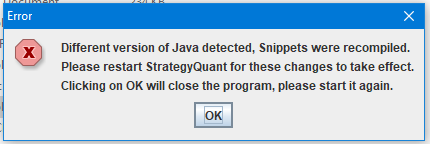
Tried this using: graalvm-ee-java11-21.1.0 on SQX Build 131.659, with no luck! Any help would be appreciated. Error was persistent, I tried many restarts!
0

こんにちは,
it will work after deleting the files below from j64 folder
\j64\languages\nfi\builder\svm-none.jar;
\j64\languages\nfi\truffle-nfi-none.jar;
SQ team, Tamas
0

For all who want to use graalvm: Take the 21.1 java version 11 not version 16.
This produces that error (in my case on Linux):
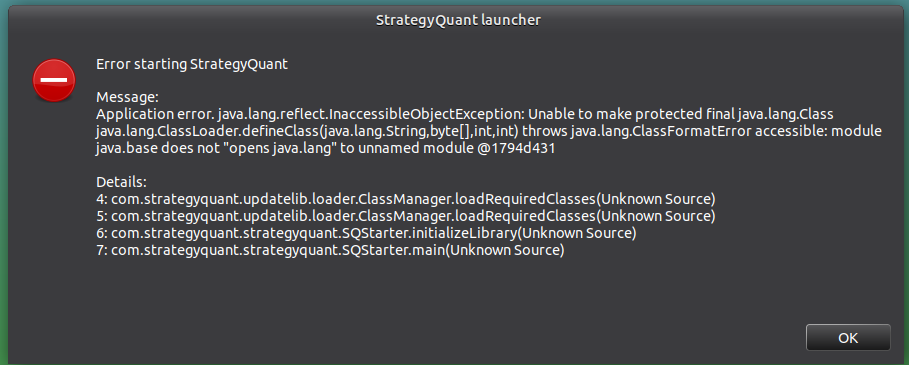
If you take version 11, than it works fine after a restart of SQ. Before this you should delete
\j64\languages\nfi\builder\svm-none.jar;
\j64\languages\nfi\truffle-nfi-none.jar;
as Tamas already said.
エキスパートアドバイザーによる自動取引
https://www.rabenesche.de
また、以下の分野でも活動しています:
https://forums.babypips.com/u/ravenash
0
Tried this using: graalvm-ee-java11-21.1.0 on SQX Build 131.659, with no luck! Any help would be appreciated. Error was persistent, I tried many restarts!
I actually managed to get this working, thanks to info on the Discord server, using the package: graalvm-ee-java11-windows-amd64-20.0.0. But after testing I didn’t see any noticeable performance increase.
0
strange, because every user i know have performance boos with graal
利益を上げるアルゴトレーダーになりたいですか?私たちは2014年序盤からStrateQuantソフトウェアを使い始めました。現在では、あらゆるタイプの市場に対応するEA構築に関する膨大なノウハウを持っています。私たちはこのノウハウ、アプリ、ツール、そしてすべての最終的な戦略をリアル・トレーダーの皆様と共有しています。参加したい方は、以下にご記入ください フォーム.
0

I ran some tests this morning and observed interesting results. I tested the original configuration of Build 131 against the enterprise edition Graalvm version 20.3.2 and 21.1.0 (both using v11).
The first thing I did was to compare benchmarks and took the best out of three tests for each.
Then I did 500 trend strategy test using all three for both the random and genetic modes.
To sum it up, the original configuration did better than using either 20.3.2 or 21.1.0 on the benchmark tests and there wasn’t any real difference for the other tests…
I’ve attached a few pictures to show direct comparisons.
0

Check this out for performance comparison:
https://docs.google.com/spreadsheets/d/1PXYirYB5toqP8c4tIsU6x8swFvtt3Wwn8QGek7srTzY
more at: https://discord.gg/5TFFKUCw
0
Thanks Karish for sharing the spreadsheet and link.
I just updated the sheet with my tests and now I see a difference, and what a difference it actually is. For me, the best improvement was 43% – going from 454.2k strategies per hour to 651.7k!!!!!
0

I wonder if there is a difference in performance between Linux and Windows versions due to operating systems. Did anyone try to compare them?
Linux does not have a problem using more than 64 cores in one application as on Windows, so it may be a better alternative overall.
0

3900x
No GM 255280 s/h
with GM 285548 s/h
0