


 英語
英語 スペイン語
スペイン語 ポルトガル語
 フランス語
フランス語 イタリア語
イタリア語 ドイツ語
ドイツ語Stratergy Parameters
3件の返信

マークさん、こんにちは,
Do you think you would be able to add in the strategy parameters section, full controls of Stop Loss, Take Profit, Break Even, Trailing Stop etc with the Average true range function.
ありがとう
リー
0

リー,
I don’t know exactly if this is exactly what you are asking for, but what I did to solve this problem is I have created a template for myself where many parameters are already entered (I did it once so don’t have to do it twice) (attached is one of my templates). Maybe you can do something like that, but add in the ATR coeficianet and period instead of absolute pip SL as in the screenshot:
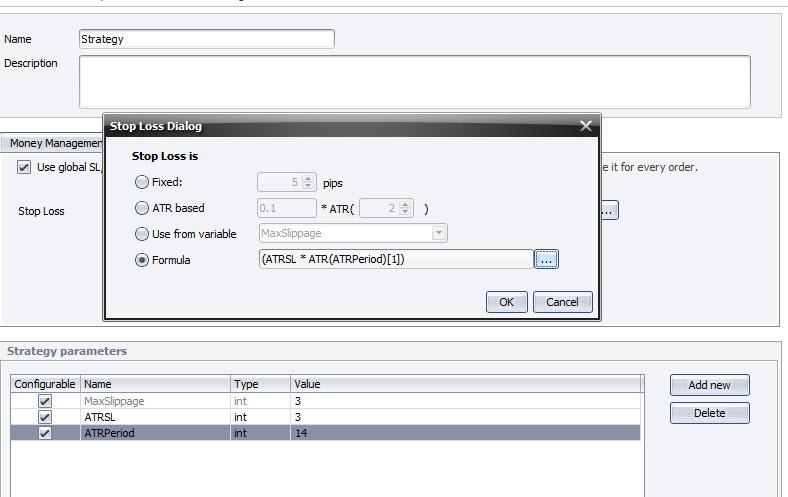 12-30-2012 7-28-27 AM2.jpg
Another option is Mark has created a template as well. So under “new” tab, if you click the down arrow, you can click on “Strategy with global SL/PT and MM”. That one has some parameters already done as well.
ステアルノ
0

こんにちは、,
one thing about templates – you can easily add your own templates to the program by simply saving a strategy into the {EA Wizard}/templates directory.
Then you’ll have this new strategy in the list of templates when you click on New.
マーク
マーク
StrategyQuantアーキテクト
0
Yeah, that works great. Thanks for sharing this nugget. I thought that is what templates was for, but last time I did not restart EA Wizard, which you must for the templates to load. Thansk.
0
3件の返信を表示中 - 1 - 3件目 (全3件中)