At StrategyQuant, we listen to you. You’ve asked for a way to smooth out your indicators with a moving average—and today, we’re delivering! Our brand-new comparison blocks let you effortlessly apply any moving average to any indicator, transforming noisy data into clean, actionable signals. Imagine turning a choppy indicator into a sleek, refined tool that highlights true market trends. Whether you’re after quick trend confirmation or capturing the precise moment of a reversal, these blocks give you the power to filter out market noise and focus on what really matters.
仕組み
Our new comparison blocks come in two flavors:
- Indicator is Above/Below its MA: These blocks compare the current indicator value with its moving average (choose from Simple, Exponential, Weighted, or even our Hull MA).
- Indicator is Above MA: Returns true if the indicator is higher than the MA, suggesting bullish momentum.
- Indicator is Below MA: Returns true if it’s lower, hinting at bearish conditions.
- Indicator Crosses Above/Below its MA: These blocks go a step further by checking crossovers between the indicator an its moving average
- Indicator Crosses Above MA: Returns true if the indicator is crosses above the MA, suggesting bullish momentum.
- Indicator Crosses Below MA: Returns true if the indicator is crosses below the MA, suggesting bearish momentum.
Block Parameters:
- Period: The number of bars or data points used to calculate the moving average. The default value is set to 14.
- MA Type: Specifies the type of moving average. Options typically include SMA, EMA, WMA, HMA
- シフト Indicates how many periods back the moving average calculation should be shifted. It is set to 1, meaning the calculation is slightly offset.
Real-World Examples
Example 1: RSI is Above its SMA 20
- Scenario: Confirm bullish momentum by checking if RSI is above its 20-bar Simple Moving Average.
- Outcome:
- True if RSI > 20-bar SMA
- False if RSI <20-bar SMA
Example 3: Indicator Crosses Below its SMA 20
- Scenario: Spot a bullish reversal as RSI crosses above its 20-bar Weighted Moving Average.
- Outcome:
- True only when the previous bar’s RSI was below and the current bar’s RSI is above the 20-bar SMA
Using the New Comparison Blocks in StrategyQuant X
These blocks are a native part of StrategyQuant 142. You can use them directly—there’s no need to import them in the code editor. In general, there are two ways you can use them:
1. StrategyQuant – Builder
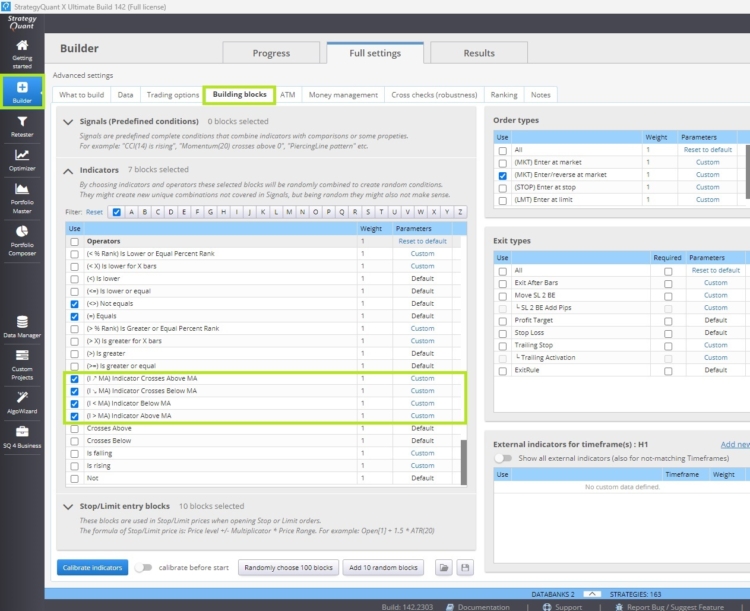
In the StrategyQuant X Builder in the section Operators you can easily enable and configure these blocks:
2. StrategyQuant AlgoWizard with Custom Blocks
Custom blocks in StrategyQuant X allow you to build personalized trading conditions without writing code. By integrating these comparison blocks as custom blocks, you can:
- Build Custom Conditions: Seamlessly combine static and dynamic comparisons to create sophisticated, tailor-made trading conditions based on your own ideas.
- Parameterize Key Metrics: Easily set indicator periods, moving average types (Simple, Exponential, Weighted, or even Hull ), and other essential parameters.
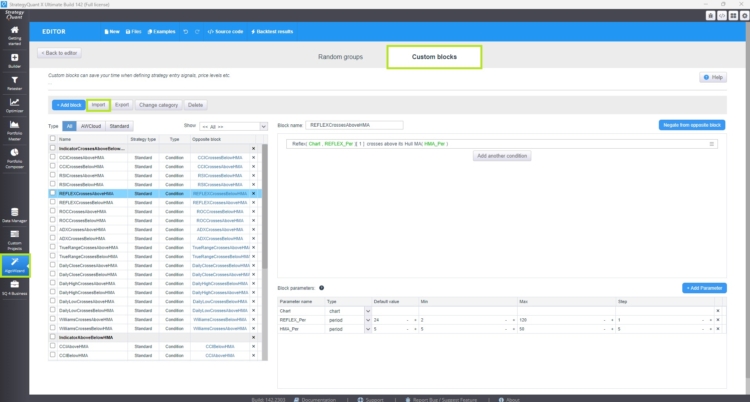
These blocks are perfect for use as custom blocks or in AlgoWizard. Their flexible configuration means you can develop advanced strategy templates that meet your specific needs. I have created 40 custom blocks for you, all available for download directly from our codebase. You can import them by following the green marks as seeen in the picture. ( Algowizard/Custom Blocks/ Import )
If you import custom blocks, please note that they function as conditions within the StrategyQuant Builder. Enabling these conditions later significantly reduces the search space for your strategy. After successful creation or import, you can enable them in Builder/Settings/BuildingBlocks/Signals.
3. Strategy Templates
For those looking to push the envelope, combining custom blocks with random groups lets you create prototype strategies that guide SQX to search for particular strategy types while maintaining adaptiveness. This advanced topic will be covered in greater detail in one of an upcoming article. For now, download our pre-configured custom blocks and import them by following the provided steps, and start enhancing your strategies with these powerful new tools.
Conclusion and Summary
In conclusion, the new comparison blocks in StrategyQuant 142 make indicator smoothing straightforward. They let you apply any moving average—Simple, Exponential, Weighted, or Hull—to convert noisy signals into clear trends. Whether you’re using static comparisons for a current snapshot or dynamic ones to capture market transitions, these blocks integrate seamlessly into your workflow via the Builder or AlgoWizard. With 40 pre-configured custom blocks available in our codebase, you can reduce your strategy’s search space and build more refined trading systems. Stay tuned for future articles on advanced strategy templates.




 英語
英語 スペイン語
スペイン語 ポルトガル語
 フランス語
フランス語 イタリア語
イタリア語 ドイツ語
ドイツ語