


 英語
 スペイン語
 ポルトガル語
 フランス語
 イタリア語
 ドイツ語
制限注文を使用したSQ戦略では、6Eおよび6J先物取引は行われない
5件の返信

SQ strategies using limit orders don’t trade 6E and 6J futures in Market Replay and real trading with Ninjatrader. The issue is caused by tick size of these instruments: 0.00005. If tick size is changed to 0.0001 SQ strategies trade normally. I reported this issue a month ago and so far it has been ignored. 6E and 6J are very popular currency future instruments. Not being able to trade them because of Strategy Quant bug is serious issue that needs to be addressed.
0

I’m a Ninjatrader user as well.
Do you have the SQ Data Symbol definition for 6E specifying Pip/Tick Step & Size as 0.0001 ?
I’ve attached what I use.
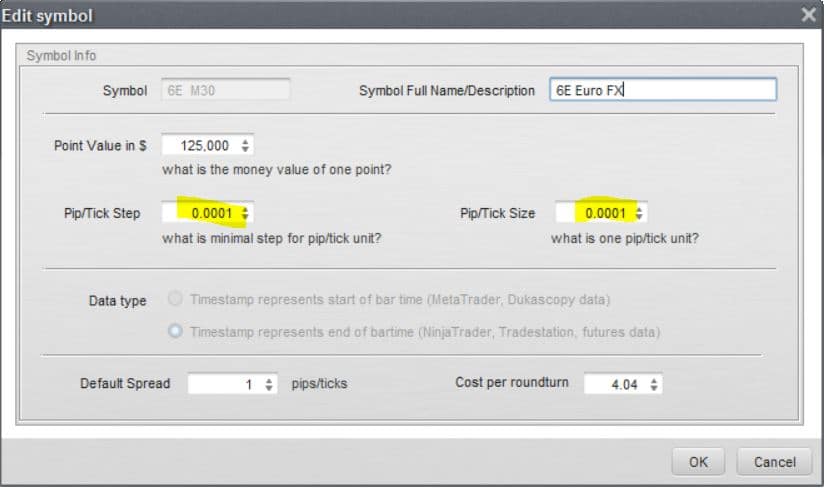 SQ 6E DEF.JPG
0
6E tick and step size is set to 0.00005. This doesn’t affect Ninjatrader behavior. SQ generated strategy (using 0.0001 or 0.00005 tick/step size) will not trade instruments with 0.00005 tick size when using limit orders. It looks like a bug in the limit order management.
0
Based on Market Replay tests the following futures can not be traded with StrategyQuant generated strategies due to the bug with limit orders: ZN, ZC, 6E, 6J
0

こんにちは,
string str = Instrument.MasterInstrument.TickSize.ToString(System.Globalization.CultureInfo.InvariantCulture).TrimEnd('0');
string str = Instrument.MasterInstrument.TickSize.ToString("##.#").TrimEnd('0');
0
Thanks for the fix but my .cs code does not contain “string str =” I inserted the line as shown below but this didn’t solve the issue.
protected override void Initialize()
{
string str = Instrument.MasterInstrument.TickSize.ToString(“##.#”).TrimEnd(‘0’);
base.Initialize();
ReplacePendingOrders = 本当;
ExitOnClose = 本当;
MinimumPTSL = 6;
MaximumPTSL = 120;
PendingOrderValidOneBar = false;
BarsRequired = 120;
StrictStopPrices = 本当;
LimitSignalsToRange = false;
TimeRangeFrom = 0700;
TimeRangeTo = 0400;
MaxTradesPerDay = 50; // 0 means 無制限
}
0
5件の返信を表示中 - 1 - 5件目 (全5件中)