


 英語
 スペイン語
 ポルトガル語
 フランス語
 イタリア語
 ドイツ語
ドキュメント
アプリケーション
最終更新日:2022年6月21日(マーク・フリック)
相関関係によるフィルター – プラグインの例
ページのコンテンツ
ノート
- この例とそれが要求する機能は、SQ Build 136 Dev 2以降のみに追加されます。
- 説明されている機能は「上級者」および専用のユーザー向けのみです。完全に文書化されているわけではなく、これがこの可能性を示す最初の例です。.
注記2:SQXビルド140以降用のアップデート版があります。. ユーザーインターフェースにプラグインが表示されない問題が発生した場合は、SQ Xのインストールフォルダ内の「internal\electron\resources\userData」フォルダにあるキャッシュを削除し、SQ Xを再起動してください。.
インストール手順:
- ファイルをSQ Xのインストールフォルダ/user/extend/pluginsに解凍してください
- SQ Xを再起動
これは独自のプラグインでSQXの機能を拡張する方法の一例です。.
StrategyQuant Xはプラグインベースのシステムとして構築されており、プログラムのあらゆる部分がプラグインとなっています。しかし、SQXを独自のプラグインで拡張することは、これまで(Build 136 Dev 2)は不可能でした。これは、完全なソースコードへのアクセスが必要であったにもかかわらず、プラグインをコンパイルする方法がなかったためです。.
SQX UIは、基本的にはAngularJSで書かれたウェブアプリケーションであり、バックエンドはJavaサーブレットです。.
この例では、簡単なUIを含むシンプルなプラグインの作成方法を段階的に説明します。.
プラグインの完全版は、この記事に添付されているZIPファイルとしても入手できます。.
このプラグインは、相関によって戦略をフィルタリングする機能を実装します。その動作は以下の通りです:
- プラグインによって新しいボタンが追加されます 相関でフィルター データバンクへ
- ボタンをクリックするとポップアップダイアログが表示され、そこでユーザーは許容される最大相関を設定します。
- 確認されると、プラグインはバックエンドのメソッドを呼び出し、実際のデータベース内のすべての戦略を確認し、このデータベース内の他の戦略との相関関係が最大相関(Max correlation)よりも高いものを除外(削除)します。
クレジット – このプラグインは以下のコードに基づいています: AgentPot Discord上の私たちのコミュニティの一部として ライブコーディングセッション, 、そのコードは彼の同意のもとで使用されている。.
ユーザープラグインの場所
ユーザー開発のプラグインは次のフォルダーに配置する必要があります {SQ installation}/user/extend/Plugins. このプラグインのZIPファイルをダウンロードし、このフォルダーに展開しても構いません。.
CodeEditorを開くと、そこにこのプラグインのフォルダが表示されるはずです:
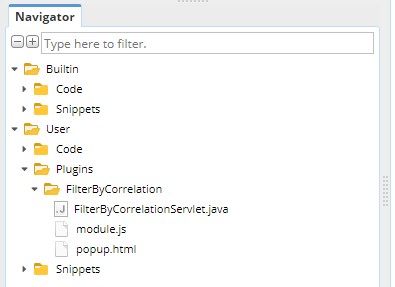
このプラグインは3つのファイルで構成されています:
- FilterByCorrelationServlet.java 相関関係によるフィルタリング戦略の実装機能を提供するJavaファイル.
- module.js – Angularにおけるモジュールの定義を含むJavaScriptファイル
- popup.html – この新しいプラグインのUIを含むHTMLファイル
一番簡単なものから、1つずつ確認していきましょう。.
プラグインのUI定義 – popup.html
プラグインUIはファイルで定義されています popup.html. それはモーダルウィンドウに表示される標準的なHTMLファイルです。.
ウィンドウを装飾するためのDIVがあり、実際の「フォーム」はDIVのmodal-bodyの中に定義されています。
<!-- Modal window-->
<div class="modal centered" id="filterByCorrelationButtonModal" tabindex="-1" role="dialog" aria-labelledby="myModalLabel">
    <div class="modal-dialog" role="document">
        <div class="modal-content">
            <div class="modal-header">
                <h4 class="modal-title" id="myModalLabel" tsq>相関でフィルター</h4>
            </div>
            <div class="modal-body" style="height: auto;">
                機能:Maxより大きい相関を持つすべての戦略が現在のデータバンクから削除されます。.
                <label tsq>フィルター設定</label>
                <div class="row">
                    <div class="col-sm-12">
                        <div class="col-sm-6">
                            <label class="sqn-label" tsq>相関期間:</label>
                        </div>
                        <div class="col-sm-6">
                            <select id="fbc-correlation-period" class="setting-control">
                                <option value="5" tsq>時間</option>
                                <option value="10" selected tsq>日</option>
                                <option value="20" tsq>週</option>
                                <option value="30" tsq>月</option>
                            </select>
                        </div>
                    </div>
                </div>
                <div class="row">
                    <div class="col-sm-12">
                        <div class="col-sm-6">
                            <label class="sqn-label" tsq>最大相関:</label>
                        </div>
                        <div class="col-sm-6">
                            <div class="sqn-spinner setting-control">
                                <input type="text" class="sqn-input" id="fbc-max-correlation" min="0" max="1" step="0.01" value="0.5" />
                                <div class="sqn-spinner-btns">
                                    <div class="sqn-spinner-minus" onclick="sqnSpinnerMinus(this)"></div>
                                    <div class="sqn-spinner-plus" onclick="sqnSpinnerPlus(this)"></div>
                                </div>
                            </div>
                        </div>
                    </div>
                </div>
            </div>
            <div class="modal-footer">
                <a data-dismiss="modal" tsq>閉じる</a>
                <button type="button" class="btn btn-primary" onclick="onFilter()" tsq>フィルター</button>
            </div>
        </div>
    </div>
</div>

<style>
    #filterByCorrelationButtonModal .setting-control {
        width: 100px;
    }
</style>

<script>
    function onFilter(){
        let period = document.getElementById("fbc-correlation-period").value;
        let maxCorrelation = document.getElementById("fbc-max-correlation").value;

        const urlParams = new URLSearchParams({
            projectName: window.parent.filterByCorrelationData.projectName,
            databankName: window.parent.filterByCorrelationData.databankName,
            period,
            maxCorrelation
        });

        CustomPluginController.sendRequest("filterByCorrelation/filter?" + urlParams.toString(), "GET", null, function(response){
            let responseJSON = JSON.parse(response);
            console.error(responseJSON);
            if(responseJSON.error){
                alert(responseJSON.error);
            }
            else {
                alert(responseJSON.success);
                window.parent.hidePopup("#filterByCorrelationButtonModal");
            }
        });
    }
</script>
ここで重要なのはidです filterByCorrelationButtonModal それは最初の行で使用されています。このポップアップはmodule.js内のJavaScript関数でこのIDによって参照されるため、重要です。.
独自のプラグインを開発する際は、ポップアップ固有のIDを作成し、そのIDを使用する必要があります module.js – 後で参照.
もう一つの特徴は、〜を使用していることです。 onClick() フォームの送信をキャッチするJavaScriptイベントを使用し、シンプルなJSを使って設定された値を取得します。.
それらはその後、特別な方法を使用してバックエンドに送信されます。 CustomPluginController.sendRequest() 〜へリクエストを送信する /filterByCorrelation/filter フォームからパラメーターを渡し、その戻り値がアラートで表示される場所。.
module.jsでのプラグインの定義
プラグインには特別なものが必要です module.js UIに正しく認識され、組み込まれるようにファイルを処理します。.
これはJavaScriptのAngularコードですが、Angularの詳細な知識は必要ありません。独自のプラグインを実装する場合は、このサンプルプラグインを使用して、コピー&ペーストして修正するだけです。.
module.jsのコード全体は以下の通りです:
angular.module('app.resultsdatabankactions.filterByCorrelation', ['sqplugin']).config(function(sqPluginProvider, $controllerProvider) {

    function callback(projectName, taskName, databankName, selectedStrategies){
        window.parent.filterByCorrelationData = {
            projectName,
            taskName,
            databankName
        };
        window.parent.showPopup("#filterByCorrelationButtonModal");
    }

    let buttonController = new CustomPluginController('app.resultsdatabankactions.filterByCorrelation', $controllerProvider, callback).init();

    sqPluginProvider.plugin("ResultsDatabankAction", 100, {
        title: Ltsq("Tools:Filter by correlation"),
        class: 'btn btn-normal btn-default',
        controller: buttonController,
        id: "databank-action-filterbycorrelation"
    });

    sqPluginProvider.addPopupWindow("plugins/FilterByCorrelation/popup.html", null, 'SQUANT');

});
コードを部分ごとに見ていきましょう。.
最初の部分は、新しいプラグインをAngularモジュールとして登録することです:
angular.module('app.resultsdatabankactions.filterByCorrelation', ['sqplugin']).config(function(sqPluginProvider, $controllerProvider) {
通常、次のような一意の名前を付けるだけで十分です: app.resultsdatabankactions.filterByCorrelation.
弊社内では、規約として app.resultsdatabankaction.YourUniqueName を使用しています。
2番目の部分は、ポップアップダイアログを表示するボタンコントローラーとコールバックを作成することです。.
function callback(projectName, taskName, databankName, selectedStrategies){
    window.parent.filterByCorrelationData = {
        projectName,
        taskName,
        databankName
    };
    window.parent.showPopup("#filterByCorrelationButtonModal");
}

let buttonController = new CustomPluginController('app.resultsdatabankactions.filterByCorrelation', $controllerProvider, callback).init();
ここで重要なのはメソッドを呼び出すことです window.parent.showPopup() popup.html内で以前に定義されたポップアップの一意のIDを指定します。名前が示すように、これを呼び出すとポップアップとフォームが表示されます。,
そしてボタンコントローラーがボタンをクリックした時にそれを呼び出します。.
3番目のパートでは、このプラグインを登録し、どこに表示されるかを定義します。
sqPluginProvider.plugin("ResultsDatabankAction", 100, {
    title: Ltsq("相関によるフィルタリング"),
    class: 'btn btn-normal btn-default',
    controller: buttonController,
    id: "databank-action-filterbycorrelation"
});
ここでは〜につながっていると言います ResultsDatabankAction 拡張ポイント。これはデータバンク内にボタンとして表示されることを意味します。.
ここで興味深いのはタイトルです。もしそれを別々のボタンとして表示させず、既存の項目の別のアイテムとして表示させたい場合 ツール button, you can simply use title:
タイトル:Ltsq("Tools:Filter by correlation"),
ボタンコントローラーを定義し、それを私たちの ボタンコントローラー 以前に定義された.
最後の部分は、popup.html が確実に読み込まれ UI の一部となるように、SQX プラグインシステムに UI ファイルを登録することです。.
sqPluginProvider.addPopupWindow("plugins/FilterByCorrelation/popup.html", null, 'SQUANT');
バックエンドの実装 – FilterByCorrelationServlet.java
UIができたので、今度はバックエンドに必要な機能を実装する必要があります。.
バックエンドは、フロントエンド(UI)からのHTTPリクエストを処理して必要な機能を実行するHTTPサーブレットとして作成されています。覚えているかもしれませんが、このリクエストはpopup.htmlファイルで定義されており、特別なメソッドを使用しています。 CustomPluginController.sendRequest() 〜へリクエストを送信する /filterByCorrelation/filter.
したがって、このリクエストを処理し、目的の処理を行うサーブレットを実装する必要があります。.
サーブレットは実装しなければならない IServletPlugin インターフェース。ここでの重要なメソッドは getHandler(), バックエンドがリクエストを受信したときに呼び出される /filterByCorrelation/.
その後、リクエストは当社の 相関関係によるフィルター 機能を実装するインナークラス.
したがって、スニペットの中でリクエストを処理し、それにハンドラーを割り当てる部分は次のとおりです:
@PluginImplementation
public class FilterByCorrelationServlet implements IServletPlugin {

    private static final Logger Log = LoggerFactory.getLogger(FilterByCorrelationServlet.class);
    private ServletContextHandler connectionContext;

    //------------------------------------------------------------------------
    //------------------------------------------------------------------------
    //------------------------------------------------------------------------

    @Override
    public String getProduct() {
        return SQConst.CODE_SQ;
    }

    //------------------------------------------------------------------------

    @Override
    public int getPreferredPosition() {
        return 0;
    }

    //------------------------------------------------------------------------

    @Override
    public void initPlugin() throws Exception {
    }

    //------------------------------------------------------------------------

    @Override
    public Handler getHandler() {
        if(connectionContext == null){
            connectionContext = new ServletContextHandler(ServletContextHandler.SESSIONS);
            connectionContext.setContextPath("/filterByCorrelation/");
            connectionContext.addServlet(new ServletHolder(new FilterByCorrelation()),"/*");
        }
        return connectionContext;
    }
FilterByCorrelation内部クラス
これはリクエストを処理するクラスです /filterByCorrelation/filter UIから.
このクラスの最初の部分では、どのコマンドが正確に呼び出されたかをチェックします。私たちのケースでは、存在するものはただ一つです フィルター コマンド.
class FilterByCorrelation extends HttpJSONServlet {
    @Override
    protected String execute(String command, Map<String, String[]> args, String method){
        switch(command) {
            case "filter": return onFilter(args);
            default:
                return apiErrorJSON("Execution failed. Unknown command '"+command+"'.", null);
        }
    }

    //------------------------------------------------------------------------

    private String onFilter(Map<String, String[]> args) {
        JSONObject response = new JSONObject();
        try {
            String projectName = tryGetParam(args, "projectName")[0];
            String databankName = tryGetParam(args, "databankName")[0];
            int period = Integer.parseInt(tryGetParam(args, "period")[0]);
            double maxCorrelation = Double.parseDouble(tryGetParam(args, "maxCorrelation")[0]);

            int removedCount = filterByCorrelation(projectName, databankName, period, maxCorrelation);

            response.put("success", "Strategies filtered, "+removedCount+" strategies removed.");
            return response.toString();
        }
        catch(Exception e){
            Log.error("Error while filtering strategies by correlation", e);
            response.put("error", "Filtering failed - " + e.getMessage());
            return response.toString();
        }
    }
このコマンドを受信すると実行されます onFilter() 次のメソッド:
- リクエストパラメータからプロジェクト名、データバンク名、期間、maxCorrelationなどのパラメータを取得する
- メソッドを呼び出して相関による実際のフィルタリングを実行します filterByCorrelation(projectName, databankName, period, maxCorrelation)
- その後、削除された戦略の実際の数、またはエラーの場合はエラーメッセージを含むメッセージが返送されます。.
filterByCorrelation() メソッド
このメソッドは実際のフィルタリングを実行します。実際のデータバンク内のすべての戦略を確認し、戦略間の相関を計算し、相関が maxCorrelation を超える戦略を削除します。.
相関の計算にはそれ単体で記事と例が必要です。コード内でどのように実装されているかを参考にしてください:
    private int filterByCorrelation(String projectName, String databankName, int period, double maxCorrelation) throws Exception {
        Log.info("Filtering by correlation (Project: " + projectName + ", databank: " + databankName + ")...");
        SQProject project = ProjectEngine.get(projectName);
        Databank databank = project.getDatabanks().get(databankName);
        int removedCount = 0;

        // Check for correlated strategies using fitness score as a ranking/priority list
        ArrayList<ResultsGroup> rgSortedCandidates = new ArrayList<>(databank.getRecords());

        rgSortedCandidates.sort((o1, o2) -> Double.valueOf(o1.getFitness()).compareTo(Double.valueOf(o2.getFitness())));

        ArrayList<ResultsGroup> rgSortedCandidatesRanked = new ArrayList();

        for(ResultsGroup rgSC : rgSortedCandidates) {
            rgSortedCandidatesRanked.add(0, rgSC);
        }

        ArrayList<ResultsGroup> rgUncorrelated = new ArrayList();
        // todo: multiple strategies could have the same fitness. this should be addressed using additional sorting (i.e. fitness > pf > ret/dd .. etc)

        while (rgSortedCandidatesRanked.size() > 0) {
            ResultsGroup focusStrat = rgSortedCandidatesRanked.get(0).clone();
            String focusStratName = focusStrat.getName();

            Log.info("Focus strategy to compare: {}", focusStratName);

            rgUncorrelated.add(focusStrat.clone()); // add the best strategy in the pool to the uncorrelated list as a starting point
            rgSortedCandidatesRanked.remove(0);

            Iterator<ResultsGroup> it = rgSortedCandidatesRanked.iterator();

            while(it.hasNext()) {
                ResultsGroup subStrat = it.next();

                String subStratName = subStrat.getName();

                if (subStratName != focusStratName) {
                    CorrelationPeriods corrPeriods = new CorrelationPeriods();

                    CorrelationType corrType = CorrelationTypes.getInstance().findClassByName("ProfitLoss");
                    CorrelationComputer correlationComputer = new CorrelationComputer();

                    // compute correlation periods
                    CorrelationPeriods correlationPeriods = precomputePeriodsAP(focusStrat, subStrat, period, corrType);
                    double corrValue = SQUtils.round2(correlationComputer.computeCorrelation(false, focusStratName, subStratName, focusStrat.orders(), subStrat.orders(), correlationPeriods, corrType));

                    Log.info(" - Correlation of '{}'' to focus strategy: {}", subStratName, corrValue);

                    if (corrValue > maxCorrelation) {
                        it.remove();
                        removedCount++;
                        Log.info("   - Removing strategy " + subStratName + " (correlation " + corrValue + " > " + maxCorrelation + ")...");
                        databank.remove(subStratName, true, true, true, true, true, null);
                    }
                } else {
                    it.remove();
                }
            }
        }

        return removedCount;
    }

    //------------------------------------------------------------------------

    private CorrelationPeriods precomputePeriodsAP(ResultsGroup paramResultsGroup1, ResultsGroup paramResultsGroup2, int paramInt, CorrelationType paramCorrelationType) throws Exception {
        CorrelationPeriods correlationPeriods = new CorrelationPeriods();
        TimePeriod timePeriod = CorrelationLib.getPeriod(paramResultsGroup1.orders());
        long l1 = timePeriod.from;
        long l2 = timePeriod.to;
        timePeriod = CorrelationLib.getPeriod(paramResultsGroup2.orders());
        if (timePeriod.from < l1) {
            l1 = timePeriod.from;
        }
        if (timePeriod.to > l2) {
            l2 = timePeriod.to;
        }

        TimePeriods timePeriods1 = CorrelationLib.generatePeriods(paramInt, l1, l2);
        TimePeriods timePeriods2 = timePeriods1.clone();

        paramCorrelationType.computePeriods(paramResultsGroup1.orders(), paramInt, timePeriods1);
        correlationPeriods.put(paramResultsGroup1.getName(), timePeriods1);

        paramCorrelationType.computePeriods(paramResultsGroup2.orders(), paramInt, timePeriods2);
        correlationPeriods.put(paramResultsGroup2.getName(), timePeriods2);

        return correlationPeriods;
    }
}
コードエディターでのプラグインの操作
SQX Build 136 Dev 2に、ユーザー定義のプラグインに対応する新機能を追加しました。.
添付されたプラグインを正しいフォルダに解凍した場合({SQのインストール先}/user/extend/Plugins コードエディターを開くと、新しいプラグインがある新しいPluginsセクションが表示されます。

通常どおりそこでファイルやフォルダーの作成や編集を行うことができます。新しい機能は、プラグインをコンパイルできるようになったことです。.
プラグインフォルダーを右クリックし、「プラグインのコンパイル」を選択します:
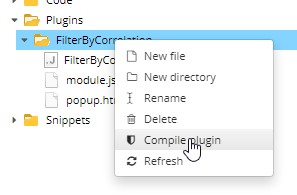
プラグインがコンパイルされ、新しいファイル「FilterByCorrelation.jar」がフォルダーに生成されます。.
ここで StrategyQuant を再起動すると、新しい「データバンク」ボタンが表示されるはずです:

それをクリックすると、以下に示すダイアログが開きます。
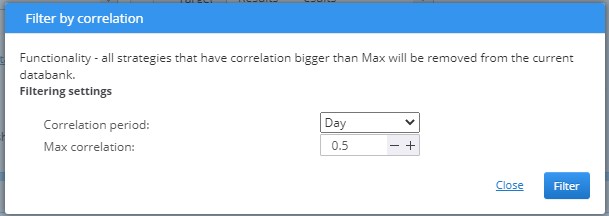
フィルタリング設定を行い、[フィルタ] ボタンをクリックします。データバンクに戦略がある場合、その一部が削除され、アラートが表示されることがあります:
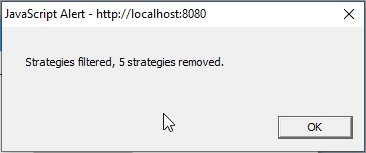
当社のプラグインは正常に動作しました。現在のデータバンク内のすべての戦略間の相関を計算・比較し、設定された最大相関を超える5つの戦略を削除しました。.
この記事は参考になりましたか? この記事は役に立った この記事は役に立たなかった
最高です!!!!!!!!!!!!!!!!!!!!!!!!!!!! この改善、本当にありがとうございます!!!
新しい展開への扉を開いている!!
プラグインの例を見るのはこれが初めてで、プラグインと相関関係がどのように機能するかを理解するのに本当に役立ちます。もっとプラグインの例が必要です。例があれば、私たちもプラグインを開発して共有することができます。この例をありがとうございます。
ストラテジーの相関関係に基づく重複排除は、素晴らしい機能です。言わざるを得ませんが、私はあまり優れた開発者ではないにもかかわらず、SQXの拡張性は印象的です。.
マーク、ありがとうございます。感謝します。.
同時に、この機能が「Custom Projects」で利用可能なタスクとして提供されることを期待しています。.
このプラグインをSQ 4.137 Dev2でテストしましたが、問題なく動作しています。満足しています。この機能は次回のSQのリリースに含まれるべきです。.
この「相関関係によるフィルター」がワークフロー内の新しいタスク(ブロック)として利用できるようになると非常に助かります。多くのことが自動化できるようになります。.
素晴らしいアイデアだ!!
Can you please modify the script Filter by correlation to work in version 140 ? There is a problem with the correlationComputer.computeCorrelation method. I tried, but my knowledge of Java is not enough. Thank you very much.
To fix for newer builds simply find the line double corrValue = SQUtils.round2(correlationComputer.computeCorrelation(false, focusStratName, subStratName, focusStrat.orders(), subStrat.orders(), correlationPeriods)); and add a new parameter ‘corrType’ at the end so the new line will be
double corrValue = SQUtils.round2(correlationComputer.computeCorrelation(false, focusStratName, subStratName, focusStrat.orders(), subStrat.orders(), correlationPeriods, corrType));
Now you should be able to compile the script without any problems
ありがとうございます 🙂
I tested this filter by correlation with SQX 140 release version. I installed this. I complied this and I restartet the SQX 140. The filter is available in the Userinterface. The .jar file was generated.
The if I click the button nothing happens. I selected strategies for calculation. In the last versions of SQX this filter works. But with SQX 140 this filter is not working. I tried the newest file here? No reaction of this filter. No error in the logfile
Ok, we will look into it and test soon
Hi,are there any possibilities to run Filter by correlation via Custom project?
I wanted to determine that the strategy should be filtered, for example, according to day max 0.7
You could use ‘Custom Analysis’ module to do this. See https://strategyquant.com/doc/strategyquant/custom-analysis/
Hello, I installed the plugin gor the second jar file and restarted SQX but a new isnt available after a restart. Can someone help.
Please, email us with the details about your SQX version and which zip file or sxp file did you use. The sxp file is for build 140.
can you make the download available again for older version 136, please?
Scroll down on our download page here https://strategyquant.com/download/ to get previous versions
is this compatible with V137? I tried to compile it but shows an error on line177 column 78