


 英語
 スペイン語
 ポルトガル語
 フランス語
 イタリア語
 ドイツ語
ドキュメント
アプリケーション
Last updated on 20. 11. 2021 by clonex / Ivan Hudec
株式移動平均シミュレーション
ページのコンテンツ
In this tutorial we will show you how to create and simulate equity curve control in What If Crosscheck .
What-If scenarios in StrategyQuantx is the tool that allows you to test various hypothesis of trading your strategy.
Equity control simulation function allows to simulate switching a strategy on and off based on the equity curve. The assumption is based on the hypothesis that is better to trade strategy if its performance is above its average. Good article dedicated to this topic is possible to read ここ.
Finished snippet you can download ここ.
Step 1 – Create new What if snippet
コードエディターを開き、「新規作成」をクリックして、取引リスト(List of trades)の列オプションを選択します- 名前を付けます EquityMATrading.
これにより、新しいスニペットが作成されます EquityMATrading.java フォルダ内 User/Snippets/SQ/Whatif
Step 2 – Define snippet parameters
Since we want to compute equity average, we need to include a parameter – MAPeriod that allows us to specify a period of the moving average.
@ClassConfig(name="() Equity MA Trading", display="Equity MA(#MAPeriod#) Trading ")
@Help("Help text")
public class EquityMATrading extends WhatIf {
    public static final Logger Log = LoggerFactory.getLogger(EquityMATrading.class);


    @Parameter(name="MAPeriod", defaultValue="10", minValue=2, maxValue=100000, step=1)
    public int MAPeriod;
Step 3 – Implement filter(OrdersList orders) method
The filter(注文リスト orders) method is used to filter the original list of orders in the strategy. 注文リスト 戦略のトレードのリストを格納し、そのトレードのリストを操作するメソッドを提供するクラスです。全体をループ処理することができます 注文リスト そして非常にデータを取得する 注文 メソッドを使用して 取得(int index).
Here you need to pay attention to how you loop trough the list of orders. In our example, we are using the classic for loop, so we can not manipulate the orders list during the loop.
Instead, we create a temporary 注文リスト ol where we store the trades that have met our conditions. We copy this orderslist at the end of the snippet into the main orderslist
Step 4 – Using Whatif snippet EquityMATrading
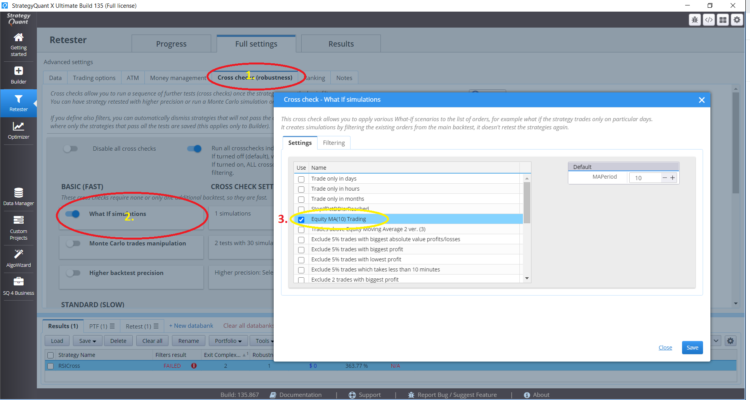
To add a snippet in Crosschecks you can use this snippet to simulate what would happen if you traded your strategy if its equity curve is above its moving average.
このコードスニペットのコメント付き完全版
package SQ.WhatIf;
import org.slf4j.Logger;
import org.slf4j.LoggerFactory;
import com.strategyquant.lib.SQTime;
import com.strategyquant.tradinglib.ClassConfig;
import com.strategyquant.tradinglib.Help;
import com.strategyquant.tradinglib.Order;
import com.strategyquant.tradinglib.OrdersList;
import com.strategyquant.tradinglib.Parameter;
import com.strategyquant.tradinglib.WhatIf;
import com.strategyquant.tradinglib.results.stats.comparator.OrderComparatorByOpenTime;
import it.unimi.dsi.fastutil.objects.ObjectListIterator;
@ClassConfig(name="() Equity MA Trading", display="Equity MA Trading (#MAPeriod#)")
@Help("Help text")
public class EquityMATrading extends WhatIf {
public static final Logger Log = LoggerFactory.getLogger(EquityMATrading.class);
@Parameter(name="MAPeriod", defaultValue="10", minValue=2, maxValue=100000, step=1)
public int MAPeriod;
@Override
public void filter(OrdersList orders) throws Exception {
// New instance of OrdersList in which we store trades that are above the moving average
OrdersList newOL = new OrdersList("AboveMovingAverage");
// We are looping trough whole OrdersList orders in order to compute Moving Average
for(int i = MAPeriod;i < orders.size();i++){
// Current last order we are deciding whether or not to go to newOL
Order order = orders.get(i);
// get balance of order
double balance = order.AccountBalance;
// filter balanced orders
if(order.isBalanceOrder()) continue;
double sum = 0;
// compute Moving Average of Equity
for(int k =1;k<=MAPeriod;k++){ /// robim ma , pricom zaratavam prvy orders.get(i-1) a posledny orders.get(i-MAPeriod) pri vyratavani MA
Order o = orders.get(i-k);
sum = sum + o.AccountBalance; // o.PL = order Profit/Loss
}
// average of equity
double avg = sum/MAPeriod;
// we are comparing get(i-1) with moving average
Order lastOrder = orders.get(i-1);
// if last order equity > average of equity
if(lastOrder.AccountBalance>avg) {
// we add order.get(i) to newOL
newOL.add(order);
}
avg =0; // reset average variable
sum =0; // reset sum variable
}
// sorting newOL by positions open time
newOL.sort(new OrderComparatorByOpenTime()); //// sorting orders by open time
// we are replacing OrdersList orders with OrdersList newOL and we recieve only trades above moving average
orders.replaceWithList(newOL);
}
}
この記事は参考になりましたか? この記事は役に立った この記事は役に立たなかった
very good 🙂