We have added several new indicators and snippets to the sharing server in recent months. In today’s blog post, we’ll briefly go through each of them. All indicators work only in StrategyQuant X Build 137 and higher. They may not work in earlier versions. At the time of writing, 137 Build Relase Candidate 4 is available for download ここ.
Casey C%
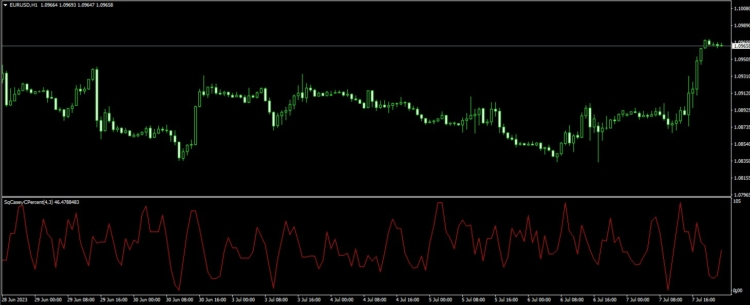
Casey C% is a momentum oscillator that measures the speed and change of price movements. It’s often used to identify overbought or oversold conditions in a market, which could signal a potential reversal in price, making it a useful tool for mean reversion strategies. It is used by traders to identify potential trading opportunities. The indicator was created by Ali Casey , our partner and SQX educator.
インジケーターには1本の線があります:
- Casey Percent
このインジケーターには以下のパラメータがあります
- Lookback – Oscillator calculation period
- SmoothLen – Averaging period
インジケーターは以下のプラットフォームに対応しています:MT4/MT5/Tradestation/ Multicharts。.
インジケーターと条件をダウンロードできます ここ.
Volume Weighted Average Price Bollinger Bands – VWAPBB
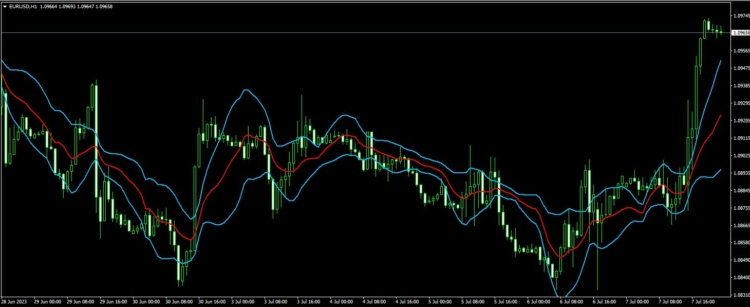
Volume Weighted Average Price (VWAP) Bollinger Bands is a technical analysis indicator that combines the concepts of Volume Weighted Average Price (VWAP) and Bollinger Bands to create dynamic support and resistance levels, or “bands”, around the VWAP line. This indicator helps traders to gauge the volatility and price action around the VWAP, providing additional insights for potential trade setups.
Volume Weighted Average Price (VWAP): VWAP is a indicator used by traders that gives the average price a security has traded at throughout the day, based on both volume and price. It is important because it provides traders with insight into both the trend and value of a security. VWAP is calculated by adding up the dollars traded for every transaction (price multiplied by the number of shares traded) and then dividing by the total shares traded for the day.Bollinger Bands: Bollinger Bands is a volatility indicator developed by John Bollinger that consists of three lines: a simple moving average (middle band) and two standard deviations above (upper band) and below (lower band) the moving average. The bands widen or narrow based on the volatility of the security’s price, with higher volatility leading to wider bands and lower volatility leading to narrower bands.
To create VWAP Bollinger Bands, you would first calculate the VWAP line and then apply the Bollinger Bands methodology using the VWAP as the middle line (instead of the simple moving average). This means calculating the standard deviation of the price based on a specific period and then adding or subtracting a multiple of the standard deviation (typically two) from the VWAP to form the upper and lower bands.
VWAP Bollinger Bands can be used in various ways, such as identifying potential entry and exit points, setting stop-loss and take-profit levels, and evaluating the strength of trends. They can also be used to determine whether the price is relatively high or low compared to the VWAP. Keep in mind, though, that like any technical indicator, VWAP Bollinger Bands should be used in conjunction with other tools and analysis techniques to improve trading decisions.
インジケーターには2本の線があります:
- VWAP Upper
- VWAP Lower
このインジケーターには以下のパラメータがあります
- VWAP Period – Lookback Period of VWAP
- 偏差– Multiplication of the STDEV from the VWAP
インジケーターの対応プラットフォーム:MT4 / MT5 / TradeStation / MultiCharts
インジケーターをダウンロードできます ここ.
Volume Weighted Average Price ATR Bands – VWAPAB
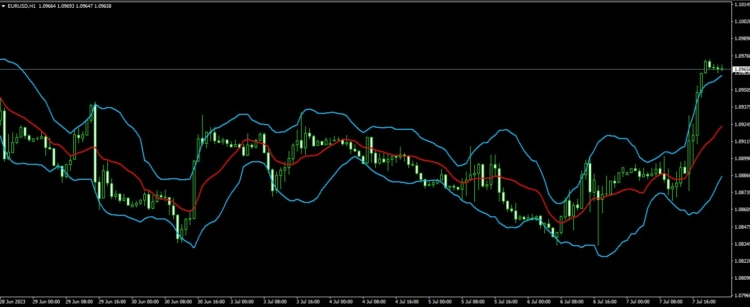
Volume Weighted Average Price (VWAPAB) ATR Bands is a technical analysis indicator that combines the concepts of Volume Weighted Average Price (VWAP) and Average True Range (ATR) to create dynamic support and resistance levels, or “bands”, around the VWAP line. This indicator helps traders to gauge the volatility and price action around the VWAP, providing additional insights for potential trade setups.
Volume Weighted Average Price (VWAP): VWAP is a trading indicator used by traders that gives the average price a security has traded at throughout the day, based on both volume and price. It is important because it provides traders with insight into both the trend and value of a security. VWAP is calculated by adding up the dollars traded for every transaction (price multiplied by the number of shares traded) and then dividing by the total shares traded for the day.
アベレージ・トゥルー・レンジ(ATR):ATRは、J・ウェルズ・ワイルダー・ジュニアによって開発されたボラティリティ指標であり、特定の期間における価格変動の度合いやボラティリティを測定します。ATRはトゥルー・レンジの平均を取ることで計算されます。トゥルー・レンジとは、「当日の高値と当日の安値の差」、「当日の高値と前日終値の差の絶対値」、「当日の安値と前日終値の差の絶対値」のうち、最も大きいものです。.
To create VWAP ATR Bands, you would first calculate the VWAP line and then add or subtract a multiple of the ATR from the VWAP. This multiple is typically a user-defined parameter that can be adjusted according to the desired sensitivity of the bands. The result is an upper and lower band that represents a range around the VWAP, which can be used to identify potential support and resistance levels or to gauge the strength of price moves relative to the VWAP.
VWAP ATR Bands can be used in various ways, such as identifying potential entry and exit points, setting stop-loss and take-profit levels, and evaluating the strength of trends. Keep in mind, though, that like any technical indicator, VWAP ATR Bands should be used in conjunction with other tools and analysis techniques to improve trading decisions.
インジケーターには2本の線があります:
- 上
- 下げる
このインジケーターには以下のパラメータがあります
- VWAP Period – Lookback Period of VWAP
- Multiplication – Multiplication of the ATR Bands ( Lower and Upper ) from the VWAP
インジケーターの対応プラットフォーム:MT4 / MT5 / TradeStation / MultiCharts
インジケーターをダウンロードできます ここ.
Hull Moving Average Bollinger Bands – HMABB
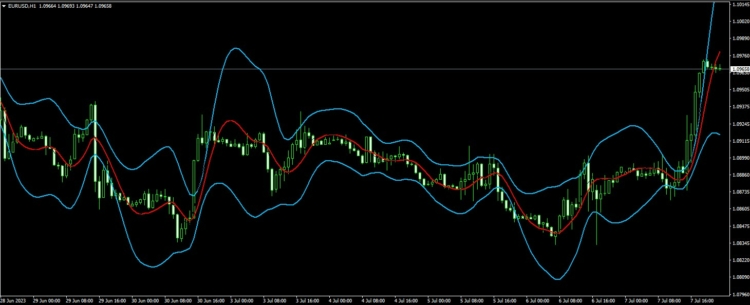
Hull Moving Average (HMA) Bollinger Bands is a technical analysis indicator that combines the concepts of Hull Moving Average (HMA) and Bollinger Bands to create dynamic support and resistance levels, or “bands,” around the HMA line. This indicator helps traders gauge the volatility and price action around the HMA, providing additional insights for potential trade setups.
ハル移動平均線(HMA):アラン・ハル(Alan Hull)によって開発されたハル移動平均線は、従来の移動平均線に比べて遅延を減らし、応答性を向上させるために設計された、高速かつ滑らかな移動平均線です。HMAは、中間点(期間の半分)の加重移動平均(WMA)を求め、そこから期間全体のWMAを引くことによって計算されます。次に、その結果に対して期間の平方根に基づくWMAを適用します。この計算により、遅延が軽減され、より応答性の高い移動平均線が得られます。.
Bollinger Bands: Bollinger Bands is a volatility indicator developed by John Bollinger that consists of three lines: a simple moving average (middle band) and two standard deviations above (upper band) and below (lower band) the moving average. The bands widen or narrow based on the volatility of the security’s price, with higher volatility leading to wider bands and lower volatility leading to narrower bands.
To create HMA Bollinger Bands, you would first calculate the HMA line and then apply the Bollinger Bands methodology using the HMA as the middle line (instead of the simple moving average). This means calculating the standard deviation of the price based on a specific period and then adding or subtracting a multiple of the standard deviation (typically two) from the HMA to form the upper and lower bands.
HMA Bollinger Bands can be used in various ways, such as identifying potential entry and exit points, setting stop-loss and take-profit levels, and evaluating the strength of trends. They can also be used to determine whether the price is relatively high or low compared to the HMA. Keep in mind, though, that like any technical indicator, HMA Bollinger Bands should be used in conjunction with other tools and analysis techniques to improve trading decisions.
インジケーターには2本の線があります:
- 上
- 下げる
The indicator has these parameters:
- ComputedFrom – Type of price series from which the HMA is calculated
- ピリオド – Lookback Period of HMA
- Deviation– Multiplication of the STDEV from the HMA
インジケーターの対応プラットフォーム:MT4 / MT5 / TradeStation / MultiCharts
インジケーターをダウンロードできます ここ.
Hull Moving Average ATR Bands – HMAATRB
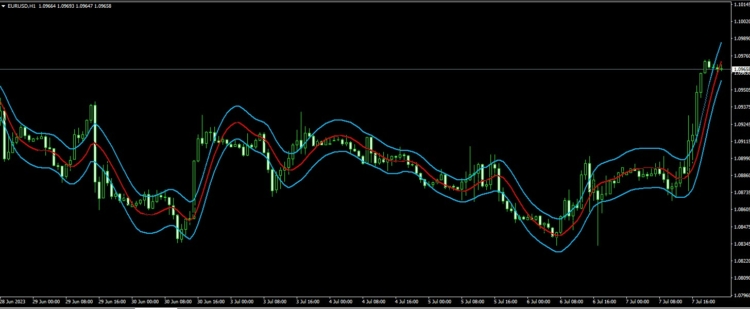
ハル移動平均線(HMA)ATRバンドは、ハル移動平均線(HMA)とアベレージ・トゥルー・レンジ(ATR)の概念を組み合わせたテクニカル分析指標であり、HMAラインの周囲に動的なサポートおよびレジスタンスレベル、すなわち「バンド」を形成します。この指標は、トレーダーがHMA周辺のボラティリティや価格変動を測るのに役立ち、潜在的なトレード・セットアップに関するさらなる洞察を提供します。.
ハル移動平均線(HMA):アラン・ハル(Alan Hull)によって開発されたハル移動平均線は、従来の移動平均線に比べて遅延を減らし、応答性を向上させるために設計された、高速かつ滑らかな移動平均線です。HMAは、中間点(期間の半分)の加重移動平均(WMA)を求め、そこから期間全体のWMAを引くことによって計算されます。次に、その結果に対して期間の平方根に基づくWMAを適用します。この計算により、遅延が軽減され、より応答性の高い移動平均線が得られます。.
アベレージ・トゥルー・レンジ(ATR):ATRは、J・ウェルズ・ワイルダー・ジュニアによって開発されたボラティリティ指標であり、特定の期間における価格変動の度合いやボラティリティを測定します。ATRはトゥルー・レンジの平均を取ることで計算されます。トゥルー・レンジとは、「当日の高値と当日の安値の差」、「当日の高値と前日終値の差の絶対値」、「当日の安値と前日終値の差の絶対値」のうち、最も大きいものです。.
HMA ATR Bandsを作成するには、まずHMAのラインを計算し、次にATRの倍数をHMAに加算または減算します。この倍数は通常、バンドの望ましい感度に応じて調整できるユーザー定義のパラメータです。その結果得られるアッパーバンドとローワーバンドは、HMAの周囲のレンジを表し、潜在的な支持線や抵抗線を特定したり、HMAに対する値動きの強さを測ったりするために使用できます。.
HMA ATR Bandsは、潜在的なエントリーポイントやエグジットポイントの特定、損切りおよび利食い水準の設定、トレンドの強さの評価など、さまざまな方法で使用できます。ただし、他のテクニカル指標と同様に、HMA ATR Bandsは取引の決定を改善するために他のツールや分析手法と組み合わせて使用すべきであることに留意してください。.
インジケーターには2本の線があります:
- 上
- 下げる
このインジケーターには以下のパラメータがあります
- ComputedFrom – Type of price series from which the HMA is calculated
- ピリオド – Lookback Period of HMA
- Multiplication – Multiplication of the ATR Bands ( Lower and Upper ) from the HMA
インジケーターの対応プラットフォーム:MT4 / MT5 / TradeStation / MultiCharts
インジケーターをダウンロードできます ここ.
パーセンタイルランク比較ブロック
In February we added new comparison blocks to the sharing server IsGreater Percentile/Is Lower Percentile. These comparison blocks allow you to create rules based on the percentile rank of a given indicator. The main advantage is the possibility to create normalized blocks from the indicators in Algowizard. We have devoted a whole blog post to these comparison blocks where their use is discussed in more detail. You read the whole post ここ.
You can download the comparison blocks ここ.
ATR Trailing Stops – ATS
The ATR Trailing Stops indicator is a combination of the ATR (Average True Range) and a trailing stop. The Average True Range is a volatility measurement that helps traders understand the average range of price movements over a specified period. By combining this information with a trailing stop, traders can dynamically adjust their stop loss levels based on market volatility. This can help them avoid getting stopped out too early due to minor market fluctuations while still protecting their profits. We have devoted a whole blog post to this indicator blocks whereit is discussed in more detail. You read the whole post ここ.
インジケーターをダウンロードできます ここ.
戦略の指標 サンプル外 / サンプル内 比率
The OOS/IS ratio expresses the degree of degradation of the strategy in the Out Of The Sample Period versus the IS Period. Strategy degradation refers to the decline in a trading strategy’s performance when it is applied to new, unseen data. This degradation often occurs when a strategy that has been optimized and fine-tuned on In-Sample (IS) data is tested on Out-of-Sample (OOS) data. The degradation can be a result of overfitting the strategy to the IS data or due to changing market conditions that the strategy is not able to adapt to.
Out-of-Sample (OOS) and In-Sample (IS) ratios are crucial concepts in the development, testing, and validation of trading strategies. These ratios help assess the robustness of strategies and ensure that they are not overfit to a specific data set. The following is an extensive explanation of OOS/IS ratios:
Purpose of OOS/IS Ratios: The primary goal of using OOS/IS ratios is to assess the robustness and generalizability of trading strategies. By evaluating the strategy’s performance on both IS and OOS data, users can identify potential overfitting and ensure that the strategy is not overly optimized for a specific data set. A strategy that performs well on both IS and OOS data is more likely to be resilient and adaptable to changing market conditions.
You can download databank columns snippets ここ
All indicators work only in StrategyQuant X Build 137 and higher. They may not work in earlier versions. At the time of writing, 137 Build Relase Candidate 4 is available for download ここ
We will add new conditions based on new indicators when StrategyQuantX 137 will be released.
You can easily do your conditions for new indicator in Custom blocks. More information you can find here:
SQXにカスタムインジケーターをインポートする方法:




 英語
英語 スペイン語
スペイン語 ポルトガル語
 フランス語
フランス語 イタリア語
イタリア語 ドイツ語
ドイツ語