


 Spanish
 Portuguese
 French
 Italian
 German
 Japanese
Documentation & User Guides
Learn the basics, or refine your skills with tutorials designed to inspire.
Last updated on 9. 9. 2025 by Kornel Mazur
Genetic Algorithm Options
Page contents
Settings → Genetic Options
The Genetic Options configuration tab becomes available only when Genetic Evolution is selected in Settings → What to Build → Build Mode. This section allows you to configure how genetic evolution algorithms are applied to evolve trading strategies over multiple generations.
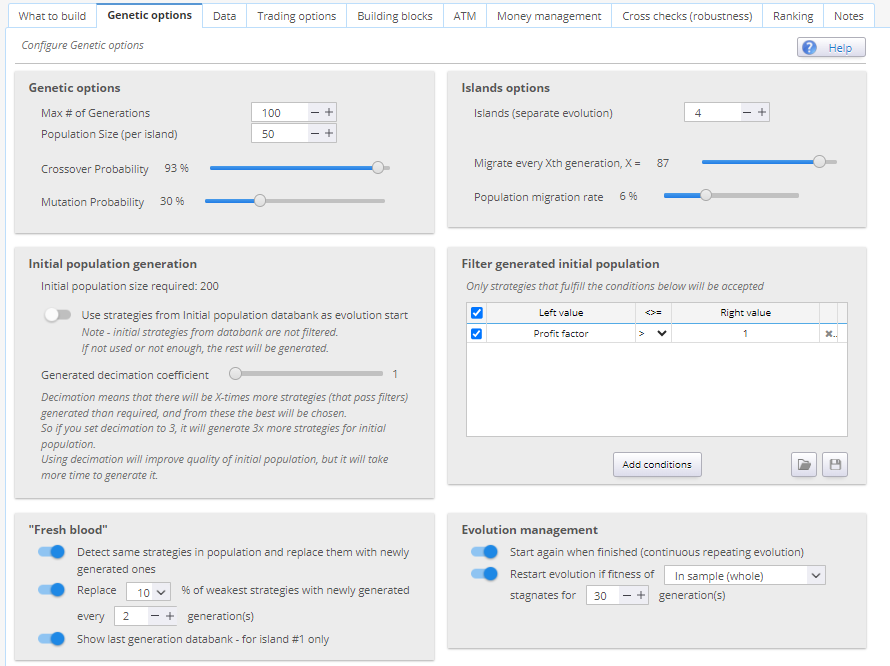
1. Genetic Evolution Configuration
Max # of Generations
- Defines how many generations the population will evolve.
- Recommended range: 5–100
- Note: Too many generations often yield diminishing returns. It's often more effective to restart evolution after stagnation.
Population Size
- Number of strategies per island.
- Recommended range: 10–100+
- If using multiple islands, total population = island count × population size.
Crossover and Mutation Probability
- Set the likelihood of genetic operations:
- Crossover: This value says how much parents (strategies from previous generation) are used to interfere with one another. With a high value more blocks are exchanged between those strategies to create candidates for a new generation
- Mutation: it is the likelihood of changing a strategy’s rule (block) to make a new strategy. With a low mutation setting, only minor changes are being made to strategies during the evolution process
- Higher mutation rates can help explore more diverse strategy solutions.
2. Island Options
Islands represent isolated sub-populations that evolve independently, enhancing diversity and exploration.
Islands
- Number of separate evolutionary sub-groups.
- Recommended range: 1–10
- More than 10 islands may slow progress due to excessive population size.
Migrate Every Xth Generation
- Frequency of strategy migration between islands.
- Recommended value: Every 10 generations
- Helps “unstick” populations trapped in local optima while preserving diversity.
Population Migration Rate
- Number or percentage of strategies to migrate.
- For small populations (e.g., size 10): use 10–20%
- For larger populations (e.g., size 100): use 1–5%
3. Initial Population Generation
Genetic evolution can begin from:
- A randomly generated population
- A user-defined set of strategies loaded from a databank
Use Strategies from Initial Population Databank
- Enable this option to load strategies from the Initial Population databank.
- If there are fewer strategies than needed, the remainder will be generated randomly.
- Note: These are not filtered using the Initial Population filter.
Generated Decimation Coefficient
- Controls oversampling of candidate strategies for initial selection.
- Example: Decimation = 3 means generating 3x more strategies than needed, then selecting the best.
- Improves initial quality but increases build time significantly.
Filter Generated Initial Population
- Optional filter to set minimum requirements (e.g., number of trades) for initial population strategies.
- Recommended to keep filters minimal to allow evolution to refine weaker strategies.
4. Evolution Management
Start Again When Finished
- Automatically restarts evolution after reaching the final generation.
- Suitable for long, unattended runs.
Restart Evolution Fitness If…
- Triggers a restart if no fitness improvement is detected across generations.
- Helps avoid wasted computation on stagnant populations.
5. Fresh Blood Mechanisms
Used to introduce new genetic material and maintain diversity.
Detect Same Strategies and Replace
- Detects duplicate strategies in each generation and replaces them with randomly generated ones.
Replace X% of the Weakest Strategies
- Periodically removes the lowest-performing strategies and replaces them with new ones.
- Promotes stronger candidates and avoids population stagnation.
6. Show Last Generation Databank
- Displays a special databank showing the current generation’s strategies.
- Available only for the first island.
Was this article helpful? The article was useful The article was not useful
Please login to comment
0 Comments
Oldest
Page contents