


 Spanish
 Portuguese
 French
 Italian
 German
 Japanese
Documentation & User Guides
Learn the basics, or refine your skills with tutorials designed to inspire.
Last updated on 23. 4. 2026 by Kornel Mazur
How to create a workflow
Page contents
Functions → Custom Projects → How to Create a Workflow in Custom Project
Creating a workflow in a Custom Project involves defining task sequences, setting data sources and targets, and optionally applying conditional logic.
Multiple Databanks
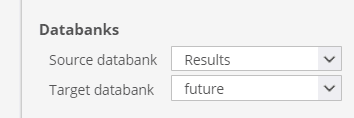
A Custom Project can include multiple databanks, which are used to store and process strategies at different stages of the workflow .
.
- Each task can specify a source databank (where to read from) and a target databank (where to save results).
- This allows complete isolation and control over each stage of the workflow.
Example: Use BuildDatabank to store initial builds and FinalDatabank for strategies that pass all checks.
Tasks Flow
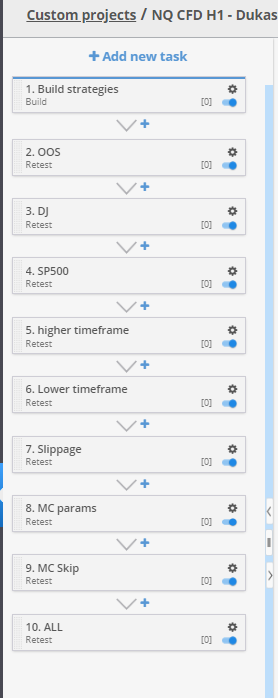
Each project contains a list of tasks, executed in the order they appear in the task panel.
- Example flow:
- Clear all databanks
- Build strategies
- Apply Retest with different precision
- Apply Monte Carlo robustness checks
- Save passing strategies to final databank
Tasks are visualized in a clear top-down sequence, providing full transparency and editability.
Conditional Loops and Filtering
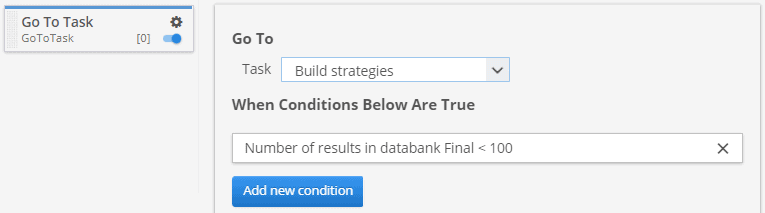
Custom Projects support conditional control structures, including:
- Looping logic using the Go To Task block
- Condition-based task routing
Example: Add a loop that re-starts the build task if fewer than 100 strategies have passed all stages.
Was this article helpful? The article was useful The article was not useful
Page contents