


 Spanish
 Portuguese
 French
 Italian
 German
 Japanese
Documentation & User Guides
Learn the basics, or refine your skills with tutorials designed to inspire.
Last updated on 23. 4. 2026 by Kornel Mazur
Strategy Correlation
Page contents
Results → Strategy Correlation
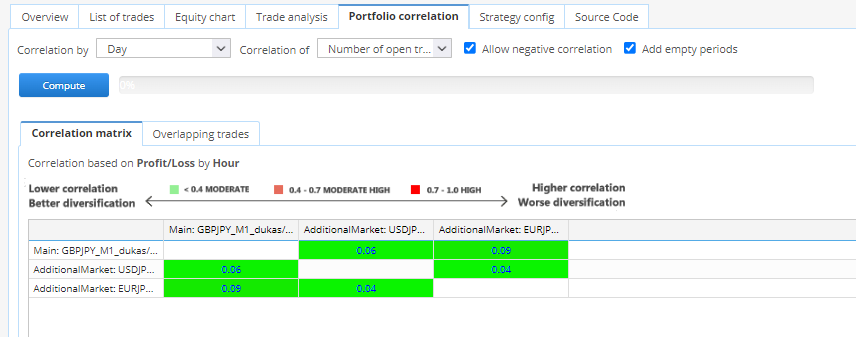
The Strategy Correlation tab appears only when multiple backtest results exist for the strategy, such as when:
- You merged multiple strategies into a portfolio via the Databank
- You used Backtest on Additional Markets to test across several symbols
Key Features
- Displays a correlation matrix between strategies
- Metrics are computed based on:
- Profit/Loss
- Trade count
You can choose the time granularity for correlation analysis:
- Hourly
- Daily
- Weekly
- Monthly
This analysis helps identify redundant or highly correlated strategies, supporting better portfolio diversification decisions.
Was this article helpful? The article was useful The article was not useful
Please login to comment
0 Comments
Oldest
Page contents