


 Spanish
 Portuguese
 French
 Italian
 German
 Japanese
Tracking Swing Points on Renko Charts
26 replies

ssdex
11 years ago #114367
Hello,
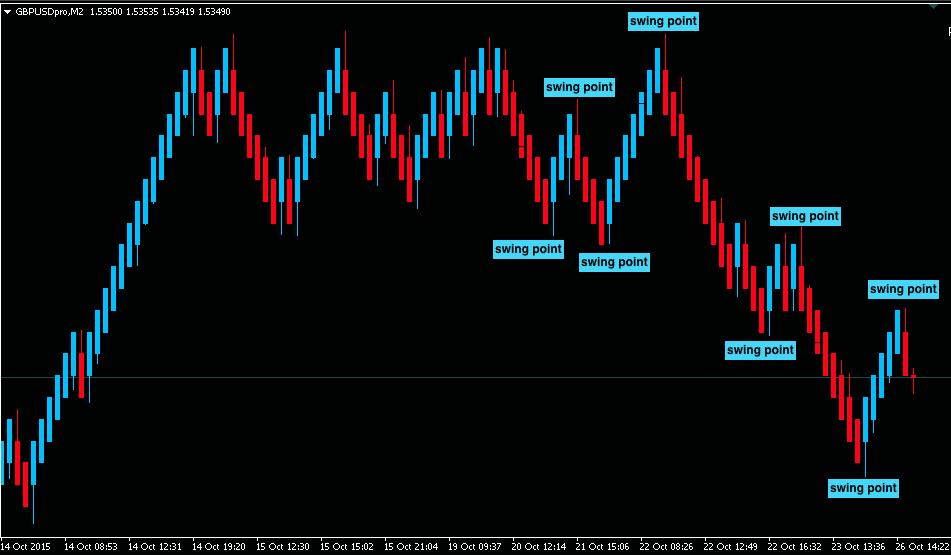
I was looking to track swing points on Renko Charts and I was hoping to get an idea of how to do this. I understand needing to use variables but where I’m stuck is how to start looking back to assign the variables.
Does anyone have any ideas? Take a look at the uploaded image. Thanks for any help with this.
Regards,
James
 Screen Shot 2015-10-26 at 2.25.19 PM.png
0
ssdex
10 years ago #134048
Thanks for the quick reply. I used variables for the amount of movement price moves (depending on the renko bar size) to get the swing highs and lows. Then the pattern of the candles won’t matter.
The arrows were just for me to see. But I was wondering if I could use a custom function for possibly displaying an arrow at the Highest High (10 bars) or Lowest Low (10 bars)? This could help with some other things I’m looking to implement into the Expert Advisor.
Thanks again. I’ve been learning a lot from all your help.
Regards,
James
0

Tomas Matejka
10 years ago #134065
Hi,
you would need custom functions like these to find the index of highest high or lowest low
int highestBarIndex(int period) {
   int val_index=iHighest(NULL,0,MODE_HIGH,period,1);
   return(val_index);
}

int lowestBarIndex(int period) {
   int val_index=iLowest(NULL,0,MODE_LOW,period,1);
   return(val_index);
}
Just add them into EA Wizard / code / CustomFunctions.mq4 file. Then you can use them in Wizard to draw arrow above/below correct candle as it is shown in example attached.
Is that what you meant?
0
ssdex
10 years ago #134069
Thanks Tomas262
I’ll take a look and copy the arrow code piece into the custom function in the EA Wizard. It should be just the right thing for the arrow placement. I’ll let you know how it goes.
Regards,
James
0
ssdex
10 years ago #134070
 Screen Shot 2015-11-29 at 10.03.47 PM.png
Quick question Tomas262
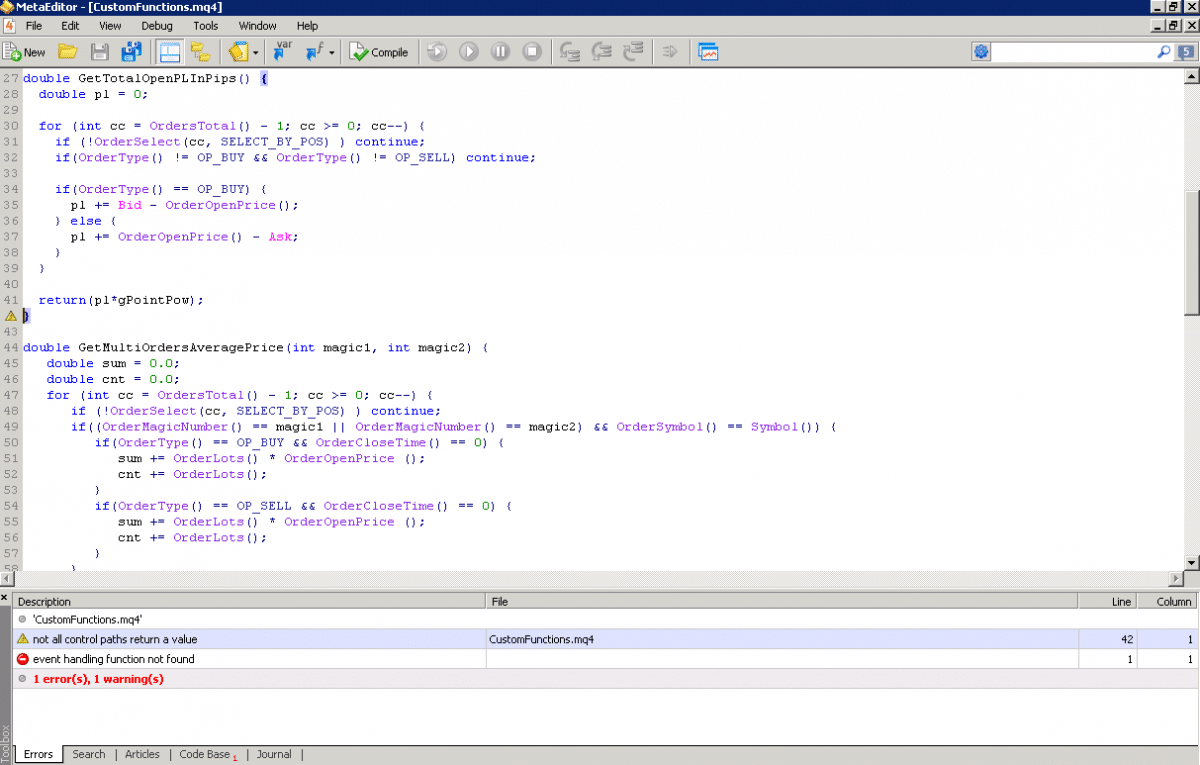
I added the to bits of code you posted above into the “CustomFunctions.mq4” and when I compiled it I got this error. Is this normal? Or did I miss understand what you said?
Thanks. I uploaded a screenshot.
Regards,
James
0
Tomas Matejka
10 years ago #134074
No need to compile this. It won’t work. It is just for Wizard to include in final code.
0
ssdex
10 years ago #134116
Thanks Tomas262!
0
ssdex
10 years ago #136729
Hey Tomas,
I’m back to swing points again. I was hoping you could shed some light on what I’m trying to do?
I want to find the Lowest Close of X number of bars (on renko chart). Finding the lowest low is easy but having a little bit of a problem figuring out how to get the lowest close.
Thanks for any input.
Regards,
James
0
Tomas Matejka
10 years ago #136733
Hi,
you need to add new function into EA Wizard
double getLowestClose(int period) {

   double lowest = Close[1];

   for (int i = 1; i <= period; i++) {
      if (Close[i + 1] < lowest) lowest = Close[i + 1];
   }

   return lowest;
}
and use as shown in the example
0
ssdex
10 years ago #136751
Thanks Tomas!
Quick question, I copied the code that you gave above and added also “getHighestClose”. Would I need to change anything but the words ‘lowest’ to ‘highest’?
Thanks again for everything!
Regards,
James
0
Tomas Matejka
10 years ago #136755
Not only ‘lowest’ to ‘highest’, also the comparison has to be switched
double getHighestClose(int period) {

   double highest = Close[1];

   for (int i = 1; i  highest) highest = Close[i + 1];
   }

   return highest;
}
0
ssdex
10 years ago #136761
Tomas,
Thank you for the direction and example. I have inputed the code and added a couple rules to see if I get the values I’m looking for. Thanks again for all you do.
Regards,
James
0