


 Spanish
 Portuguese
 French
 Italian
 German
 Japanese
Comma Use Still Unclear
19 replies

EAWIZARD
10 years ago #114549
Hello,
My question is regarding the use of bracket’s in a martingale type of EA , I have attached an example (.sqw) file below, of type of trading style. Basically, I would like each tab to preform it’s own trade, however it will not function as intended, the 2nd trade will take on the 1st trade, and the 2nd trade will attach itself to the 3rd trade. I would like each trade (tab) to trade with it’s own lot size. Any help will be gratefully appreciated.
0

Tomas Matejka
10 years ago #134560
Hi, I will check it and let you know
0
Tomas Matejka
10 years ago #134581
Hi, I have just tested what you attached in MetaTrader and it works as you described
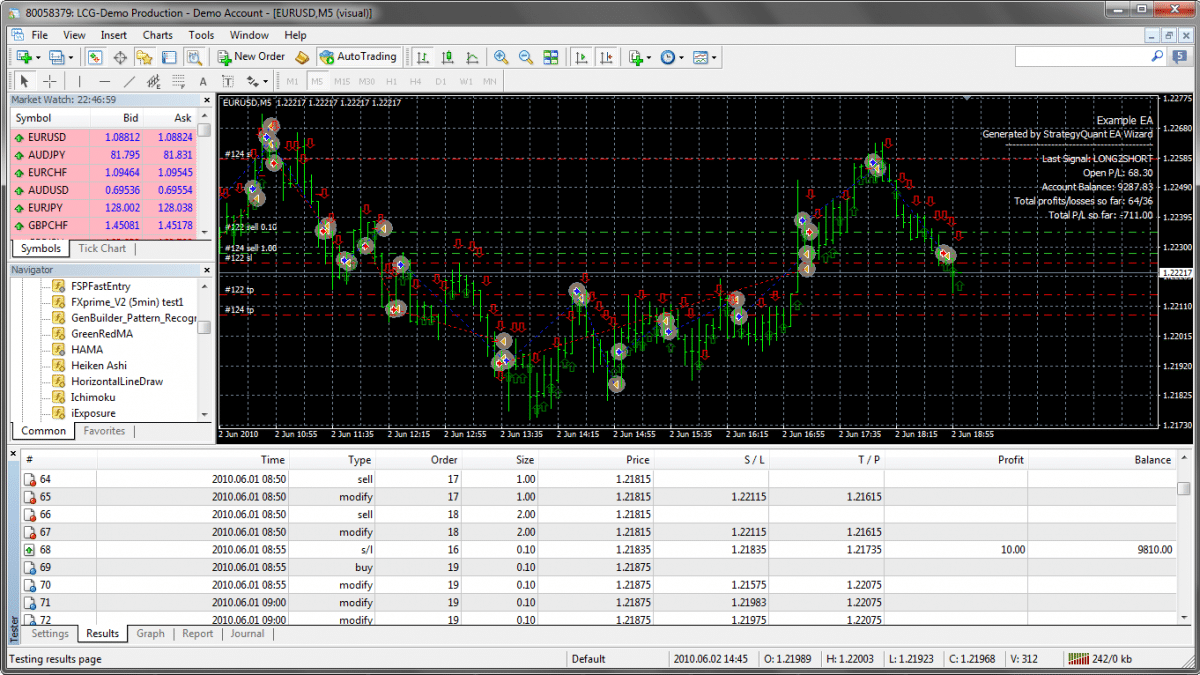 2016-01-13_23-47-03.png
0
EAWIZARD
10 years ago #134583
Hi Tomas, just to clarify, the example sqw file is just an example, showing you the correlation of trading tabs and lot sizes per trade tab. I wanted you to take a look at it, so you could show me how to use the brackets correctly. My issue is that my initial trade, will also trade on my recovery trade (the very next bar). The reason why my initial trade also trades on my recover trade is due to the parameters being identical to my recover trade. I would like each tab/trade to trade individually however I am unsure as how to setup how the brackets. Basically if one tab/trade is true, I do not want any other trades to take place during the opening of the bar. I hope this clears things up
0
Tomas Matejka
10 years ago #134595
Brackets won’t directly help you here. They are used only for more complex logic conditions within each tab. You need to specify rules in such way that will ensure that only one trade is executed. I will try to make a modification of your example to do this and post it here
0
EAWIZARD
10 years ago #134596
Awesome, I look forward to it, thanks Tomas
0
Tomas Matejka
10 years ago #134630
Hi, I have added a variable called tradePhase starting as int set to 0 which identifies which tab should be executed on next bar. With each rule the var is changed so EA always trades in correct order and executes only one tab at the same time
0
EAWIZARD
10 years ago #134631
Hi Tomas, thank you for the example that you have attached above. Just to clarify, under strategy parameters do I need to add variables tradePhase(int)1 and tradePhase(int)2, or will tradePhase(int)0 be sufficient?
0
Tomas Matejka
10 years ago #134648
One variable should be enough. You just change/set the value as trades progress in a correct manner
0
EAWIZARD
10 years ago #134652
Excellent, thank you for your help.
0
EAWIZARD
10 years ago #134795
Hello Tomas, unfortunately the example sqw is not performing as I would like. The first long/short tab executes a trade, however my 2nd and 3rd tabs do not execute their trades as set by the tradePhase and variable (the 2nd and 3rd tab parameters are correct and functioning). I trade on indicators that will remain the same for all 3 consecutive trades, hence I have a misunderstanding of the variable system and tradephase system. Please explain of how to allow these tabs; (long/short, long2short/short/long,recoverlong/recovershort) to trade. Thanks
0
Tomas Matejka
10 years ago #134800
Yes, in current setup, EA is prevented to take next trade if the first trade finished with profit. In this case the variable tradePhase is set to 1 but next condition won’t be valid and won’t take next trade since Closed P/L() > 0 instead of < 0
If you can describe your system’s logic better in few logic steps (if … then …) so I will be sure how it’s supposed to work I can modify it for you. Now I am not 100% sure
0
EAWIZARD
10 years ago #134808
The first trade was a loss (tradePhase=0), hence the follow up trade (tradePhase=1) should have placed a trade.
The follow up trade states: Closed P\L -10?
0
Tomas Matejka
10 years ago #134936
Yes, you have it set correctly with Closed PL. I think I understand what you need. I edited the Wizard file for that so it should trade correctly now
0
EAWIZARD
10 years ago #135057
Ok great, I’ll keep you posted.
0
EAWIZARD
10 years ago #135059
Hi Tomas, I just looked at the above .sqw file and the way the tradePhase’s are setup are exactly the same as the previous .sqw file, which is the problem. Hopefully I can explain it a little clearer, here goes; If you open up the example you will notice the first 2 tabs that are named LONG & SHORT that trade a lot_size of 0.1. Now, when a trade is triggered, either (long/short) will trade, which is working fine. Now, when either LONG/SHORT lose, the very next bar will trigger a SHORT2LONG or LONG2SHORT trade of a lot_size of 1, which is fine. The problem is when SHORT2LONG or LONG2SHORT is triggered with a lot_size of 1, the previous lot_size of 0.1 (LONG/SHORT) will also trigger on the second bar. I dont want long/short to trade it’s lot_size on the short2long/long2short bar.
0