


 Spanish
 Portuguese
 French
 Italian
 German
 Japanese
Testing in Time Frames Other than Data Source
8 replies

_Cujo
10 years ago #115002
Hi…I have 1 minute and tick data. I’m struggling to find 10 minute (or other compressions, but principally 10 minute) data.
I was speaking to the guys at NT, and they said their back test engine actually uses 1 minute data, and creates 10 minute data from it.
They wondered if there was a way to load 1 minute data to SQ, and have SQ run the test on 10 minute data (like the NT engine). I’ve not seen this option, and it appears like you have to actually load the data in the time compression, or am I wrong…? Can I load 1 minute (or tick), and have SQ figure out the time compression to run back tests on 10 minute?
I think not, but wanted to double check…(as it means I can stop scouring historical data sources for 10 minute data, and be happy with the 1 minute and tick data I have…)
0

Tomas Matejka
10 years ago #136377
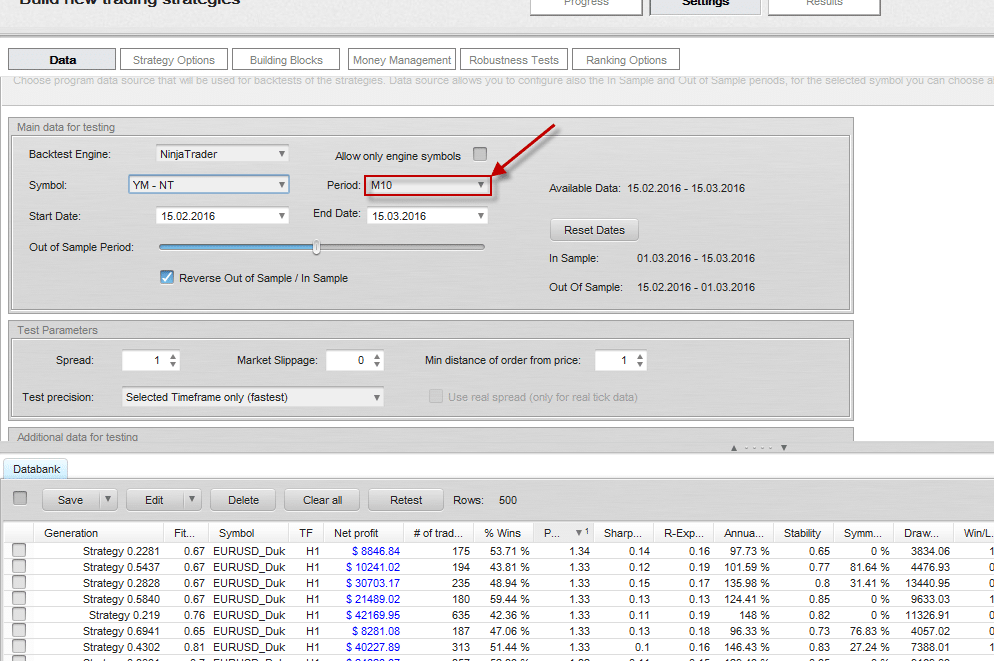
What you can do is to export 10 minute data and import them into SQ. I will be recognized as 10 minute bars. Bear in mind that NT data import only supports “Selected timeframe precision” for testing so you import the single one timeframe you will use for strategy development
 10minute.png
0
_Cujo
10 years ago #136381
Hi Tomas, yeah, it’s specifically “export 10 minute data” (or other time frames) from NT, that the NT guys are saying it can’t do. I had never seen it only – tick, minute, day exports, so I asked them. It’s on the feature request list (export in other compression). They asked me to confirm SQ can’t take a 1 minute import and backtest in different compressions, building the 10 minutes from that 1 minute. In NT, for example, it can important 1 minute, but back test in 10 minute compression, instead of 1 minute, so it can adjust the time compression itself.
…but, NT is really fine as a trading platform, but for strategy and backtesting, I’m preferring SQ.
So, sounds like SQ can only work with the compression that’s loaded? I had noted it’s a pain on symbol naming when loading differnt time (1 minute or tick or day) on a single symbol, like ES, seems not possible, it’s got to be something like “EStick” and “ESminute”.
It’s proving VERY hard to get 10 minute futures historical. Buying is not so hard, but buying fro somewhere reputable (like CME itself, tick data, etc… all comes in 1 minute, they don’t sell 10 minute), and I’m not going to but data from somewhere kind of garage, where I don’t know where it came from, so prefer to try and adjust/compress the data I have (which is from the exchange, so I know it’s fine).
0

mabi
10 years ago #136387
If i Understood correctly from reading other posts is that SQ4 engine have the capability to support this for ninjatrader. However i guess i can download 10 min bar data from my NT chart and import it to SQ. it works with 3,5,15,30,60,240,320 etc data. The only problem I had is with 120 min data were it seems SQ have a bug and cannot generate strategies on. I guess I could upload some data for free somewhere.
0
_Cujo
10 years ago #136405
..snip… i guess i can download 10 min bar data from my NT chart …snip…
This is the part I’m struggling with, how to export data from NT in time frames other than 1 tick, 1 minute or 1 day…
Alternatively, taking an export of 1 minute data from NT, and changing the time compression to 10 minutes (or whatever) for SQ testing.
0
_Cujo
10 years ago #136406
…wait, I think I have it.
I was exporting from NT’s native historical data down loader.
If I export from a chart, using the SQ data down loader script, per this thread and page 83 of the SQ manual, I can export different timeframes from a chart.
Seems a little clumsy exporting from a chart, instead of the data down loader, but whatever…
Who would have thought the manual would be useful, eheh. :blink:
0
mabi
10 years ago #136416
Well i never exported data from the historical downloader. If it build data frÃ¥n minutes charts as NT Said that (ofcourse it does) has to be supported by SQ4 and not downloading from a chart which is clever but kind of “old tech” and can be to much data for a chart to handle if using tick or even 1 minute.
0
Tomas Matejka
10 years ago #136435
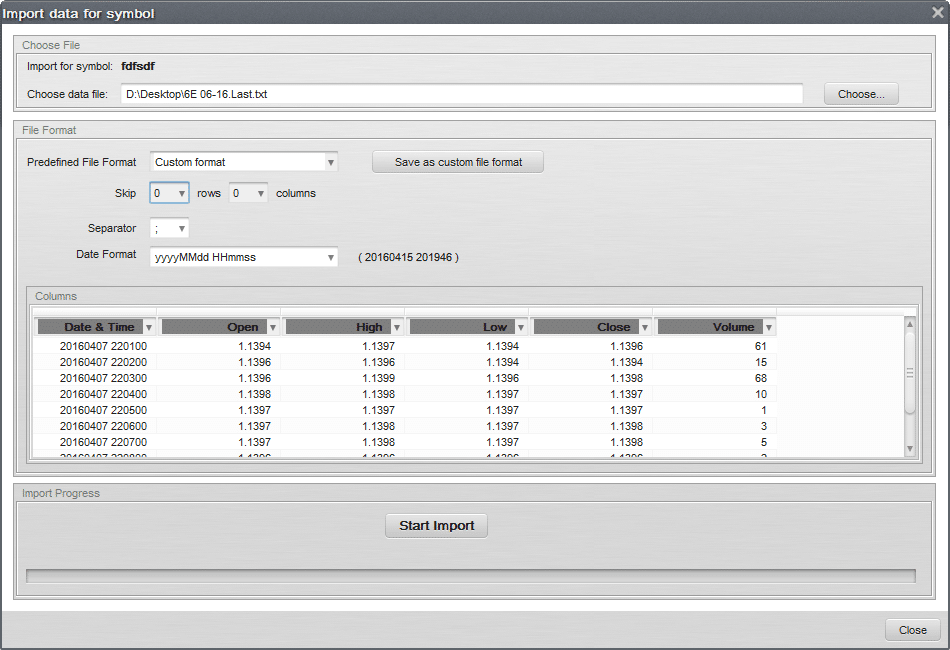
If you want to import data exported from Historical Data Manager it is possible but it works for 1 minute data and Daily data only or possibly for tick data (using MetaTrader engine then). Try settings shown on screenshot.
 NTdata.png
0
_Cujo
10 years ago #136494
Thanks both for the suggestions.
I got it to work. I was using the data exporter from NT8, but over the weekend I had more time so I went back to NT7, installed SQ Data Exporter from the graph data.
I noticed that there seems to be different backtesting results on the data from NT8 (historical exporter) vs NT7 (export from graph), so have replaced all the data loaded in SQ from source of NT8 to source of NT7. Not sure what is causing that. Using graph capture now also means I can use any time frame I want, as historical exporter only does tick, minute and day, not adjustable time compression (ie. no M60/H1, etc.).
Importing from NT7 is significantly easier NT8..
0
Viewing 8 replies - 1 through 8 (of 8 total)