


 Spanish
 Portuguese
 French
 Italian
 German
 Japanese
Source Code Translator
Page contents
What Is It?
The Source Code Translator is a Results Plugin for StrategyQuant X that lets you translate any strategy’s source code into 15 different trading platform languages — directly from the Results tab, in one click.
It is not intended to replace the high-precision translation of the existing Source Code Generator, but rather to complement it by adding support for additional trading platform languages.
Select a strategy in any Databank, choose your target platform, and the plugin uses the OpenAI API to generate a fully compilable translation, including:
- entry and exit rules,
- indicators,
- parameters,
- order management logic.
No more manually rewriting strategies when you want to run them on a different platform.
The translator performs the conversion instantly, and if something does not compile, the built-in Error Feedback & Fix system allows you to paste compiler error screenshots and receive a corrected version — all without leaving SQX.
Why You Need This
Platform Freedom
You discovered a great strategy in StrategyQuant X, but you trade on TradingView. Or NinjaTrader. Or cTrader. The Source Code Translator removes the lock-in — your strategies go wherever you go.
Instant Results
Traditional manual translation of a complex strategy can take hours or even days. The AI-powered translator produces a complete, compilable result in seconds, streamed in real time so you can watch the code appear line by line.
15 Target Platforms
The widest coverage of any SQX code translation tool:
- NinjaTrader 8 | NinjaScript (C#)
- TradingView | Pine Script v6
- MetaTrader 4 | MQL4
- MetaTrader 5 | MQL5
- TradeStation | EasyLanguage
- MultiCharts | PowerLanguage
- MultiCharts .NET | C#
- AmiBroker | AFL
- Python / backtrade | Python
- Python / Zipline | Python
- cTrader / cAlgo | C#
- JForex / Dukascopy | Java
- ThinkorSwim | ThinkScript
- WealthLab | C#
- ProRealTime | ProBuilder
Built-In Error Correction
Code translation is powerful, but no AI is perfect. The Source Code Translator includes a dedicated Error Feedback & Fix section where you can:
- Drop or paste compiler error screenshots directly into the plugin (drag & drop, Ctrl+V, or file browse)
- Describe the issue in plain text (“Line 42: undeclared variable OrderTicket — NinjaTrader uses a different order management pattern”)
- Click 🔧 Fix Code and the AI re-analyzes the translated code alongside your screenshots and feedback, then produces a corrected version
This iterative fix loop means you can go from SQX pseudo code to a working, compiled strategy on your target platform without ever leaving StrategyQuant X.
Choose Your AI Model
The plugin supports a full range of OpenAI models — from fast and economical options to the most capable reasoning models:
– GPT-4o / GPT-4o Mini — great balance of speed and quality
– GPT-4.1 / 4.1 Mini / 4.1 Nano — latest generation models
– GPT-4.5 Preview — enhanced reasoning
– GPT-5.4 / 5.4 Mini — most advanced translation quality
– o3-mini / o4-mini — reasoning-optimized models
You can also click ⟳ Refresh Models to dynamically fetch the latest available models from your OpenAI account.
Use Your Own API Key
The plugin uses your own OpenAI API key, stored securely in your browser’s local storage. You pay only for what you use — no subscriptions, no middlemen, no per-translation fees. A typical strategy translation costs fractions of a cent.
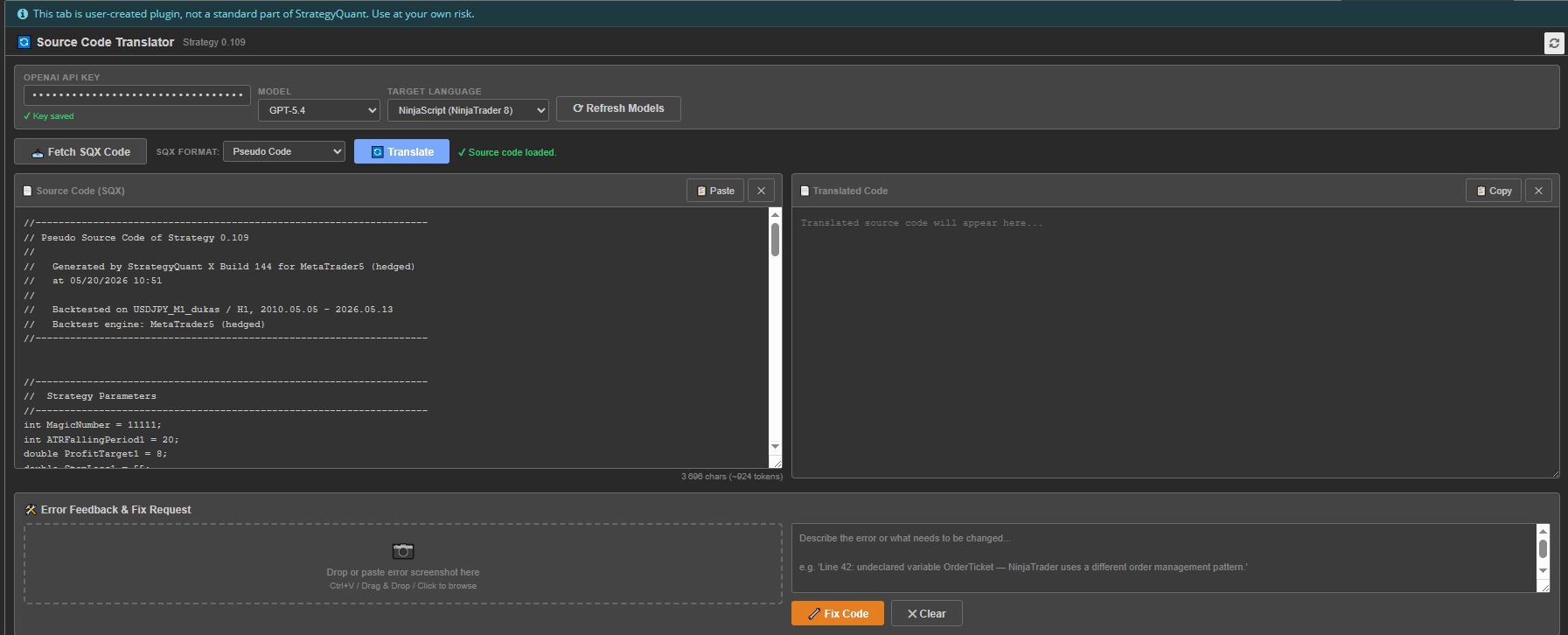
How It Works
Step 1 — Select a Strategy
Click on any strategy in a StrategyQuant X databank. The plugin automatically detects the selected strategy and displays its name in the header bar.
Step 2 — Fetch the Source Code
Click 📥 Fetch SQX Code to pull the strategy’s source code directly from SQX. You can choose which format to fetch:
– Pseudo Code — the universal, human-readable format (recommended as source for translation)
– MQL4 / MQL5 — if you already have a MetaTrader export
– EasyLanguage — TradeStation/MultiCharts format
– Java — SQX internal Java representation
– XML — raw strategy XML
Alternatively, you can paste code manually from any source using the Paste button or Ctrl+V.
Step 3 — Choose Your Target
Select the target platform/language from the Target Language dropdown. The plugin currently supports 15 target platforms (see table above).
Step 4 — Translate
Click 🔄 Translate and watch the translated code stream in real time into the output panel. The AI:
1. Translates the complete strategy — all entry/exit rules, indicators, parameters, money management, and order logic
2. Uses idiomatic conventions and best practices for the target platform
3. Preserves all parameter names and values
4. Includes all necessary imports, class declarations, and boilerplate so the output compiles directly
5. Implements indicators inline if they are not natively available on the target platform
6. Adds a header comment with the original strategy name and a translation note
Step 5 — Copy & Use
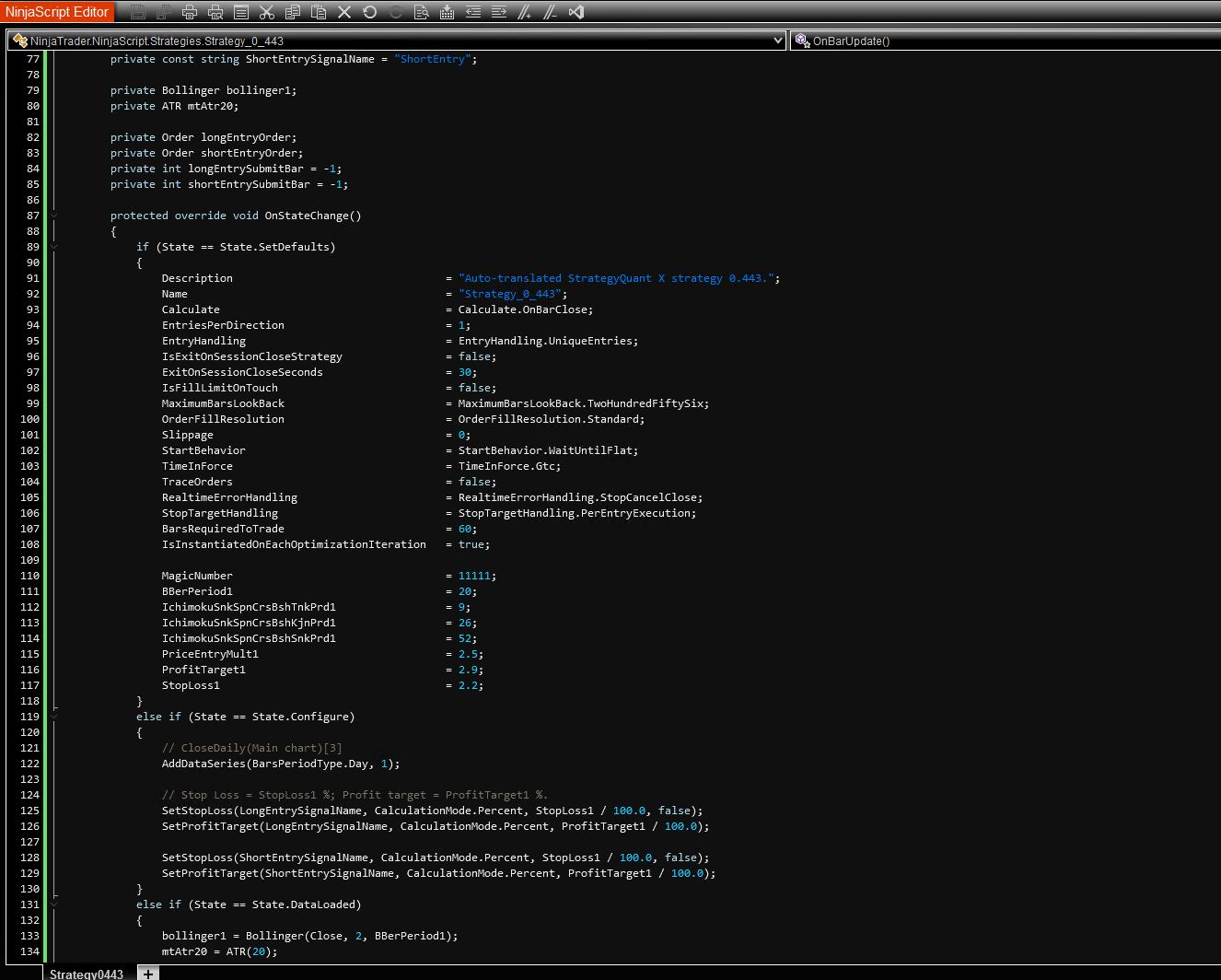
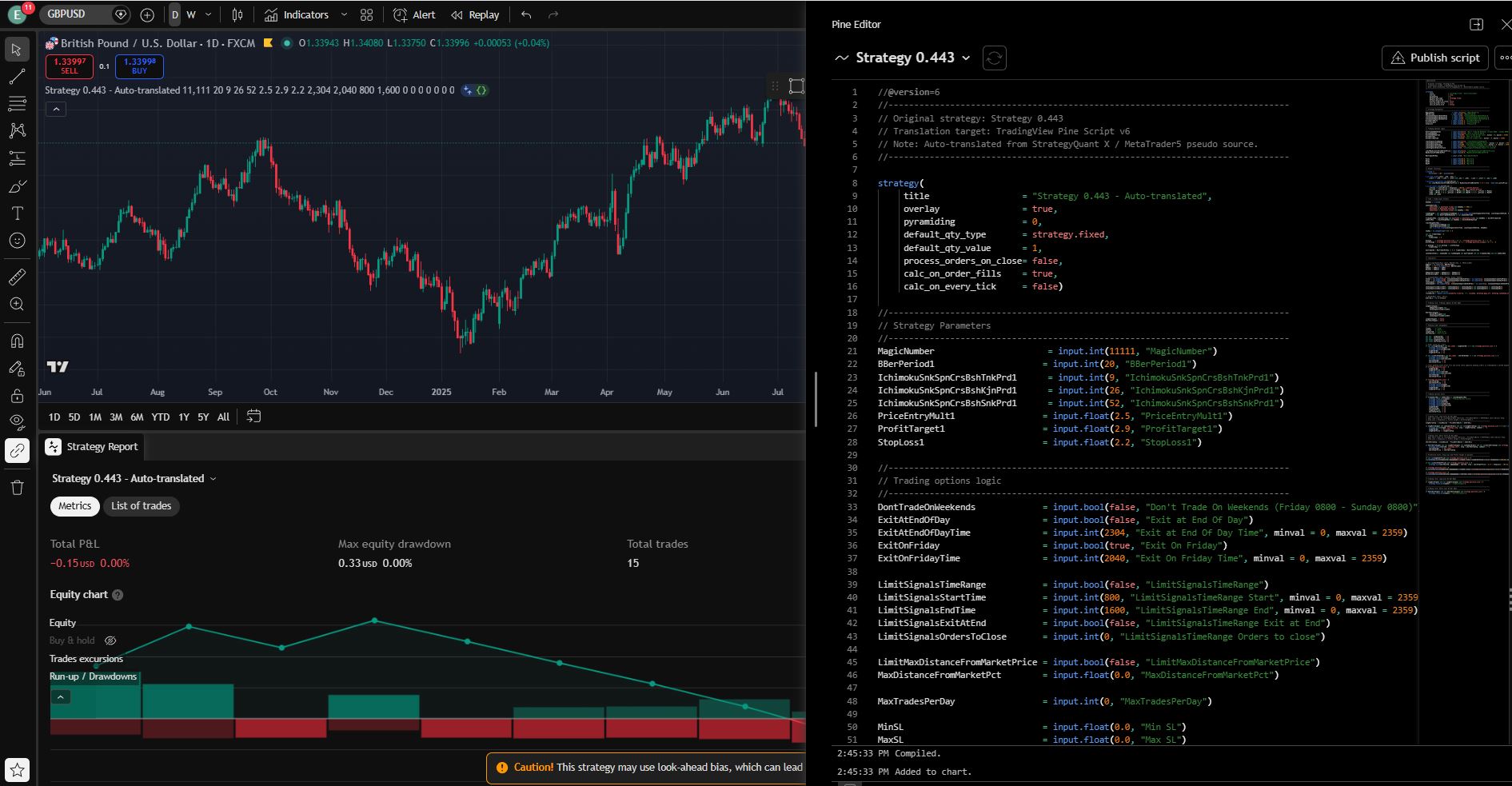
Click 📋 Copy to copy the translated code to your clipboard, then paste it into your target platform’s editor.
NinjaScript Editor :
TradingView :
Step 6 (If Needed) — Fix Errors
If the translated code has compilation errors on the target platform:
1. Take a screenshot of the compiler errors
2. Drop or paste the screenshot into the Error Feedback section
3. Describe any additional context about the issue
4. Click 🔧 Fix Code — the AI analyzes your screenshots + feedback + the original source code and produces a corrected version
You can attach up to 5 screenshots and iterate as many times as needed.
GPT-5.5 is the most accurate. As AI models continue to improve, fewer compilation and translation errors should occur.
Key Features at a Glance
Feature and Description
- One-Click Fetch Pull source code directly from the selected SQX strategy
- 15 Target Platforms NinjaTrader, TradingView, MT4/MT5, TradeStation, and 11 more
- Real-Time Streaming Watch the translation appear line by line — no waiting for a full response
- Multi-Modal Error Fix Paste compiler error screenshots + text description for AI-powered fixes
- Model Selection Choose from 10+ OpenAI models, or refresh to get the latest
- Dark/Light Theme Automatically follows SQX theme settings
- Token Estimation Live character and token count to estimate API costs
- Local Key Storage API key saved in browser localStorage — never sent to third parties
- Zero Dependencies Single `index.html` file, no build step, no external libraries
Installation
- Download the Plugin
- Open the Code Editor
- Import the plugin (at the top of the Code Editor
- Restart StrategyQuant X or reload the results tab
- The plugin appears as a new tab in the Results panel
- Enter your OpenAI API key on first use — it will be remembered for future sessions
Note: You need a StrategyQuant X Pro or Ultimate license to use custom Results Plugins. The Starter license does not support plugin extensions.
FAQ
Q: Do I need an OpenAI account?
A: Yes. You need an OpenAI API key (starts with `sk-proj-…`). You can create one at [platform.openai.com](https://platform.openai.com). API usage is pay-per-use and extremely affordable
Q: Which model should I use?
A: GPT-4o offers the best balance of speed, quality, and cost for most translations. For complex strategies with many indicators, try GPT-4.1 or GPT-5.4 for higher accuracy. Use GPT-4o Mini or GPT-4.1 Nano if you want the cheapest option.
Q: What source format works best?
A: Pseudo Code is the recommended source format because it is platform-neutral and clearly describes the strategy logic. However, any supported format (MQL4, MQL5, EasyLanguage, Java, XML) works well.
Q: The translated code doesn’t compile — what do I do?
A: Use the built-in Error Feedback & Fix section. Take a screenshot of the compiler errors, paste it into the plugin, optionally add a text description of the issue, and click 🔧 Fix Code. The AI will analyze the error and produce a corrected version. You can iterate multiple times.
Q: Is my API key secure?
A: Your API key is stored in your browser’s `localStorage` and is sent only to the OpenAI API endpoint (`api.openai.com`). It is never transmitted to StrategyQuant or any third party.
Q: Can I translate strategies I didn’t create in SQX?
A: Yes! You can paste any trading strategy source code into the Source panel manually. The plugin will translate whatever code you provide — it doesn’t have to come from SQX.
Watch the video below for more details.
Ninjatrader :
TradingView :

fantastic plugin. next up should be option to use any AI tool we want. Deepseek is giving me a very low cost per token compared to OpenAI
Hello Bee!
Thank you.
If you have a temporary DeepSeek key, I should be able to add it as an option.
If you have one, please send it to me via PM on Discord, and I will see what I can do.
sent on DM.
this is done
I’ve followed the instructions but the plugin does not show up. Please help I have the pro version