


 Spanish
 Portuguese
 French
 Italian
 German
 Japanese
Date = Start and End
4 replies

Bigape
11 years ago #114069
Hi Guys,
i need your help. I need in my EA start trading on a certain day and then stop trading on another day.
Ex.:
Start trading on 25/08/2015 and end trading (STOP THE EA) on 16/09/2015.
The EA must to work in date interval: from 25/08/2015 to 16/09/2015.
Could you help me, please?
Regards
Bigape
0

Tomas Matejka
11 years ago #132052
hi bigape,
not sure why you need this but EA Wizard currently does not allow this kind of operations with date
0
Bigape
11 years ago #132056
… I thought so, thanks anyway for the reply.
it’s interesting to have a termination date into the EA.
I use about 70/80 EAs into my account, the outcome of the WFA-Matrix process tells me exactly when I will have to re-optimize the EAs and them are so many and i could forget someone. If I have a date that stop automatically the EA is better: the system stopped … waiting to re-optimization.
Regards
0
Bigape
11 years ago #132075
Hi, I found a possible solution: It seems to work well, for now. This is the code:
//must be declared before init, start and deinit
datetime ExpirationTime = D’2015.09.20 00:00′; //set up any date and time
//in the beginning of INIT:
if ( TimeCurrent() >= ExpirationTime || TimeLocal() >= ExpirationTime ) { Alert( “Expert use time expired!!!” ); return(0); }
//in the beginning of START and DEINIT
if ( TimeCurrent() >= ExpirationTime || TimeLocal() >= ExpirationTime) { return(0); }
This is the graph of a part of the entire portfolio (EAs are only 24). At a first glance it may seem like a good surface equity but in fact – on the basis of a micro vision – the periods of DD there are, and they are frustrating. I should be able to implement (in mql code) a kind of equity control, but is not simple. For now I’m working on an automatic lock of the system beyond that to date even when reached a level of risk set. Obviously this portfolio needs to spread very ” aggressive ” and low commissions
Regards
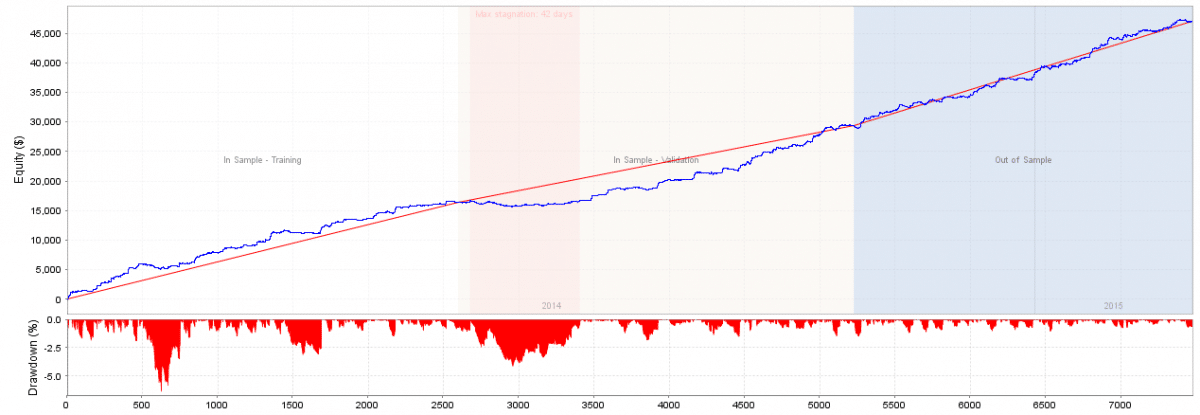 Portfolio (2014_Jun 2015) 24 EAs.png
0
Tomas Matejka
11 years ago #132091
Great to hear you have figured it out
0
Viewing 4 replies - 1 through 4 (of 4 total)