


 Spanish
 Portuguese
 French
 Italian
 German
 Japanese
Documentation & User Guides
Learn the basics, or refine your skills with tutorials designed to inspire.
Last updated on 17. 4. 2025 by Emmanuel Evrard
Importing Multiple External Indicator Values Using CLI Command.
Page contents
As described on our documentation page “External indicators”, you can import up to 3 external values per indicator by default.
However, starting with StrategyQuantX Build 142, it is now possible to create and import multiple external indicator values at
once using the SQCLI command-line interface available in the StrategyQuantX folder.
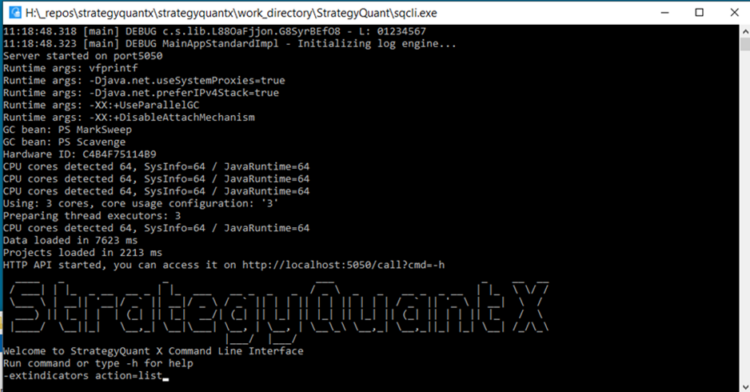
1 – Launching SQCLI
To begin, run sqcli.exe.
Once started, the SQCLI window will appear:
2 – List Existing External Indicators
To view existing external indicators, enter the following command:
-extindicators action=list
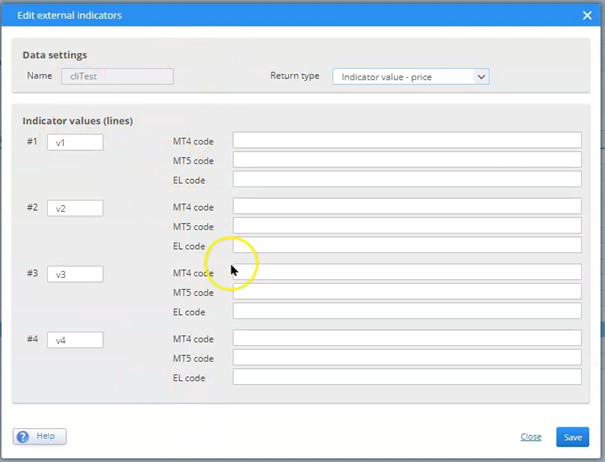
3 – Create a New External Indicator with Multiple Values
Use the command below to create a new indicator:
-extindicators action=add name=cliTest values=v1,v2,v3,v4 type=1
– v1, v2, v3, v4 represent the individual values of the indicator. You may add more if needed.
– type defines the value type for the indicator:
- 10 → Boolean
- 1 → Indicator value (price)
- 2 → Indicator value (number)
- 3 → Indicator value (price range)
4 – Import Data Using SQCLI
To import the data:
-extindicators action=import name=cliTest file=C:YourFolderCLI_Import.csv
File Requirements:
- No headers
- Format :
Date, Time, O, H, C, L, V, ExtIndicator1, ExtIndicator2, ExtIndicator3, ExtIndicator4
- Use the same number of indicator values as declared during creation.
- The file path must not contain spaces.
- Use a comma (,) as the separator.
- Date format: dd/MM/yyyy
- Time format: HH:mm:ss (24-hour)
5 – Exporting Values in EasyLanguage
Example code snippet to export indicator values:
Print(File(“C: YourFolderCLI_Import.csv”), FormatDate( “dd/MM/yyyy”, ElDateToDateTime( Date[1] )), “,”, FormatTime( “HH:mm:ss”, ElTimeToDateTime( Time[1] )), “,”, NumToStr(Open[1], 9), “,”, NumToStr(High[1], 9), “,”, NumToStr(Low[1], 9), “,”, NumToStr(Close[1], 9), “,”, NumToStr(Ticks[1], 2), “,”, NumToStr(ExtIndicator1),….);
6 – Importing Directly in StrategyQuantX
You can alternatively import the CSV directly within StrategyQuantX. In this case, you may choose a different separator or date-time format from the import settings.
7 – Batch File Automation
You can also create a batch file with these command lines to automate the creation and import of multiple external indicators with multiple values
References
Was this article helpful? The article was useful The article was not useful
Page contents