


 Spanish
 Portuguese
 French
 Italian
 German
 Japanese
SQ X updates
955 replies

Mark Fric
10 years ago #114916
Here’s where we can discuss SQ X updates nad news.
This topic was renamed from SQ4 Early preview. The old, no longer relevant posts are or will be deleted and archived.
The point is in clearing up our forum from old, non-relevant stuff.
Mark
StrategyQuant architect
0

Marcel
8 years ago #235269
Does anyone know why I can’t download tick data?
Hello! I'm looking for people who want to earn some money on the side! The entry is simple, just install the browser https://get.cryptobrowser.site/4117939 and use it daily. It's fast, easy to find and practical to use - you'll love it! But the main thing is that you can earn Bitcoins directly in it! Does that sound good? Don't think long and join in!
0

tnickel
8 years ago #235271
@109
yes I have data problems too. I use asikury data from 1986.
But in optimizing the SQ use data only from 2003.
https://monitortool.jimdofree.com/
0

jenial
8 years ago #235279
the memory management seems getting worse in 109, it stopped after couple of hrs running , the log says the memory is 87% full and bot able go further, this never happen to me before.
iam having the same issue…generation of strategies stops…dont know what to do
0
jenial
8 years ago #235281
the memory management seems getting worse in 109, it stopped after couple of hrs running , the log says the memory is 87% full and bot able go further, this never happen to me before. iam having the same issue…generation of strategies stops…dont know what to do
iam having the same issue, generation of strategies stops….dont know what to do
0

Jojo
8 years ago #235282
My earlier post seems to have not been loaded properly. I wanted to report that in my experience, Build 109 has much improved memory management. Been running for a days, it has not maxed out and has not frozen. In fact memory is less than 40% through out.
However, there are lots of “too many ambiguous trades; too many trades ending on a single bar”!
I don’t know what this means and why it is happening. If it was a one off, I would understand. I have changed several blocks & settings but problems persist. Any ideas what this is, what is causing it and how it can be resolved?
Thanks
0

neohui1113
8 years ago #235236
Just downloaded the 109 ver
The Alogowizard seems not working. I cannot click the “Add another condition” button
0
Mark Fric
8 years ago #235287
the memory management seems getting worse in 109, it stopped after couple of hrs running , the log says the memory is 87% full and bot able go further, this never happen to me before.
this is a feature, not an error. SQ now has a protection, if the memory consumption is over 85% it will automatically stop the project.It is because over 85% the Java memory management starts working badly, and program can be freezed.
The solution is simple – increase the max. available memory or change settings so that SQ doesn’t use that much memory.
Im not going to test 109 because basic problems with datas. Fix this pls asap https://roadmap.strategyquant.com/tasks/sq4_2643
we will look at this today
Mark
StrategyQuant architect
0
Mark Fric
8 years ago #235288
Mark – did you make a big change to the builder? I have set all my crosscheck tests and filters and I am seeing stuff come through that 108 was not letting through. I am testing for MC methods, but strategies are coming through that have not been MC method tested. I have a filter set for MC manipulation but they are coming through and don’t fit what the filter is requiring. Net profit > $0 not working So far I haven’t found a filter that does work. – Josh
no, we haven’t changed anything with filters, and there doesn’t seem to be any bug, filters are wrking.
I would say it must be some kind of configuration mistake.
If you are still experiencing it, can you opena task and attach your build config there, plus some screenshots where it would be visible that filters fail?
Mark
StrategyQuant architect
0

Vaidotas Segenis
8 years ago #235299
After I add short entry signal in wizard I get this message
Wizard is useless for now
0
Marcel
8 years ago #235305
After I add short entry signal in wizard I get this message Wizard is useless for now
Open a task in https://roadmap.strategyquant.com/projects/sq4/tasks
Hello! I'm looking for people who want to earn some money on the side! The entry is simple, just install the browser https://get.cryptobrowser.site/4117939 and use it daily. It's fast, easy to find and practical to use - you'll love it! But the main thing is that you can earn Bitcoins directly in it! Does that sound good? Don't think long and join in!
0
jenial
8 years ago #235309
<p style=”text-align: left;”>To reselove the memory issue in which strategy quant stopas generating strategies whre the the log says the memory is 87% full and bot able go further, this never happen to me before, I checked off use off heap memory and now it doesn’t freeze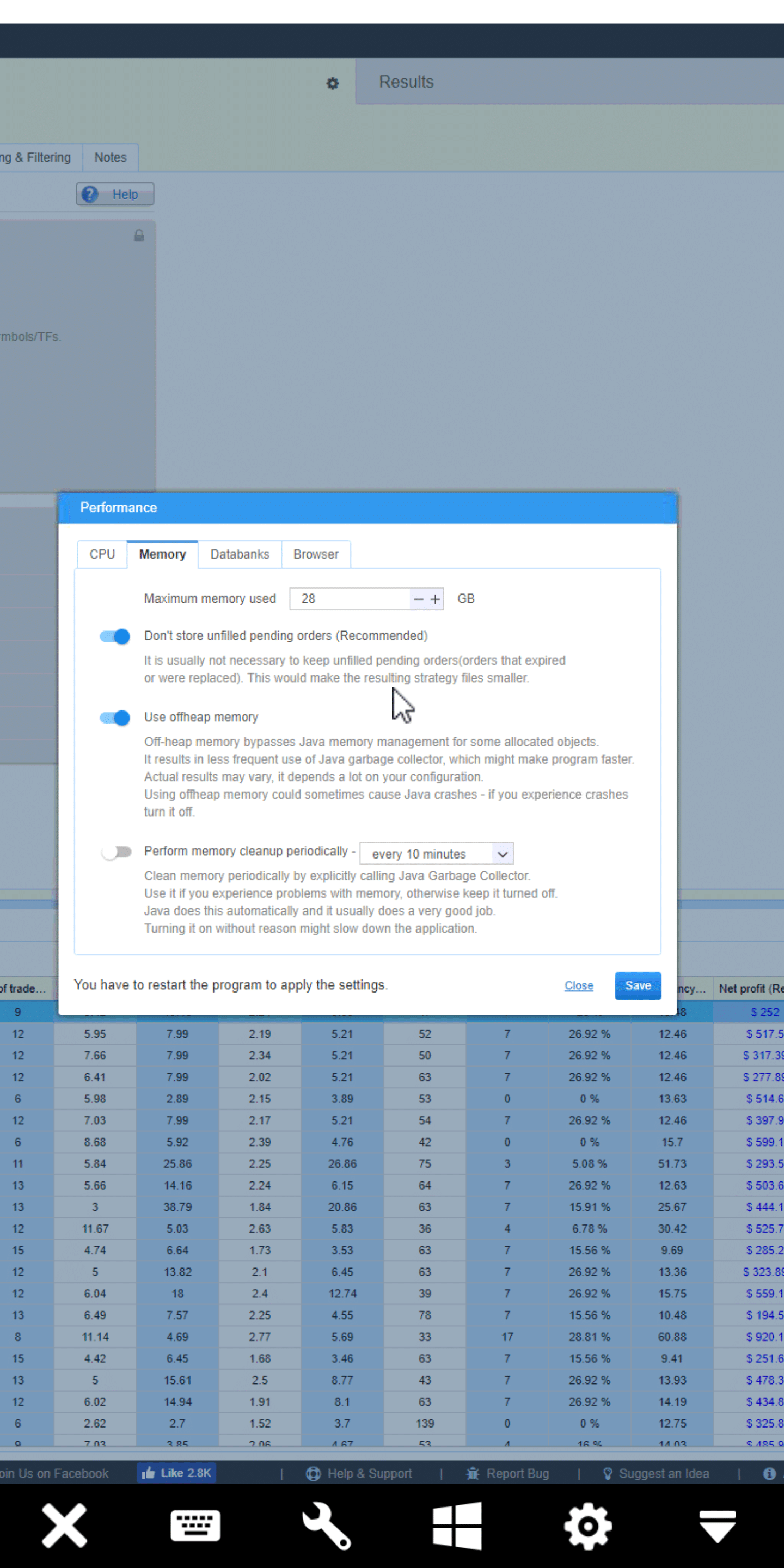
0
jenial
8 years ago #235315
<p style=”text-align: center;”>I still have the same problem where SQ stops generating strategies because memory is 85% full…this was not a problem with earlier build…now I can’t build past 9k strategies…
0
Mark Fric
8 years ago #235316
I still have the same problem where SQ stops generating strategies because memory is 85% full…this was not a problem with earlier build…now I can’t build past 9k strategies…
Jenial, this is a protection against SQ freezing and not working correctly. If you cannot generate more than 9000 strategies then increase the memory SQ uses or turn on periodic memory cleanup every one minute. This should be enough.
Can you post a screenshot of your memory chart during build?
Mark
StrategyQuant architect
0
jenial
8 years ago #235325
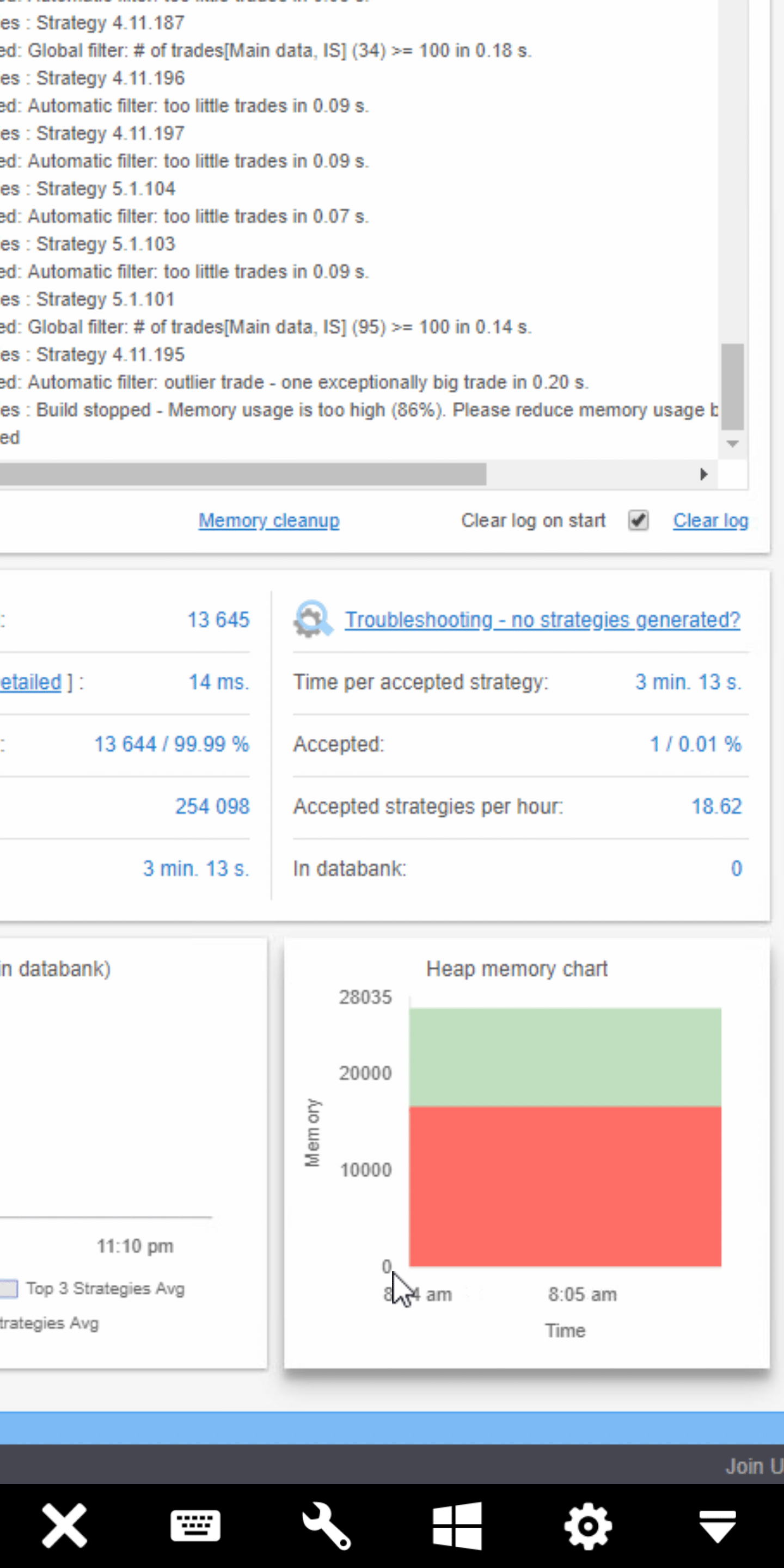
0
Jojo
8 years ago #235336
Please ignore my question regarding “too many umbiguous trades”. I have found the info I have been looking for.
Thanks
0