


 英語
英語 スペイン語
スペイン語 ポルトガル語
 フランス語
フランス語 イタリア語
イタリア語 ドイツ語
ドイツ語ドキュメント
アプリケーション
Last updated on 21. 1. 2019 by Tomas Vanek
ビルダーレイアウト
When you click for example on Builder you’ll see that the screen is divided into three main columns or sections:
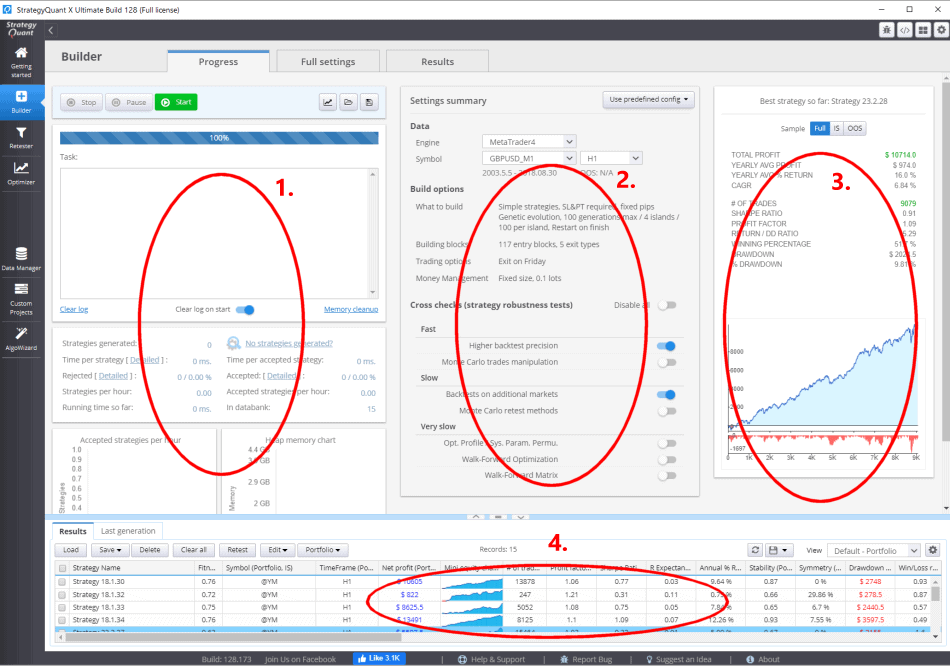
- Engine – this is where you can start or stop the task, see what’s going on in log and progress
- 設定 – this is the brief description of actual configuration of Builder, you can click on each of these tabs to view the full configuration
- 結果 – up to three mini panels with results of the top three strategies currently existing in databank. These mini panels are only a preview of most important strategy statistics. You can get detailed results by clicking on this panel or double-clicking on a strategy in databank.
- Databank – a place where all strategies are stored
この記事は参考になりましたか? この記事は役に立った この記事は役に立たなかった
It looks like the descriptions for #1 and #2 are reversed.
Thanks, it’s been fixed