


 英語
英語 スペイン語
スペイン語 ポルトガル語
 フランス語
フランス語 イタリア語
イタリア語 ドイツ語
ドイツ語ドキュメント
アプリケーション
Last updated on 9. 6. 2021 by Tomas Vanek
Linux での StrategyQuant X のファイアウォール設定
When you are using StrategyQuantX on Linux for the first time and when you are using a firewall you have to allow ports for StrategyQuant X.
StrategyQuant use these ports:
25,465,587 - SMTP server

443  - Web

80 - Web

8080-8099 - User interface

5050-5059 - User interface
Now, I will show you how to allow ports for the Ubuntu distro and ufw firewall.
Run these commands for allowing all the ports:
ufw allow 8080:8099/tcp

ufw allow 80

ufw allow 443

ufw allow 25

ufw allow 465

ufw allow 587

ufw allow 5050:5059/tcp
Check firewall status:
ufw status
You should get this output:
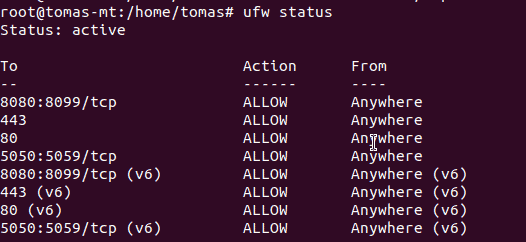
Congratulations, should be able to run StrategyQuant X with an enabled firewall on Ubuntu Linux.
この記事は参考になりましたか? この記事は役に立った この記事は役に立たなかった
What hostnames and IP addresses need be included if via a company firewalls?
I’m guessing the mail server ports are an error given they’re not shown in the output.
Fortunately these ports are blocked by ISPs so won’t work anyway because opening them is a bad idea.