


 英語
英語 スペイン語
スペイン語 ポルトガル語
 フランス語
フランス語 イタリア語
イタリア語 ドイツ語
ドイツ語
 マーク・フリック
29. 4. 2019
コンテンツへスキップ | メインメニューへ移動 | 検索に移動
ドキュメント
Last updated on 22. 3. 2023 by Mark Fric
ページのコンテンツ
Working with external futures data is tricky because we have to be careful about sessions and other things, especially when you export data from external platform like Tradestation and import it into SQX.
Below is the set of recommendations that ensure the data and thus also backtest results will be the same in SQX and Tradestation.
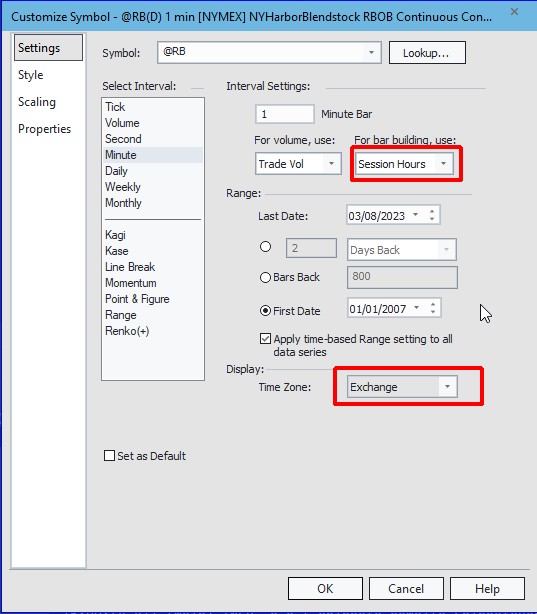
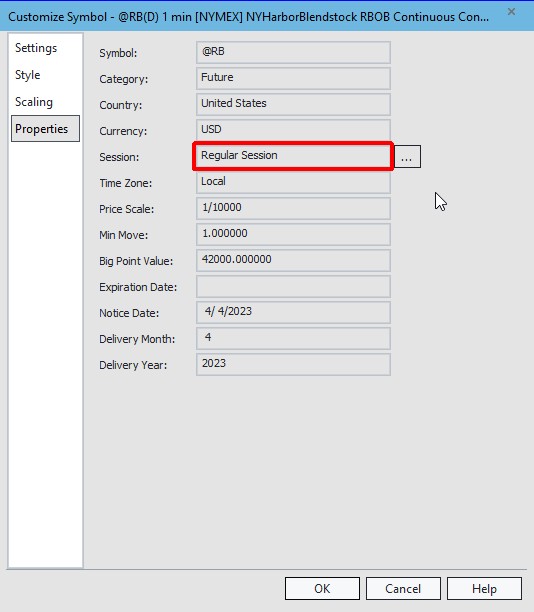
Double check that your chart setting is like this.
If you use different than recommended values for any of these settings it will have important consequences and your backtests between SQX and Tradestation might not match.
Session should be Regular so that the full day data are exported. When you’ll be attaching strategy to chart in Tradestation you can then chose your target timeframe and different session – just make sure you use the same also in SQX..
When creating symbol in SQX Data Manager for the new data don’t forget to configure the symbol to have Timestamp as end of bar:
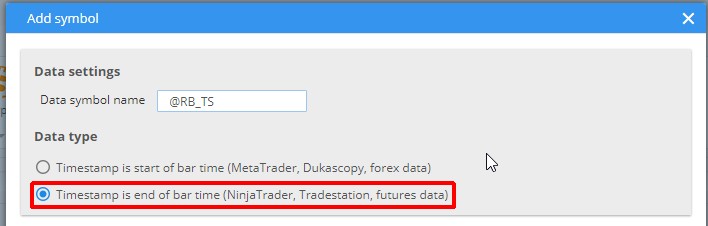
then just import the minute data as usual.
The new data imported to SQX with these recommendation can be the used in SQX normally – you can use them to compute higher timeframes and specify the proper sessions in SQX Trading Options and the bars computation and results between SQX and Tradestation should match.
この記事は参考になりましたか? この記事は役に立った この記事は役に立たなかった
