


 英語
 スペイン語
 ポルトガル語
 フランス語
 イタリア語
 ドイツ語
ドキュメント
アプリケーション
Last updated on 24. 8. 2021 by Tomas Vanek
StrategyQuant X で GPU アクセラレーションを有効または無効にする方法
ページのコンテンツ
Sometimes you might experience a situation that your graphic card has some problems during using StrategyQuant X. In this short tutorial I will show you how to enable or disable GPU. There are two ways how to do that.
The first way
is to set this option in StrategyQuant X user interface.
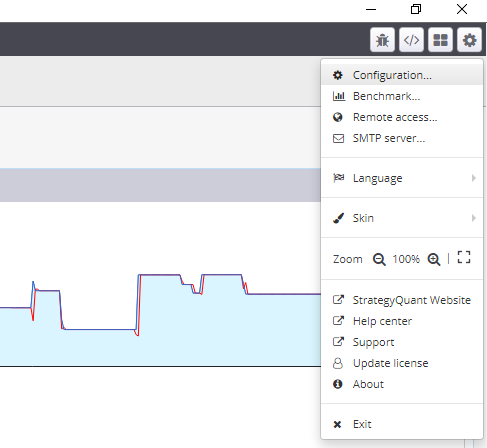
Go to the options and click on ‘Configuration’:
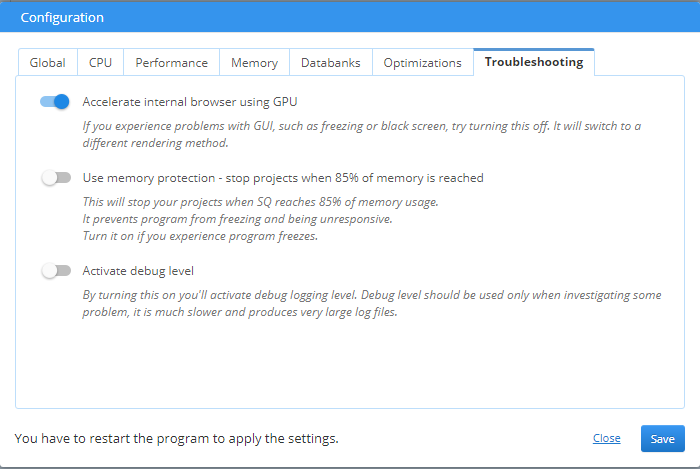
By default the GPU acceleration is enabled (as you can see in the following screen):
So if you want to disable the GPU acceleration, just turn off the switch as you can see on the next screen:
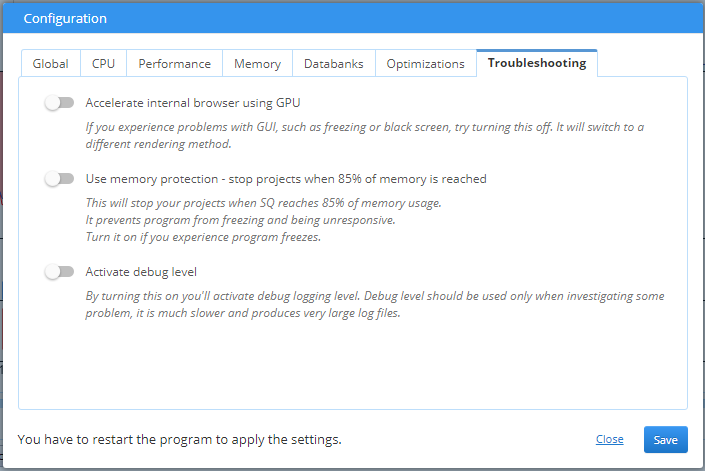
For applying this option you have to restart SQ X.
The second way
is to set the GPU acceleration directly in the config file which is stored here:
C:/StrategyQuantX/user/settings/settings.xmlOpen it in a text editor and change this line
<gpuAccelerated>本当</gpuAccelerated>
へ
<gpuAccelerated>false</gpuAccelerated>
after saving the file you can launch the StrategyQuant X.
この記事は参考になりましたか? この記事は役に立った この記事は役に立たなかった