


 Spanish
 Portuguese
 French
 Italian
 German
 Japanese
Documentation & User Guides
Learn the basics, or refine your skills with tutorials designed to inspire.
Last updated on 23. 4. 2026 by Kornel Mazur
Equity Chart
Page contents
Results → Equity Chart
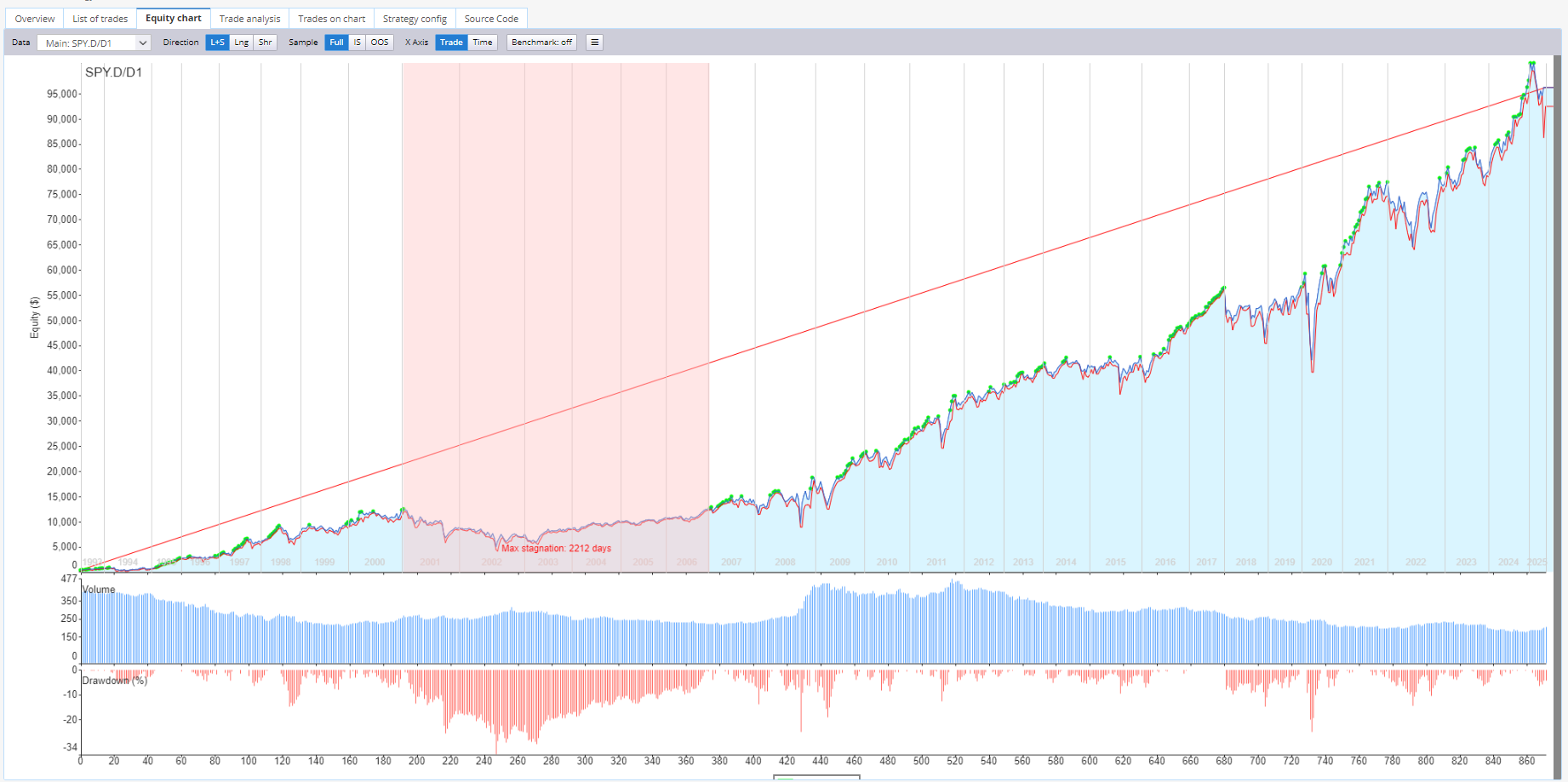
The Equity Chart tab provides a visual representation of the strategy’s equity curve over time.
Key Features
- Displays:
- Cumulative equity curve
- Stagnation marker: highlights the longest period without reaching a new equity high
- In portfolio mode, shows:
- Individual equity curves for each symbol/timeframe
- Combined portfolio equity curve
Additional Options
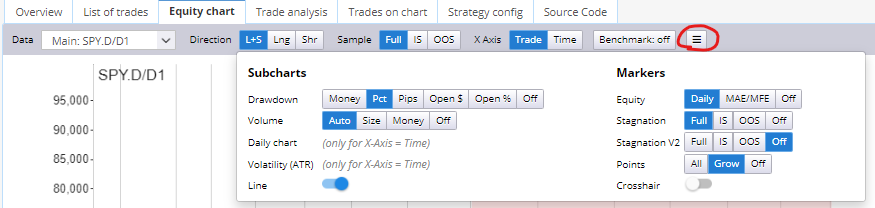
- Enable overlays such as:
- Daily equity
- MAE (Maximum Adverse Excursion) / MFE (Maximum Favorable Excursion) lines
Multi-Market Analysis
If the strategy is tested using Backtest on Additional Markets, you can:
- Switch between equity curves for each market
- View all curves simultaneously for comprehensive visual analysis
You can also display the Higher Backtest Precision Equity Chart Result.
Equity vs. Balance
- Balance: Reflects only closed trades
- Equity: Balance plus unrealized P/L from open trades
Benchmarking Feature in the Equity Chart
Introduced in StrategyQuant X Build 139, the Benchmarking feature allows you to visually compare the performance of your trading strategy against a standard benchmark—specifically, the S&P 500 index (represented by the SPY ETF). This is useful for evaluating whether your strategy offers superior returns relative to market performance and at what level of risk.
Accessing the Benchmark
To use the benchmarking feature:
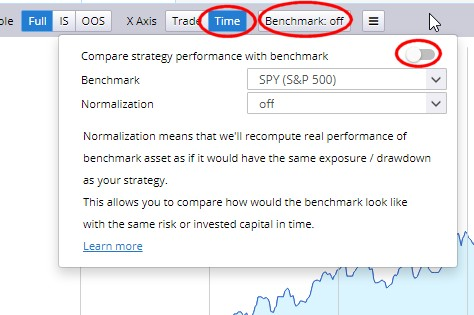
- Navigate to the Equity Chart screen.
- Ensure the X-Axis is set to Time.
- Use the Benchmark menu to activate the benchmark display.
Benchmark Visualization
Once enabled, the equity chart will display:
- Yellow Line – Represents the equity curve of a Buy & Hold benchmark investment (e.g., $10,000 in SPY ETF over the same period).
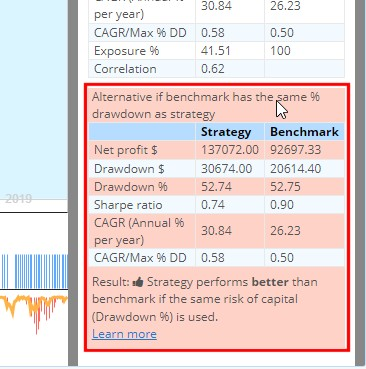
- Comparison Table – Shows key metrics for both your strategy and the benchmark, including:
- Net Profit
- Maximum Drawdown ($ and %)
- Other performance indicators
This visualization helps assess relative performance. For instance, a strategy may outperform the benchmark in returns but carry higher drawdown and risk.
Understanding Drawdown and Risk
A common observation may be:
- Your strategy outperforms the benchmark in terms of profit.
- However, it exhibits higher drawdown, indicating increased risk.
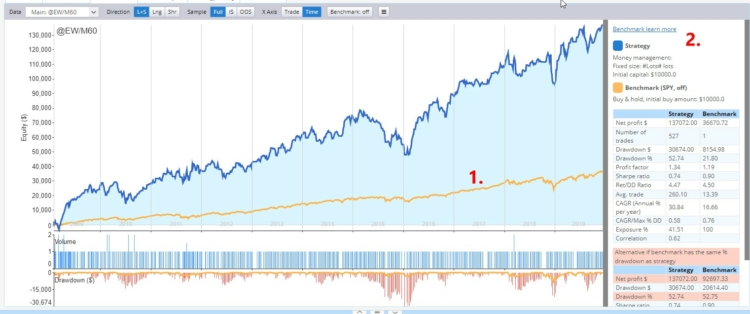
Example:
- Strategy Max % Drawdown: 52.74%
- Benchmark (SPY) Max % Drawdown: 21.80%
This highlights the importance of risk-adjusted performance comparison.
Normalization
To enable a fairer comparison between your strategy and the benchmark, StrategyQuant provides Normalization tools. These adjust the benchmark's starting capital to match specific characteristics of your strategy.
Available normalization types:
- Normalize by $ Drawdown
- Adjusts benchmark capital so its maximum drawdown in dollars equals your strategy’s.
- Normalize by % Drawdown
- Matches benchmark’s percentage drawdown with your strategy’s drawdown percentage.
- (Most commonly used for risk-adjusted performance comparisons.)
- Normalize by Money Management
- Applies the money management configuration used in your strategy to the benchmark.
- Normalize by Exposure
- Aligns benchmark capital so that the percentage of time it is “in trade” equals your strategy’s exposure. Useful for comparing against seasonal or low-frequency strategies.
Example: Normalizing by % Drawdown
- Your strategy has 52% max drawdown.
- The benchmark is recalculated to match that drawdown by adjusting its initial capital (e.g., to $25,278).
- This produces a normalized equity curve for the benchmark, making it easier to compare risk-adjusted profitability.
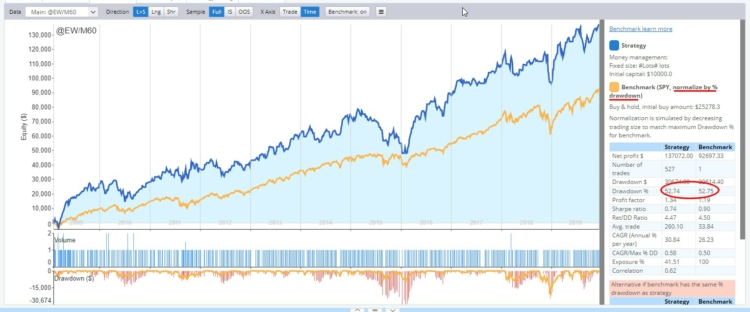
Even with normalization, if your strategy still outperforms the benchmark, this indicates stronger performance for a given level of risk.
Performance Comparison Summary
The equity chart includes a simplified comparison table, showing:
- Whether your strategy outperforms or underperforms the benchmark
- A thumbs-up or thumbs-down indicator based on net profit relative to equalized risk
Note: This is a high-level assessment based solely on Net Profit and % Drawdown. It is intended as a quick estimation, not a comprehensive risk analysis.
Was this article helpful? The article was useful The article was not useful
Page contents