


 Spanish
 Portuguese
 French
 Italian
 German
 Japanese
Documentation & User Guides
Learn the basics, or refine your skills with tutorials designed to inspire.
Last updated on 23. 4. 2026 by Kornel Mazur
Builder
Page contents
The Builder is the central module in StrategyQuant X, responsible for the automatic generation of trading strategies. It provides a configurable environment where strategies are created based on your selected data, logic templates, and settings.
Once a build process is initiated, the system continuously generates and evaluates strategies. The most promising results—referred to as top strategies—are saved to the Databank located at the bottom of the screen.
Prerequisites
Before running a build or retest:
- Ensure that your data sources are correctly configured.
- Confirm that your building blocks, strategy templates, and logic settings are properly defined.
Screen “Standard” Layout
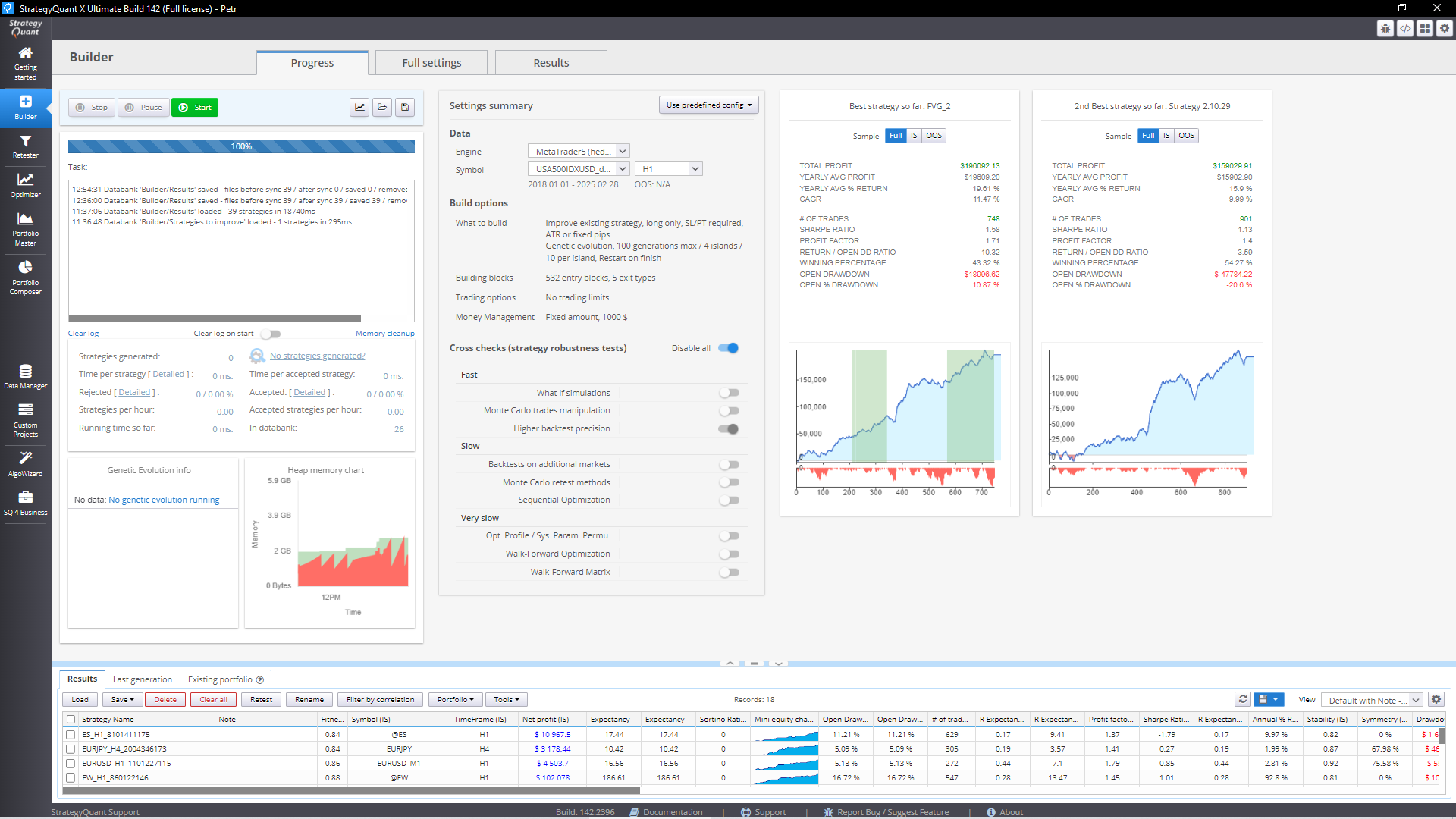
The Builder shares a common interface layout with other core modules such as the Retester, Optimizer, and Custom Projects. Navigation is organized into three main tabs at the top of the module:
1. Progress Tab
- Start / Pause / Stop the build process.
- View build logs, performance charts, and memory usage.
- Monitor a summary of the current build configuration and progress metrics.
2. Full Settings Tab
- Access the complete range of configuration options for the Builder.
- Customize:
- Strategy logic and structure
- Fitness functions
- Building block restrictions
- Money management and risk parameters
3. Results Tab
- Review metrics and visualizations for selected strategies.
- Key elements include:
- Net Profit
- Equity Chart
- Drawdown Analysis
- Other performance metrics

The selected strategy in the Databank will be reflected in the metrics shown in the Results tab.
Was this article helpful? The article was useful The article was not useful
Page contents